
Participant
October 30, 2023
Answered

Problems with the preview of picked colours

  • October 30, 2023
  • 3 replies
  • 270 views

Hello everyone,

I have a problem and I do not know if I accidentaly clicked something and it stopped working or this another reason for it.
I can't see picked color in the whole color square. When I pick the colour green, none of these are changing, the color square stays the same. Can anyone please help? 
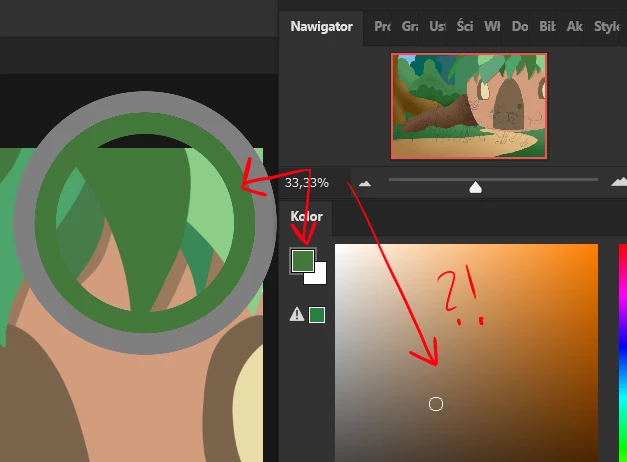


Thank you!
Greta

This topic is closed to new replies. Start a new post to keep the conversation going.
Correct answer Ged_Traynor

@Greta332615431y94 what exact version of Photoshop do you have, if it's version 25.1, it's a known issue

https://community.adobe.com/t5/photoshop-ecosystem-bugs/photoshop-2024-color-sliders-don-t-work/idc-p/14195849

3 replies

Ged_Traynor
Community Expert
Ged_TraynorCommunity ExpertCorrect answer
Community Expert
October 30, 2023

@Greta332615431y94 what exact version of Photoshop do you have, if it's version 25.1, it's a known issue

https://community.adobe.com/t5/photoshop-ecosystem-bugs/photoshop-2024-color-sliders-don-t-work/idc-p/14195849

Participant
October 30, 2023

Yeah... so now I know what is going on..
Thank you so much for your reply, do you know how I can instal 25.0 version?


Participant
October 30, 2023

Okay, I figured it out 😄