



FarhaanaBeato
Participant
October 24, 2017
Answered

Prompt to Rasterize EPS Files in CC 2018

  • October 24, 2017
  • 11 replies
  • 24106 views

I recently installed the Photoshop CC 2018 update and I’m having issues with placing EPS files. Unlike CC 2017, when I place an EPS file, I get a prompt to “Rasterize EPS Format” and select  pixel dimensions. If I don’t know what dimensions I need, I just have to guess and hope that it’s large enough to not be pixelated.
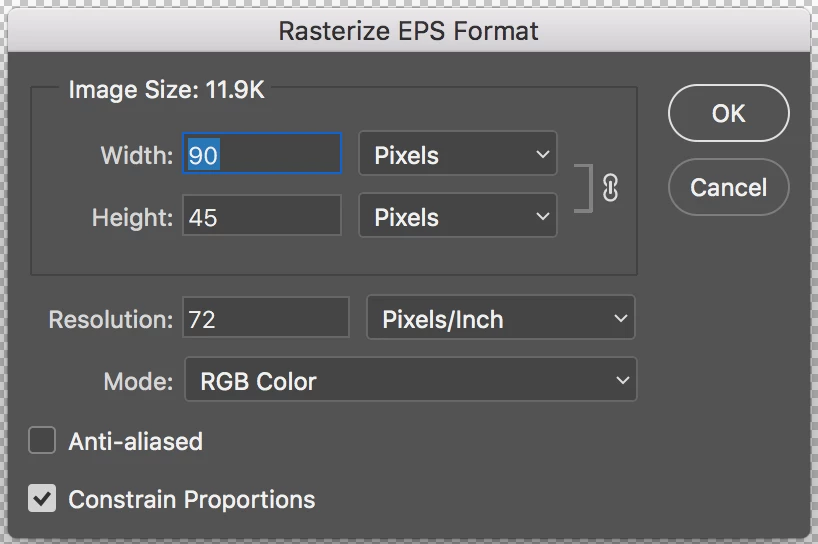


I use EPS files often because they’re vectors. There is no visible option to not rasterize the EPS and I’ve tried looking in the settings to see if maybe there was a new setting for placing images. This prompt does not happen with SVGs and PNGs. AI files seem to work but the prompt for the bounding box/media box makes the process slightly longer.


How can I place a file without having to rasterize, or stop this prompt from showing up?
This topic has been closed for replies.
Correct answer Nicollet

Hey Everyone!


I am happy to announce that this issue should be resolved in the release of Photoshop that just went live, 19.1. Please open your Creative Cloud desktop app, update Photoshop and try it out!


Thank you,

Hannah


Adobe Blog: Photoshop Releases Version 19.1 With Selections Improvements, Advanced Support for Windows High-Density Monitors and More

What's new: What's new in Photoshop

What's fixed: Fixed issues in Photoshop

Instructions for updating: Update Creative Cloud apps

11 replies

JJMack
Community Expert
Community Expert
October 24, 2017

The thing is though Eps files are vector files Photoshop does not open then as vectors.  It opens an eps file as a single raster layer. The same is true for SVG files.  However during open you can set the size you need and the open process will create the raster layer using vector graphics using the EPS file. Some File like .AI, .svg and perhaps EPS files when placed in in Photoshop become Vector smart objects.  When I use  menu File>Place Embedded and place in an EPS file I do not get prompted to rasterize anything.  I just get the normal Place Transform dialog. the I can size the place layer with.  Are you sure you used menu File>Place???

JJMack