

PS 2024 Actions Errors - Updating causes toggle "dialog" to be turned on & creates false warning
Adobe PS2024 (and earlier) has a bug both in the upgrade process and in the dialog box.
1) PS2024 can cause ALL the "toggle windows" to be turned ON if they are off, causing all actions to required manual verification and input of "OK" at EVERY step in the Action! Tedious!!!!!!!! This is unfamiliar to Adobe tech support, after speaking several times totaling several hours of wasting my valuable time, such as reinstalling a previous verion of Camera RAW, to understand why my actions weren't working properly after the upgrade... Nobody could figure it out.
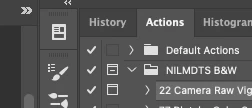
2) After refusing to reinstall the previous version of PS (it worked in PS2023, I know that; the issue is why it doesn't work with PS2024 but they wanted to check their box and verify the truth), we messed around for a long time not resolving the issue because they couldn't figure out what was causing the issue and because of the following unintelligible - and completely incorrect - "warning" dialog box that popped up when trying to uncheck the boxes:
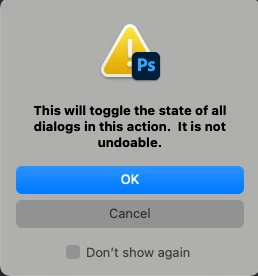
3) The tech support people couldn't understand this message either, and were afraid - as was I - of the dire warning of it being "undoable"! Yikes! A similar warning to what you get before you do something like wipe your hard drive clean or permanently delete conversations from your text strings! "Warning! This action is undoable... you will not be able to recover your data! Warning!"
4) Finally one clever tech support guy suggested duplicating an action and seeing what happened when we unchecked the box. So we did.... It went back to normal. We checked the box. The step-by-step authentication was now required. We check and uncheck the box multiple times. Each time the funcationality was activated or inactivated and returned to the previous state when the box was checked or unchecked and no data was lost. Nothing was "not undoable." You simply just turned it on and off.
5) So then we unchecked all the dialog boxes - getting all those "THIS IS NOT UNDOABLE!" incorrect and fake warnings each time, but everything was re-doable.
So, if this happens when you upgrade, just uncheck the box! Save yourself hours battling the Adobe to get through to tech support and then battling them to understand the problem! Ignore the dire warnings!! Just uncheck the box! Sounds so simple?! Adobe made it so hard!
ADOBE: CORRECT THIS TOTALLY FALSE "WARNING" MESSAGE!!!!!! Also, please get a native English speaker to redo the message into intelligble English. (I can help. My rates are reasonable.). Something like: "Checking this box will cause this action to stop at each step and require a manual entry of "OK" to continue through the entire action. To have the Action run uninterrupted to the end, keep this box unchecked. You can toggle this box "on" and "off" to activate or inactivate this functionality."
How about that for English?


 AdChoices