
Participant
September 12, 2025
Answered

Ps 2025 friert ein

  • September 12, 2025
  • 3 replies
  • 112 views

Hallo guten Abend...

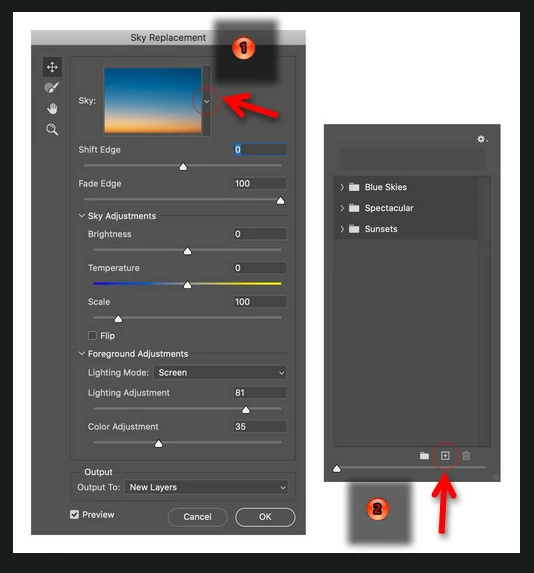
...ich möchte in der Bibliothek für Himmel austauschen weitere Fotos hinzufügen, jedoch hängt sich Ps nach dem Klick auf das + auf und nichts geht mehr.
Alle Updates für Programme und Win 11 pro auf dem neuesten Stand, jemand eine Idee woran das liegen könnte?
AMD Ryzen 7 5800x
RAM 32 GB
Win 11 pro 26.10.0.26100
NIVIDIA GeForce RTX 3060, Treiber 581.29, Wed Sep 10, 2025

Würde mich freuen wenn mir jemand helfen könnte und danke schon mal für Antworten...

Ich grüße und wünsche ein schönes Wochenende...
Correct answer HoBa-Fotografie

@Aleke  @AxelMatt 

Vielen Dank für eure Antworten... nachdem das mit der Treiberaktualisierung mit dem Studio Treiber nicht funktionierte, habe ich Ps deinstalliert und neu installiert, jetzt funktioniert es und ich kann wieder neue Fotos in die Himmel Bibliothek hochladen...

Danke, Problem erledigt 

3 replies

HoBa-FotografieAuthorCorrect answer
Participant
September 13, 2025

@Aleke  @AxelMatt 

Vielen Dank für eure Antworten... nachdem das mit der Treiberaktualisierung mit dem Studio Treiber nicht funktionierte, habe ich Ps deinstalliert und neu installiert, jetzt funktioniert es und ich kann wieder neue Fotos in die Himmel Bibliothek hochladen...

Danke, Problem erledigt 

AxelMatt
Community Expert
Community Expert
September 13, 2025
quote

...
NIVIDIA GeForce RTX 3060, Treiber 581.29, Wed Sep 10, 2025
...


By @HoBa-Fotografie


Do you have installed the Studio Version of the graphic device driver or the Game Ready version?

It's recommended to use the Studio Version for using with Lightroom and Photoshop.


If this doesn't help, try to disable the option to "Use Graphics Procesor" from Photoshop by going to Preferences, then Performance. Once done, quit & relaunch Photoshop to check if that helps.

If it helps, you can check out the steps suggested here:   https://helpx.adobe.com/photoshop/kb/troubleshoot-gpu-graphics-card.html

Take a look especially point 7 in the "Troubleshoot GPU and Graphics driver" section.


If this all doesn't help, we need more informations about your system. Maybe you can post your Photoshop system info. In Photoshop goto Help > System Info and hit the copy button. Then paste the entire informations into this thread.


My System: Intel i7-8700K - 64GB RAM - NVidia Geforce RTX 3060 - Windows 11 Pro 25H2 -- LR-Classic 15 - Photoshop 27 - Nik Collection 8 - PureRAW 6 - Topaz Photo AI
Community Manager
September 12, 2025

Hi @HoBa-Fotografie, thanks so much for reaching out!

When you try to add a new Sky, do you get an error message, or does the app just freeze up completely? Does this happen with any other tools too?

As a first step, I’d recommend resetting your Photoshop preferences, it can often help clear up odd issues like this.

Here’s how you can do that: https://adobe.ly/4pg35vD

Let me know if that helps or if you’re still running into trouble!

Thanks again,
Alek

*(If you mention me with an @, like @Aleke, I’ll get a notification and can respond faster.)*