


PS Action won`t save, i`ve used the same action for more than 5 y without problem
Hi everyone,
I’m having a strange issue with a Photoshop Action that I’ve been using for more than 5 years without any problems, but in the last 2–3 weeks Photoshop always considers the file as “modified” even after the action saves it correctly.
We use the same Workflow for many Pictures in our Company, hence we use the same “Action” for almost every Picture.
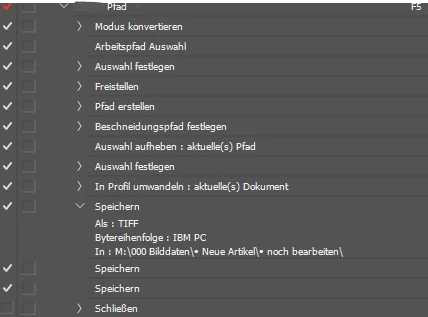
The action includes:
-
paths / clipping paths
-
profile conversion
-
TIFF save
At the end of the action the file is properly saved to disk, but the document title still shows the asterisk (*) as if there are unsaved changes.
If I manually close the file after the action finishes, Photoshop shows the popup asking:
“Do you want to save changes?”
Things I already tried:
-
deleted and recreated all Save / Save As steps
-
left only one normal “Save” at the end
-
added “3” and I repeat “3” normal “Save” at the end of the action
-
removed every step after Save
-
disabled “Save in Background”
-
recreated the action from scratch
-
tried Purge Histories
the problem still happens.
What’s strange is that this exact same action worked perfectly for years, and the issue only started recently.
Has anyone else experienced this with TIFF + clipping paths?
Could this be a bug introduced in a recent Photoshop version?
Eventually I can translate every step of this Action in english if it helps.

 AdChoices