


loston_
Participant
October 18, 2023
Answered

PS and Illustrator 2024 both insanely laggy on high spec MBP

  • October 18, 2023
  • 17 replies
  • 22342 views

absolutely useless, the whole 2024 package. I am running the highest spec macbook pro from 2020 and both illustrator and photoshop are so laggy that its impossible to work. Further to this, they will not allow you to install previous versions before Illustrator 27.0 or Photoshop 22.2 so even if you want to return to the 2022 stable version you can't. 


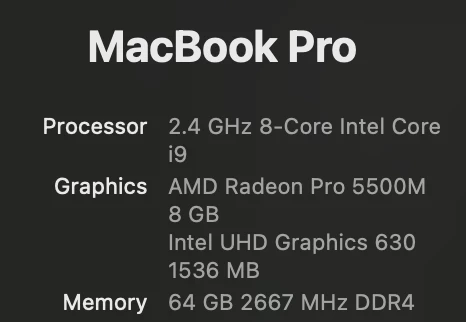
My specs are as below and im running Sonoma 14.0 OS. 


I even just went as far as to completely reinstall the operating system and run nothing but the CC suite and it is still insanely slow. 


Please give me a direct download link to the stable 2022 Adobe CC immediately.
 

Correct answer Wave Digital Arts

I was having the same issue, until I came across a Reddit post which suggested disabling the app 'Magnet'. I've turned it off for Illustrator, and the issue now seems to be resolved.


If you're using Magnet, you can disable it for Illustrator by opening an Illustrator window, click on the magnet icon in the toolbar, and select 'Ignore Illustrator'.

17 replies

Participant
December 10, 2023

same computer as OP and exact same lag issues. unuseable

Participant
November 29, 2023

I'm experiencing the same problem and it's very frustrating. Illustrator is now almost unusable for me.

Participant
November 24, 2023

Also the same thing, two different macs. 

Participating Frequently
November 20, 2023

I feel your pain.
For me, the latest 2024 version, hangs anytime I want to save it. I get the white-out screen for anything from 2-5 minutes. I am running an i9 Windows machine, with 64GB of RAM, SSD's, and a half decent graphics card - Nvidia GeForce RTX 3070. I have disabled the GPU Performance (under the Preferances Panel) still, nothing has changed. 
I hate the Windows OS with a passion. Personally, I would opt for a Mac. However, since my employers, IT support firm said they wouldn't support Mac, or; if they did, it would be at an excessive cost, they priced me our of a half decent Mac Studio, or Macbook Pro : (   By the sound of it, it still wouldn't have made too much difference at this time : ) 

Participant
October 20, 2023

I just upgraded to the new Macbook Pro M2 and find it laggy too. When I select something, it takes a couple of attempts to select, then the object would sticks to the cursor and release somewhere random. It's very frustratiing and a real disappointment. I've encountered issues the last couple of years and try not to upgrade Illustrator when I have a version that is stable enough, I have deadlines and need to focus on my projects,  not spend time digging through the internet for solutions


Participant
November 14, 2023

For those those here on enterprise computers, you might have IT look at the security side of things. I had my issue resolved after some back end adjustments.

Participant
October 20, 2023

I also am having the same issue. 

D Fosse
Community Expert
Community Expert
October 18, 2023

I know it doesn't help you here and now, but this isn't the experience others have.


If I had to guess, I'd point the finger at the Radeon 5500M. Although fairly recent (2019), the later Photoshop Mac versions are optimized for Apple silicon. Maybe go back to 24.x until someone has a better solution.


Dual graphics is a widespread problem on Windows laptops, so you might try to completely disable the Intel UHD 630.

Markus van der Westhuizen
Participating Frequently
February 28, 2024

I have an Apple Silicon and I have the same issue. Every object I select in Illustrator sticks to my cursor, so I have to click, wait for the bounding box (takes a second), and then I can move. If I move too soon the object sticks to the cursor and it drops somewhere else on the artboard or in the swatches panel as I'm moving to go select a swatch. So my workflow at the moment is Select, ⌘Z (to put the object back to its location), do what I need to do, select, ⌘Z and do what I need to do and then select, and ⌘Z and do what I need to do. F********ing frustrating. 


I have the same issues in Photoshop. 


When I work in Affinity Designer or Affinity Photo I have none of these issues. At the moment I have a few big jobs that are already set up in Adobe, so no time so transfer them over to Affinity, but if this issue persit I may just do that.


Since CC I've been seeing more and more bugs and glitches in the Adobe software. I guess they are too quick to release updates and don't test things properly.