
Participant
November 14, 2012
Question

PS CS6 Type tool is backwards

  • November 14, 2012
  • 11 replies
  • 154334 views

Photoshop CS6 (reinstalled fresh today from Creative cloud)

Mac OSX 10.8.2

Macbook Pro

Fontcase 2.1.1

Hi I am having trouble with the type tool. it is putting all punctuation at the start of the sentance.

Example i want to type

This is doing my head in!

What i get is:

!This is doing my head in (exclamation mark at the start of the sentance)

So far I have:

Reinstalled photoshop

Changed the language prefs from East Asian and Middle Eastern (both give the same result)

Trashed all my prefs

Checked other apps (all fine)

Used different typefaces (all act the same)

I found this screenshot on a forum that looks perfect:
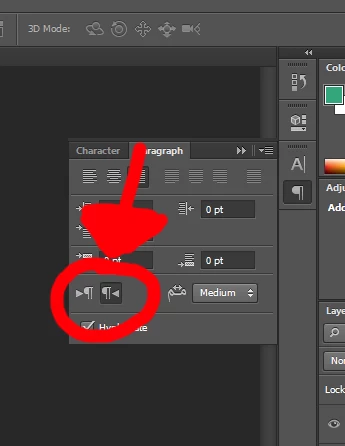
Howerver my paragraph panel does not have that option.

I have read this thread: http://forums.adobe.com/thread/1056427

And there is nothing there to help.

Anyone help me out with this?

Thanks

Neil

This topic has been closed for replies.

11 replies

Participant
December 6, 2018

Okay..

Click The Paragraph option

Once the paragraph tab option up. Select the hamburger Option

Now from the drop down menu that appears Select ("MIDDLE EASTERN FEATURES") ….. Assuming that that you have already done EDIT > Preferences > Type...> Choose Text Engine Options > Select Middle Easter and South Asian

Now click back on the paragraph Option and the forward typing option should be available. Voila!! HalleluYAH!

Matane! Yah bless

Participant
October 30, 2017

Thank you. This did the trick.

Participant
June 15, 2017

If your Middle Eastern features is disable then you can enable this featured through few simple steps.

Choose Edit > Preferences > Type (Windows) or Photoshop > Preferences > Type (Mac OS).

In the Choose Text Engine Options section, select Middle Eastern.

Click OK, and restart Photoshop.

Choose Type > Language Options > Middle Eastern features.

Participant
December 16, 2024

Thank you ^^ it works

Participant
August 21, 2016

make sure this option is the selected one

Participant
August 21, 2016

Hello

I am currently out of the office, back on the 23rd August for more graphic goodness.

Cheers

Neil

Participant
August 17, 2016

in text you should see Icon 1, click it and go into paragraph and press icon 2 shown on the picture, hope this helped

Participant
August 18, 2016

Hello

I am currently out of the office, back on the 23rd August for more graphic goodness.

Cheers

Neil

Participant
December 19, 2015

Follow the two steps on the illustration below.

October 31, 2014

Hi

I just recently occured the same problem, and to fix this 100% you need to do following:

Go to Preferences > General > Type > Choose Text Engine > Asian

This will fix the prob!

Participant
May 25, 2015

Just started working from my creative cloud account on a new computer, and was having this problem.  THANK YOU!

intertarik
Participant
September 4, 2014

Hello,

I have the same probleme but just for one psd... what can I do ??

thx

RayStaar
Participant
October 21, 2014

I had the same experience. The file is corrupted, that's all. Try saving it using an alternate name. If that doesn't work, the next best solution is to save your psd as a png, tif or jpeg, then cut it up and recreate the layers.

Hope that helps.

Participant
June 29, 2014

set your language to middle eastern

Type> language options> middle eastern

The option should be there now

Participant
April 8, 2014

- Type > Panels > Paragraph Styles Panel.
- Create new (Create new paragraph style), the button left to the delete option.

- Double click on the new "Paragraph Style +1"
- Make the changes you want and save

- Use the new paragraph style ("Basic Paragraph" is the one making problem)

This work for me

Participant
February 13, 2021

I don't understand what's going on but this one worked for me. Thank you!