
Participant
October 3, 2025
Answered

PS don't use specific names of the AI files imported with drag-and-drop

  • October 3, 2025
  • 2 replies
  • 76 views

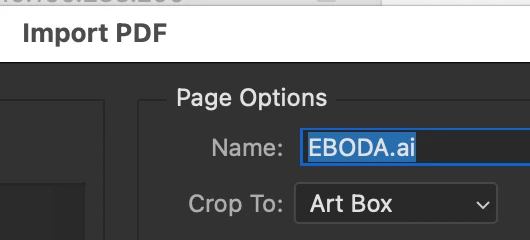
I try to rasterize AI files with drag-and-drop PDF import, but PS doesn't use the names of these files, but to every imported file gives the previously remembered name, and all imported files have the same, wrong name.
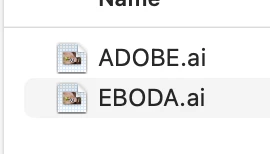
Example files to import:
  Import window with correct name shown:

 Result - the name of the imported file is "PKO5C101448 karta KAPIBARA", which I've imported a few days ago:

Same with the other file:

I've tried to downgrade PS to fix this, but it seems that all 25 and 26 versions have the same bug.

Correct answer Anshul_Saini

Hi @DTPaweł,


Thank you for reaching out. That’s definitely unexpected behavior, and we appreciate the detailed screenshots. Photoshop should preserve the original file names when importing Ai files via drag-and-drop, so the behavior you’re describing is not typical.


Let’s start by ruling out any preference-related issues. Please back up your preferences (just in case). Then reset Photoshop preferences.


If you’re still seeing the issue after that, please help us by sharing a few additional details:


  • Go to Help > System Info, click Copy, and paste the full text here.

  • Record a short screen capture showing your full workflow, from drag-and-drop import to the final filename issue.

  • Share a couple of the sample AI files that reproduce this issue via Direct Message so that we can run internal tests.


Once we have that, we’ll forward the findings to the product team for deeper investigation.


Thank you again for catching this and for your patience while we investigate it further.


Best,

Anshul Saini

2 replies

DTPawełAuthor
Participant
October 6, 2025

Hello,

after resetting PS preferences everything went back to normal. Next, I've restored my preferences and now importing PDF seems to be working fine 🙂
Thank you for help!

Regards
DTPaweł

Anshul_Saini
Community Manager
Anshul_SainiCommunity ManagerCorrect answer
Community Manager
October 3, 2025

Hi @DTPaweł,


Thank you for reaching out. That’s definitely unexpected behavior, and we appreciate the detailed screenshots. Photoshop should preserve the original file names when importing Ai files via drag-and-drop, so the behavior you’re describing is not typical.


Let’s start by ruling out any preference-related issues. Please back up your preferences (just in case). Then reset Photoshop preferences.


If you’re still seeing the issue after that, please help us by sharing a few additional details:


  • Go to Help > System Info, click Copy, and paste the full text here.

  • Record a short screen capture showing your full workflow, from drag-and-drop import to the final filename issue.

  • Share a couple of the sample AI files that reproduce this issue via Direct Message so that we can run internal tests.


Once we have that, we’ll forward the findings to the product team for deeper investigation.


Thank you again for catching this and for your patience while we investigate it further.


Best,

Anshul Saini