
Participating Frequently
September 24, 2025
Answered

PS linked objects script MacOS

  • September 24, 2025
  • 5 replies
  • 802 views

Hi folks,


TL;DR: I am trying to find (or create) a way to automatically relink all linked objects across multiple subfolders from a shared drive in a single PSD upon opening the file in Photoshop CC for MacOS.


Long version: I work in a studio where PS files must be shared between a team of artists and many of us touch the files at different points in the process. We have container PSDs with multiple linked objects in each, and the source files for the linked objects are stored on a shared Google Drive. MacOS changes the base directory for the shared drive to each person's username and Google Drive has its own credentials, so that even when the relative folder placement remains the same (ex. SharedDrive/Folder/Workfiles/Example.psd) the absolute path changes upstream from the files, forcing each artist to relink all the files manually at open. (ex. Users/NameNameson/Library/CloudStorage/GoogleDrive-namenameson@companyname.com/SharedDrive/Folder/Workfiles/Example.psd)

We have different asset types organized into different folders on the shared drive, but once created, the relative file structure within the project folder does not change. The automatic dialog only works to relink files in the same folder and the process must be repeated for each folder that contains linked files. Our workflow does not currently use Photoshop Libraries, though if nothing else works, that might be an option if we can also get the library files to copy to Drive.

I've looked through lots of posts describing similar issues here, on reddit, and on github, and cannot find a solution for this problem. I've already tried this script and its update (https://community.adobe.com/t5/photoshop-ecosystem-ideas/is-there-an-option-that-shows-me-a-list-with-all-smart-objects-paths/idi-p/12657491#U12689475) and while it finds the broken links without an issue, I cannot get it to update them. jazz-y mentioned that one part of it only works on Windows and that may be hanging the rest of the function for me on Mac.


Is it even possible to change PS relink behavior to look only at relative file paths, or to specify the highest level directory that it should look in? Can this be scripted or controlled via an action? We're losing a lot of time tracking down source file locations when they should be known or (hopefully) automatically populated, and I would love to streamline the process.

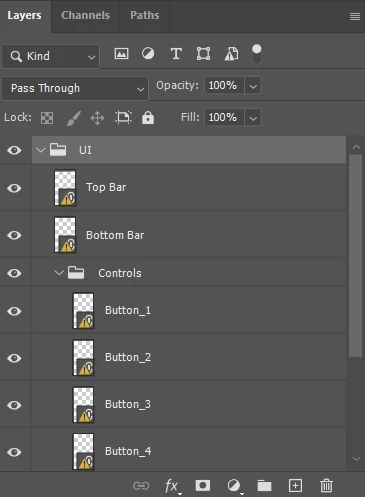
Correct answer Stephen Marsh

@Lysandra26636147dc2x 


So the issue may not be *missing/broken links* but *modified links*... I thought the former, but when I open the file you sent me with the same directory structure, I get the following:


I don't get the red warning symbol for broken/missing links that I expected, which would require a relinking script. Modified links are much simpler.


Please try this script. It doesn't use the "update ALL modified content" command, it manually selects each linked smart ohject layer and performs the "update modified content" command on each layer. As you mentioned that the ALL command was inconsistent, I am hoping that this brute force approach works consistently.


/* 
Update All Modified Smart Object Layers.jsx
Stephen Marsh
v1.0 - Initial release
https://community.adobe.com/t5/photoshop-ecosystem-discussions/ps-linked-objects-script-macos/m-p/15521809
*/

#target photoshop

app.activeDocument.suspendHistory('Update all modified links...', 'main()');

function main() {
    if (!documents.length) return;
    var savedDialogs = app.displayDialogs;
    app.displayDialogs = DialogModes.NO;
    
    try {
        var layerIDs = [];
        collectLinkedSmartObjects(app.activeDocument, layerIDs);
                for (var i = 0; i < layerIDs.length; i++) {
            try {
                selectLayerByID(layerIDs[i]);
                // Update modified SO layers
                app.runMenuItem(stringIDToTypeID("placedLayerUpdateModified"));
            } catch (e) {}
        }
    } catch (e) {
    }
    // End of script
    app.displayDialogs = savedDialogs;
    app.beep();
    app.runMenuItem(stringIDToTypeID( "collapseAllGroupsEvent" ));
    alert("Finished updating " + layerIDs.length + " linked smart objects.");
}


///// Helper Functions /////

function collectLinkedSmartObjects(parent, layerIDs) {
    for (var i = 0; i < parent.layers.length; i++) {
        var layer = parent.layers[i];
        if (layer.typename === "ArtLayer") {
            if (isLinkedSmartObject(layer)) {
                layerIDs.push(layer.id);
            }
        } else if (layer.typename === "LayerSet") {
            collectLinkedSmartObjects(layer, layerIDs);
        }
    }
}

function isLinkedSmartObject(layer) {
    try {
        var ref = new ActionReference();
        ref.putIdentifier(charIDToTypeID("Lyr "), layer.id);
        var desc = executeActionGet(ref);
        if (desc.hasKey(stringIDToTypeID("smartObject"))) {
            var soDesc = desc.getObjectValue(stringIDToTypeID("smartObject"));
            if (soDesc.hasKey(stringIDToTypeID("linked"))) {
                return soDesc.getBoolean(stringIDToTypeID("linked"));
            }
        }
    } catch (e) {
        return false;
    }
    return false;
}

function selectLayerByID(id) {
    var ref = new ActionReference();
    ref.putIdentifier(charIDToTypeID("Lyr "), id);
    var desc = new ActionDescriptor();
    desc.putReference(charIDToTypeID("null"), ref);
    desc.putBoolean(charIDToTypeID("MkVs"), false);
    executeAction(charIDToTypeID("slct"), desc, DialogModes.NO);
}


  1. Copy the code text to the clipboard
  2. Open a new blank file in a plain-text editor (not in a word processor)
  3. Paste the code in
  4. Save as a plain text format file – .txt
  5. Rename the saved file extension from .txt to .jsx
  6. Install or browse to the .jsx file to run (see below)

https://prepression.blogspot.com/2017/11/downloading-and-installing-adobe-scripts.html


5 replies

Stephen Marsh
Community Expert
Community Expert
September 27, 2025

@Lysandra26636147dc2x 


I just had a thought...


What happens if you use the properties panel and select "update modified content"?


I'm just trying to better understand the issue, if it is just picking up modified content or if it's really a broken link. Screenshots of the layers panel and properties panel would of course help.


Participating Frequently
September 29, 2025

Well, this has been an interesting rabbit hole to dive down.
Update (all) modified content sometimes works and sometimes doesn't. Trying to narrow down the cases and grab examples of file paths that don't work but aren't broken.

Stephen Marsh
Community Expert
Stephen MarshCommunity ExpertCorrect answer
Community Expert
September 29, 2025

@Lysandra26636147dc2x 


So the issue may not be *missing/broken links* but *modified links*... I thought the former, but when I open the file you sent me with the same directory structure, I get the following:


I don't get the red warning symbol for broken/missing links that I expected, which would require a relinking script. Modified links are much simpler.


Please try this script. It doesn't use the "update ALL modified content" command, it manually selects each linked smart ohject layer and performs the "update modified content" command on each layer. As you mentioned that the ALL command was inconsistent, I am hoping that this brute force approach works consistently.


/* 
Update All Modified Smart Object Layers.jsx
Stephen Marsh
v1.0 - Initial release
https://community.adobe.com/t5/photoshop-ecosystem-discussions/ps-linked-objects-script-macos/m-p/15521809
*/

#target photoshop

app.activeDocument.suspendHistory('Update all modified links...', 'main()');

function main() {
    if (!documents.length) return;
    var savedDialogs = app.displayDialogs;
    app.displayDialogs = DialogModes.NO;
    
    try {
        var layerIDs = [];
        collectLinkedSmartObjects(app.activeDocument, layerIDs);
                for (var i = 0; i < layerIDs.length; i++) {
            try {
                selectLayerByID(layerIDs[i]);
                // Update modified SO layers
                app.runMenuItem(stringIDToTypeID("placedLayerUpdateModified"));
            } catch (e) {}
        }
    } catch (e) {
    }
    // End of script
    app.displayDialogs = savedDialogs;
    app.beep();
    app.runMenuItem(stringIDToTypeID( "collapseAllGroupsEvent" ));
    alert("Finished updating " + layerIDs.length + " linked smart objects.");
}


///// Helper Functions /////

function collectLinkedSmartObjects(parent, layerIDs) {
    for (var i = 0; i < parent.layers.length; i++) {
        var layer = parent.layers[i];
        if (layer.typename === "ArtLayer") {
            if (isLinkedSmartObject(layer)) {
                layerIDs.push(layer.id);
            }
        } else if (layer.typename === "LayerSet") {
            collectLinkedSmartObjects(layer, layerIDs);
        }
    }
}

function isLinkedSmartObject(layer) {
    try {
        var ref = new ActionReference();
        ref.putIdentifier(charIDToTypeID("Lyr "), layer.id);
        var desc = executeActionGet(ref);
        if (desc.hasKey(stringIDToTypeID("smartObject"))) {
            var soDesc = desc.getObjectValue(stringIDToTypeID("smartObject"));
            if (soDesc.hasKey(stringIDToTypeID("linked"))) {
                return soDesc.getBoolean(stringIDToTypeID("linked"));
            }
        }
    } catch (e) {
        return false;
    }
    return false;
}

function selectLayerByID(id) {
    var ref = new ActionReference();
    ref.putIdentifier(charIDToTypeID("Lyr "), id);
    var desc = new ActionDescriptor();
    desc.putReference(charIDToTypeID("null"), ref);
    desc.putBoolean(charIDToTypeID("MkVs"), false);
    executeAction(charIDToTypeID("slct"), desc, DialogModes.NO);
}


  1. Copy the code text to the clipboard
  2. Open a new blank file in a plain-text editor (not in a word processor)
  3. Paste the code in
  4. Save as a plain text format file – .txt
  5. Rename the saved file extension from .txt to .jsx
  6. Install or browse to the .jsx file to run (see below)

https://prepression.blogspot.com/2017/11/downloading-and-installing-adobe-scripts.html


Stephen Marsh
Community Expert
Community Expert
September 26, 2025

@Lysandra26636147dc2x 


I will test using my Google Drive and Mac, however, I can't create the links from another account for testing.


Can you provide a layered test PSD file with links to 2 or more files, and also provide the linked files? I'll recreate the directory structure on my drive, but just in case, please paste an example of the link.


This only needs to be a mock file, not a production file that may contain client sensitive data. The layer structure should match a production file though (if you use layer sets or artboards etc). The actual content and resolution etc. doesn't matter, it's only the link paths that are important. You can send me a private message with the files to avoid having your email address out there in the publicly available files.

Participating Frequently
September 29, 2025

Thanks again. I have DMed you the test file and link path. Fingers crossed.

Stephen Marsh
Community Expert
Community Expert
September 25, 2025

@Lysandra26636147dc2x 


Are the following entries in red static for each user, or do they change?


lysandra.0123

jack.4567

Participating Frequently
September 25, 2025

Those are static for each user (the company e-mail address associated with the GDrive account for each employee)

Stephen Marsh
Community Expert
Community Expert
September 25, 2025
quote

Those are static for each user (the company e-mail address associated with the GDrive account for each employee)


By @Lysandra26636147dc2x


Please test the following snippet, it's only purpose is to confirm the path of a selected linked smart object layer.


It will copy the path to the clipboard, then you can paste the clipboard path into the forum.


Please test on at least two different computers and paste the link text and or screenshot of the alert here to confirm the path.


You can redact or change the company name, I just need to check that the preiously discussed static .digits suffix is correctly reported for each user.


/*
Snippet from:
https://community.adobe.com/t5/photoshop-ecosystem-discussions/photoshop-script-replacing-linked-smart-objects-based-on-layer-quot-name-string-quot/td-p/14559920
*/

var theName = getSmartObjectReference().filePath.fsName.toString();
alert(theName);

var d = new ActionDescriptor();  
d.putString(stringIDToTypeID("textData"), theName);  
executeAction(stringIDToTypeID("textToClipboard"), d, DialogModes.NO);

function getSmartObjectReference() {
    // https://stackoverflow.com/questions/63010107/get-a-smart-objects-layers-files-directory-source-in-jsx
    try {
        var smartObject = {
            found: false,
            fileRef: '',
            filePath: '',
            linked: false,
        };
        var ref, so;
        ref = new ActionReference();
        ref.putProperty(charIDToTypeID("Prpr"), stringIDToTypeID("smartObject"));
        ref.putEnumerated(charIDToTypeID("Lyr "), charIDToTypeID("Ordn"), charIDToTypeID("Trgt"));
        so = executeActionGet(ref).getObjectValue(stringIDToTypeID("smartObject"));
        smartObject.found = true;
        smartObject.linked = so.getBoolean(stringIDToTypeID("linked"));
        smartObject.fileRef = so.getString(stringIDToTypeID("fileReference"));
        if (smartObject.linked) {
            smartObject.filePath = so.getPath(stringIDToTypeID("link"));
        } else {
            smartObject.filePath = Folder.temp + '/' + smartObject.fileRef;
        }
        return smartObject;
    } catch (e) {
        alert(e);
        return smartObject;
    }
}


Stephen Marsh
Community Expert
Community Expert
September 24, 2025

So just to confirm, when you open such a PSD, there may be linked smart objects such as:


/gdrive/jack/headers/header1.psd


However, when you open the PSD, the you need the linked asset to read as:


/gdrive/lysandra/headers/header1.psd


Where you need to update the entire path in blue, with the path on your machine in red. I'm guessing it's not going to be that simple though.


Can you please post some examples so that I can see that actual pattern of the link, which bits change and which bits are unchanged?


If the path is always the same for each user, it could either be configured via a settings file, or perhaps the script could offer the user to select the main path or perhaps the first new file that matches, then it could use this as an example for the other missing links.

Participating Frequently
September 24, 2025

Thank you for your super quick responses, Stephen!

Here is the whole file path with just the parts that change between users highlighted:

/Users/lysandra/Library/CloudStorage/GoogleDrive-lysandra.0123@6698564.com/Shared drives/Dev/Projects/Gamename/BGFolder/BG_01.psd

/Users/jack/Library/CloudStorage/GoogleDrive-jack.4567@6698564.com/Shared drives/Dev/Projects/Gamename/BGFolder/BG_01.psd


What would be ideal is some way to instruct PS to look only at the /Shared drives/Dev/Projects/Gamename/BGFolder/BG_01.psd part.

However, /BGFolder/ is just one of the folders with linked assets in it. One container PSD might have links to multiple assets in /BGFolder/, /CharacterFolder/, /UIFolder/, etc. Like the following:

/Users/lysandra/Library/CloudStorage/GoogleDrive-lysandra.lastname@ABCompany.com/Shared drives/Dev/Projects/Gamename/BGFolder/BG_01.psd

/Users/lysandra/Library/CloudStorage/GoogleDrive-lysandra.lastname@ABCompany.com/Shared drives/Dev/Projects/Gamename/BGFolder/BG_02.psd

/Users/lysandra/Library/CloudStorage/GoogleDrive-lysandra.lastname@ABCompany.com/Shared drives/Dev/Projects/Gamename/BGFolder/BG_03.psd

/Users/lysandra/Library/CloudStorage/GoogleDrive-lysandra.lastname@ABCompany.com/Shared drives/Dev/Projects/Gamename/CharacterFolder/CharacterExpression_01.psd

/Users/lysandra/Library/CloudStorage/GoogleDrive-lysandra.lastname@ABCompany.com/Shared drives/Dev/Projects/Gamename/CharacterFolder/CharacterExpression_02.psd

/Users/lysandra/Library/CloudStorage/GoogleDrive-lysandra.lastname@ABCompany.com/Shared drives/Dev/Projects/Gamename/UIFolder/UIFrame.psd

/Users/lysandra/Library/CloudStorage/GoogleDrive-lysandra.lastname@ABCompany.com/Shared drives/Dev/Projects/Gamename/UIFolder/UIElement_01.psd

/Users/lysandra/Library/CloudStorage/GoogleDrive-lysandra.lastname@ABCompany.com/Shared drives/Dev/Projects/Gamename/UIFolder/UIElement_02.psd

/Users/lysandra/Library/CloudStorage/GoogleDrive-lysandra.lastname@ABCompany.com/Shared drives/Dev/Projects/Gamename/UIFolder/UIElement_03.psd


The path is always the same structure for each user and we are all pulling linked assets from the same shared database. Being able to select the main path or the /Gamename/ directory would be the best option, as right now the auto relink dialog gets caught up in the subfolders.

Participating Frequently
September 24, 2025

Thanks, there are some discussions here I hadn't found!

I did try the previous script you posted in the same thread as the jazz-y one, and it gave me an error 8800 (screenshot attached if it helps.)

The rest of the scripts I've tried, as well as PS default, can't handle the different subfolders. Even though those should be consistent between users.