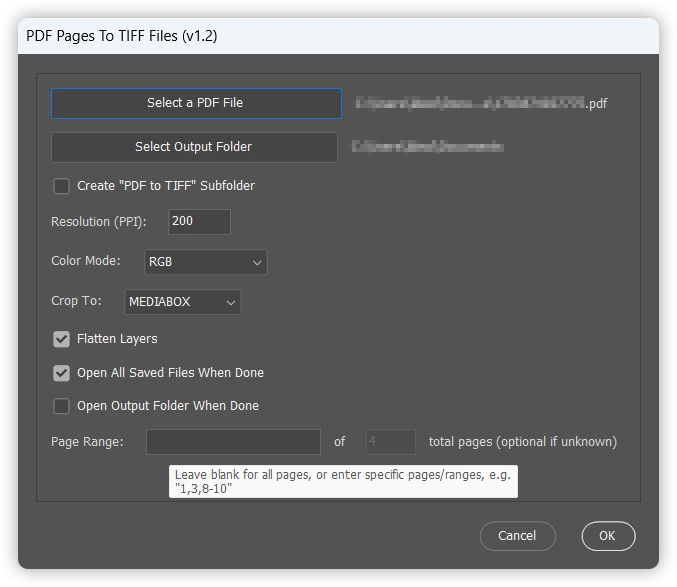
@bellevue scott - You can try this script. When you select the PDF file, the output directory for the TIFF files is automatically selected, however, this can be overridden or you can also check the box to create a subfolder:
EDIT 3rd August 2026: Script updated to v1.2.
/* PDF Pages To TIFF Files.jsx Stephen Marsh 26th July 2026 - v1.0: Initial release 1st August 2026 - v1.1: Added "Open All Saved Files When Done" and "Open Output Folder When Done" checkboxes 3rd August 2026 - v1.2: Page Range field now pairs with a auto-detected/manual Total Pages field
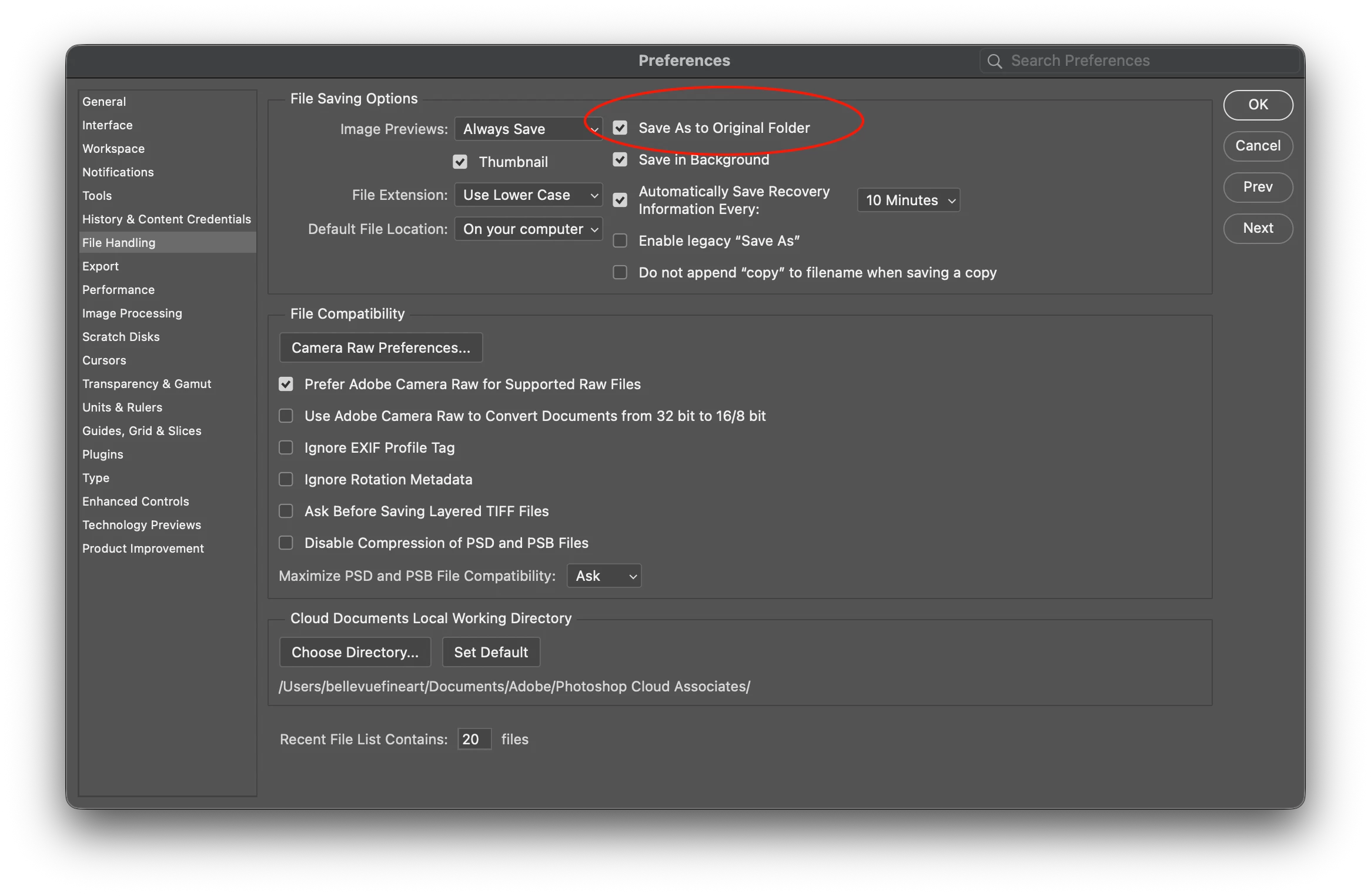
https://community.adobe.com/questions-712/ps-save-as-doesn-t-save-pdf-files-to-same-folder-as-original-with-save-as-original-folder-checked-1633715 Based on "PDF Pages To Layers ScriptUI.jsx" by Stephen Marsh https://community.adobe.com/t5/photoshop-ecosystem-discussions/import-a-multipage-pdf-in-ps/m-p/13512431 */
#target photoshop;
// Set the global variables var theCounter = 1; var docRes = 200; var docColorMode = OpenDocumentMode.RGB; var enableFlatten = true; var cropToType = CropToType.MEDIABOX; var outputFolderManuallySet = false; var createSubfolder = false; var outputFolderBasePath = ""; // The actual selected/derived output folder, without the subfolder appended var allPagesSentinelMax = 999; // Upper bound used only when no page range is entered (stops automatically once a page fails to open) var openOutputFolderWhenDone = false; var openAllSavedFilesWhenDone = true;
// Save and set the dialog display settings var savedDisplayDialogs = app.displayDialogs; app.displayDialogs = DialogModes.NO;
// Parse a page range string like "1,3,8-10" into an array of individual page numbers function parsePageRange(rangeStr) { var pages = []; var parts = rangeStr.split(","); for (var i = 0; i < parts.length; i++) { var part = parts[i].replace(/^\s+|\s+$/g, ""); // trim whitespace if (part === "") continue;
if (part.indexOf("-") !== -1) { var bounds = part.split("-"); var startPage = parseInt(bounds[0], 10); var endPage = parseInt(bounds[1], 10); if (!isNaN(startPage) && !isNaN(endPage)) { var lo = Math.min(startPage, endPage); var hi = Math.max(startPage, endPage); for (var p = lo; p <= hi; p++) { pages.push(p); } } } else { var singlePage = parseInt(part, 10); if (!isNaN(singlePage)) { pages.push(singlePage); } } } return pages; }
function uniqueSortedPages(arr) { var seen = {}; var result = []; for (var i = 0; i < arr.length; i++) { var v = arr[i]; if (v >= 1 && !seen[v]) { seen[v] = true; result.push(v); } } result.sort(function(a, b) { return a - b; }); return result; }
// Approximate the PDF's total page count by scanning its raw bytes for /Type /Pages ... /Count N // (works for uncompressed/plain PDFs; returns null if the structure can't be found, e.g. compressed object streams) function getPDFPageCountApprox(file) { var count = null; try { file.open("r"); file.encoding = "BINARY"; var raw = file.read(); file.close();
var matches = raw.match(/\/Type\s*\/Pages[^>]{0,200}?\/Count\s+(\d+)/g); if (!matches) { matches = raw.match(/\/Count\s+(\d+)[^>]{0,200}?\/Type\s*\/Pages/g); } if (matches && matches.length) { var counts = []; for (var i = 0; i < matches.length; i++) { var m = matches[i].match(/\/Count\s+(\d+)/); if (m) counts.push(parseInt(m[1], 10)); } if (counts.length) count = Math.max.apply(null, counts); } } catch (e) { count = null; } return count; }
function updateOutputPathDisplay() { if (outputFolderBasePath === "") { outputPath.text = "No output folder selected"; } else if (subfolderCheckbox.value) { outputPath.text = outputFolderBasePath + "/PDF to TIFF"; } else { outputPath.text = outputFolderBasePath; } }
// Create the UI var mainWindow = new Window("dialog", "PDF Pages To TIFF Files (v1.2)", undefined, { resizeable: false }); mainWindow.orientation = "column"; mainWindow.alignChildren = "fill"; mainWindow.preferredSize = [500, -1]; // Set window width to 500px
// Create a panel to contain the main content var mainPanel = mainWindow.add("panel"); mainPanel.orientation = "column"; mainPanel.alignChildren = "left"; mainPanel.margins = 10;
// PDF file selection var pdfGroup = mainPanel.add("group"); pdfGroup.orientation = "row"; pdfGroup.alignChildren = ["fill", "center"]; pdfGroup.alignment = ["fill", "top"]; var pdfButton = pdfGroup.add("button", undefined, "Select a PDF File"); var pdfPath = pdfGroup.add("statictext", undefined, 'No PDF file selected', { truncate: 'middle' }); pdfPath.alignment = ["fill", "center"];
pdfButton.onClick = function() { var thePDF = File.openDialog("Select the Multi-page PDF File"); if (thePDF) { pdfPath.text = thePDF.fullName; // Default the output folder to the PDF's own folder if (!outputFolderManuallySet) { outputFolderBasePath = thePDF.parent.fullName; updateOutputPathDisplay(); } // A PDF has been selected, so the subfolder option can now be used subfolderCheckbox.enabled = true;
// Attempt to auto-detect the total page count from the PDF's internal structure var detectedTotal = getPDFPageCountApprox(thePDF); if (detectedTotal !== null && detectedTotal > 0) { totalPagesInput.text = String(detectedTotal); totalPagesInput.enabled = false; // auto-detected - lock it against manual edits detectStatusText.text = ""; } else { totalPagesInput.text = ""; totalPagesInput.enabled = true; // not detected - let the user type it in manually detectStatusText.text = "Couldn't auto-detect the page count (compressed PDF). You can enter it manually, or leave both fields blank to process all pages until one fails to open."; } } else { //alert("No file selected."); } }
outputButton.onClick = function() { var theFolder = Folder.selectDialog("Select the Output Folder for the TIFF Files"); if (theFolder) { outputFolderBasePath = theFolder.fullName; outputFolderManuallySet = true; updateOutputPathDisplay(); } }
// Create "PDF to TIFF" subfolder checkbox (disabled until a PDF is selected) var subfolderGroup = mainPanel.add("group"); subfolderGroup.orientation = "row"; var subfolderCheckbox = subfolderGroup.add("checkbox", undefined, "Create \"PDF to TIFF\" Subfolder"); subfolderCheckbox.value = createSubfolder; subfolderCheckbox.enabled = false; subfolderCheckbox.helpTip = "Save the TIFF files inside a \"PDF to TIFF\" subfolder within the selected output folder"; subfolderCheckbox.onClick = function() { updateOutputPathDisplay(); };
// Document resolution field var resGroup = mainPanel.add("group"); resGroup.orientation = "row"; resGroup.add("statictext", undefined, "Resolution (PPI):"); var resInput = resGroup.add("editnumber", undefined, docRes); // Use editnumber to restrict input to numbers resInput.characters = 5;
// Document color mode dropdown list var colorModeGroup = mainPanel.add("group"); colorModeGroup.orientation = "row"; colorModeGroup.add("statictext", undefined, "Color Mode:"); var colorModeDropdown = colorModeGroup.add("dropdownlist", undefined, ["RGB", "CMYK", "LAB", "GRAYSCALE"]); colorModeDropdown.selection = 0; // Default to the first item in the array (RGB)
// Crop page type dropdown list var cropGroup = mainPanel.add("group"); cropGroup.orientation = "row"; cropGroup.add("statictext", undefined, "Crop To:"); var cropDropdown = cropGroup.add("dropdownlist", undefined, ["MEDIABOX", "CROPBOX", "BLEEDBOX", "TRIMBOX", "ARTBOX"]); cropDropdown.selection = 0; // Default to the first item in the array
// Open All Saved Files When Done Checkbox var openFilesGroup = mainPanel.add("group"); openFilesGroup.orientation = "row"; var openFilesCheckbox = openFilesGroup.add("checkbox", undefined, "Open All Saved Files When Done"); openFilesCheckbox.value = openAllSavedFilesWhenDone; openFilesCheckbox.helpTip = "Open every saved TIFF file (in its associated application) once the script has finished";
// Open Output Folder When Done Checkbox var openFolderGroup = mainPanel.add("group"); openFolderGroup.orientation = "row"; var openFolderCheckbox = openFolderGroup.add("checkbox", undefined, "Open Output Folder When Done"); openFolderCheckbox.value = openOutputFolderWhenDone; openFolderCheckbox.helpTip = "Open the output folder in the OS file browser once all TIFF files have been saved";
// Page Range field, paired with an (optional) Total Pages field var pageRangeGroup = mainPanel.add("group"); pageRangeGroup.orientation = "row"; pageRangeGroup.alignChildren = ["left", "center"]; pageRangeGroup.add("statictext", undefined, "Page Range:"); var pageRangeInput = pageRangeGroup.add("edittext", undefined, ""); pageRangeInput.characters = 14; pageRangeInput.helpTip = 'Leave blank for all pages, or enter specific pages/ranges, e.g. "1,3,8-10"'; pageRangeGroup.add("statictext", undefined, "of"); var totalPagesInput = pageRangeGroup.add("edittext", undefined, ""); totalPagesInput.characters = 4; totalPagesInput.helpTip = "Total page count in the PDF (auto-detected when possible, or enter manually if unknown)"; pageRangeGroup.add("statictext", undefined, "total pages (optional if unknown)");
// Parse the total page count field (optional; blank = unknown) var totalRaw = totalPagesInput.text.replace(/^\s+|\s+$/g, ""); var knownTotal = totalRaw.length ? parseInt(totalRaw, 10) : null; if (knownTotal !== null && (isNaN(knownTotal) || knownTotal < 1)) { alert("Error: Total pages must be a positive number, or left blank if unknown.", "Invalid Total Pages"); return; // Keep the dialog open }
// Parse the page range field (blank = process all pages) var pageRangeText = pageRangeInput.text.replace(/^\s+|\s+$/g, ""); var allPagesMode = (pageRangeText === ""); var targetPages = []; var padDigits;
if (!allPagesMode) { targetPages = uniqueSortedPages(parsePageRange(pageRangeText)); if (targetPages.length === 0) { alert("Error: The page range entered is not valid!" + "\n" + 'Please use a format like "1,3,8-10".', "Invalid Page Range"); return; // Keep the dialog open } // If the total page count is known, validate the requested range against it up front if (knownTotal !== null) { var highestRequested = targetPages[targetPages.length - 1]; if (highestRequested > knownTotal) { alert("Error: The page range entered (highest page " + highestRequested + ") exceeds the total page count (" + knownTotal + ").", "Page Range Exceeds Total"); return; // Keep the dialog open } } } else if (knownTotal !== null) { // No specific range entered, but the total page count is known: expand it to every page. // This lets the save loop skip any individual page that fails to open, rather than aborting // on the first failure the way the "unknown total" sentinel-probing loop does. for (var t = 1; t <= knownTotal; t++) { targetPages.push(t); } allPagesMode = false; }
if (allPagesMode) { // Total page count still unknown: fall back to sequential probing (see allPagesSentinelMax) padDigits = 3; // Generous default digit width since the total page count isn't known in advance } else { // Base the digit width on the known total when available, otherwise on the highest requested page var highestPage = knownTotal !== null ? knownTotal : targetPages[targetPages.length - 1]; padDigits = String(highestPage).length < 2 ? 2 : String(highestPage).length; }
// Check if no PDF is selected if (pdfPath.text === "" || pdfPath.text === "No PDF file selected") { alert("Error: No PDF file selected!" + "\n" + "Please select a PDF file before proceeding.", "No PDF file selected"); return; // Keep the dialog open }
var thePDF = new File(pdfPath.text); var thePath = thePDF.fsName; var theExtension = thePath.match(/\.[^\.]+$/)[0]; if (theExtension !== ".pdf") { alert("Error: No PDF file chosen!" + "\n" + "Please select a valid PDF file.", "Invalid File Type"); return; // Keep the dialog open }
// Check if no output folder is selected if (outputFolderBasePath === "") { alert("Error: No output folder selected!" + "\n" + "Please select an output folder before proceeding.", "No Output Folder Selected"); return; // Keep the dialog open }
var theOutputFolder = new Folder(outputFolderBasePath); if (!theOutputFolder.exists) { alert("Error: The selected output folder does not exist!", "Invalid Output Folder"); return; // Keep the dialog open }
createSubfolder = subfolderCheckbox.value;
// If requested, save into a "PDF to TIFF" subfolder of the chosen output folder if (createSubfolder) { var subFolder = new Folder(theOutputFolder.fsName + "/PDF to TIFF"); if (!subFolder.exists) { subFolder.create(); } theOutputFolder = subFolder; }
processPDF(thePDF, theOutputFolder, padDigits, targetPages, allPagesMode); mainWindow.close(); // Close the dialog only after successful validation };
// Show the dialog mainWindow.center(); mainWindow.show();
function padNumber(num, size) { var s = num.toString(); while (s.length < size) { s = "0" + s; } return s; }
function processPDF(thePDF, theOutputFolder, padDigits, targetPages, allPagesMode) { var pagesSaved = 0; var skippedPages = []; var savedFiles = []; try { // Set the PDF open options var pdfOpenOptions = new PDFOpenOptions; pdfOpenOptions.antiAlias = true; pdfOpenOptions.mode = docColorMode; pdfOpenOptions.bitsPerChannel = BitsPerChannelType.EIGHT; pdfOpenOptions.resolution = docRes; pdfOpenOptions.suppressWarnings = true; pdfOpenOptions.cropPage = cropToType;
// Get the original filename without its extension var baseName = thePDF.name.replace(/\.[^\.]+$/, "");
if (allPagesMode) { // No specific pages requested: open pages sequentially and stop at the first one that fails // (this is how the actual page count of the PDF is discovered) for (theCounter = 1; theCounter <= allPagesSentinelMax; theCounter++) { try { var savedFile = openAndSavePage(thePDF, theOutputFolder, pdfOpenOptions, theCounter, padDigits, baseName); savedFiles.push(savedFile); pagesSaved++; } catch (pageError) { closeActiveDocIfOpen(); break; } } } else { // Specific pages/ranges requested: try each one, skipping (not aborting on) any that don't exist for (var i = 0; i < targetPages.length; i++) { theCounter = targetPages[i]; try { var savedFile = openAndSavePage(thePDF, theOutputFolder, pdfOpenOptions, theCounter, padDigits, baseName); savedFiles.push(savedFile); pagesSaved++; } catch (pageError) { closeActiveDocIfOpen(); skippedPages.push(theCounter); } } }
// End of script notification var resultMessage = "Script completed! " + pagesSaved + " page(s) saved as separate TIFF files to:\n" + theOutputFolder.fullName; if (skippedPages.length > 0) { resultMessage += "\n\nPage(s) not found in the PDF and skipped: " + skippedPages.join(", "); } alert(resultMessage);
// Open the output folder in the OS file browser, if requested if (openOutputFolderWhenDone) { theOutputFolder.execute(); }
// Open every saved TIFF file (in its associated application), if requested if (openAllSavedFilesWhenDone) { for (var f = 0; f < savedFiles.length; f++) { savedFiles[f].execute(); } }
Here are the 2-part scripts that I mentioned earlier...
Script 1 of 2 will leave the rasterized PDF page/s open so that you can work on them. You would then run the 2 of 2 script to save the open doc/s to the folder where the PDF was originally opened from. This might suit your workflow better than automatically saving/opening the rasterized files.
/* Open PDF Pages 1 of 2.jsx Stephen Marsh 1st August 2026 - v1.0: Initial release 2nd August 2026 - v1.1: Script rewritten with a custom UI window
SCRIPT 1 OF 2: Open and rasterize a single PDF and write the original file path location to a log file */
// Upper bound used only when the page range is left blank and the total page count is unknown // (stops automatically once a page fails to open) var allPagesSentinelMax = 999;
// Parse a page range string like "1,3,8-10" into an array of individual page numbers function parsePageRange(rangeStr) { var pages = []; var parts = rangeStr.split(","); for (var i = 0; i < parts.length; i++) { var part = parts[i].replace(/^\s+|\s+$/g, ""); // trim whitespace if (part === "") continue;
if (part.indexOf("-") !== -1) { var bounds = part.split("-"); var startPage = parseInt(bounds[0], 10); var endPage = parseInt(bounds[1], 10); if (!isNaN(startPage) && !isNaN(endPage)) { var lo = Math.min(startPage, endPage); var hi = Math.max(startPage, endPage); for (var p = lo; p <= hi; p++) { pages.push(p); } } } else { var singlePage = parseInt(part, 10); if (!isNaN(singlePage)) { pages.push(singlePage); } } } return pages; }
function uniqueSortedPages(arr) { var seen = {}; var result = []; for (var i = 0; i < arr.length; i++) { var v = arr[i]; if (v >= 1 && !seen[v]) { seen[v] = true; result.push(v); } } result.sort(function(a, b) { return a - b; }); return result; }
var previousLogFile = File(Folder.desktop + "/_PDF_File_Path_Log.txt"); previousLogFile.remove();
/* // Disabled for now, could be used if the 2 of 2 script is modified to automatically loop over and save all unsaved docs...
// Save any new/unsaved documents that don't have a path yet before the dialog is shown alert("Unsaved files should be saved before this script continues to run..."); saveUnsavedDocuments(); */
// Script UI dialog var dlg = new Window("dialog", "Open PDF Pages - Script 1 of 2 (v1.1)"); dlg.orientation = "column"; dlg.alignChildren = "fill"; dlg.spacing = 10; dlg.margins = 16;
var browseBtn = filePanel.add("button", undefined, "Choose PDF..."); var fileNameText = filePanel.add("statictext", undefined, "No file selected", { truncate: "middle" }); fileNameText.preferredSize.width = 320;
// Page range panel (disabled until a PDF is chosen) var rangePanel = dlg.add("panel", undefined, "Pages"); rangePanel.orientation = "column"; // column so the status text sits on its own line below rangePanel.alignChildren = "left"; rangePanel.margins = 12; rangePanel.spacing = 8; rangePanel.enabled = false; // inactive until a file is selected
pageRangeRow.add("statictext", undefined, "Page Range:"); var pageRangeInput = pageRangeRow.add("edittext", undefined, "1"); pageRangeInput.characters = 20; pageRangeInput.helpTip = 'Leave blank for all pages, or enter specific pages/ranges, e.g. "1,3,8-10"';
pageRangeRow.add("statictext", undefined, "of"); var totalPagesInput = pageRangeRow.add("edittext", undefined, ""); totalPagesInput.characters = 4; pageRangeRow.add("statictext", undefined, "total pages (optional if unknown)");
// Two-column layout: Color Mode + Resolution stacked in column 1, // Bit Depth + Rasterize To stacked in column 2, so each column's // labels/controls line up vertically and the two columns align with each other. var optionsColumns = optionsPanel.add("group"); optionsColumns.orientation = "row"; optionsColumns.alignChildren = "top"; optionsColumns.spacing = 24;
browseBtn.onClick = function () { var f = File.openDialog("Select the PDF file to open", pdfFilterString, false); if (f !== null) { theFile = f; fileNameText.text = decodeURI(theFile.fullName);
var detected = getPDFPageCountApprox(theFile); if (detected !== null && detected > 0) { totalPagesInput.text = String(detected); totalPagesInput.enabled = false; // auto-detected - lock it against manual edits detectStatusText.text = ""; } else { totalPagesInput.text = ""; totalPagesInput.enabled = true; // not detected - let the user type it in manually detectStatusText.text = "Couldn't auto-detect the page count (compressed PDF). You can enter it manually, or leave the it blank..."; }
// Reset the page range to a safe default: just page 1 pageRangeInput.text = "1";
rangePanel.enabled = true; // enabled once a file is selected okBtn.enabled = true;
dlg.layout.layout(true); // re-measure/redraw so the status text isn't clipped } };
// Populated by okBtn.onClick once validated, then consumed after the dialog closes var allPagesMode = true; var targetPages = [];
okBtn.onClick = function () { var totalRaw = totalPagesInput.text.replace(/^\s+|\s+$/g, ""); // trim var total = totalRaw.length ? parseInt(totalRaw, 10) : null; // null = left blank/unknown var res = parseFloat(resolutionInput.text);
if (theFile === null) { alert("Please choose a PDF file first."); return; } // Total page count is optional - only validate it if a value was actually provided if (total !== null && (isNaN(total) || total < 1)) { alert("Total pages must be a positive number, or left blank if unknown."); return; } if (isNaN(res) || res <= 0) { alert("Please enter a valid resolution."); return; }
// Parse the page range field (blank = process all pages) var pageRangeText = pageRangeInput.text.replace(/^\s+|\s+$/g, ""); allPagesMode = (pageRangeText === ""); targetPages = [];
if (!allPagesMode) { targetPages = uniqueSortedPages(parsePageRange(pageRangeText)); if (targetPages.length === 0) { alert("Please enter a valid page range, e.g. \"1,3,8-10\", or leave it blank for all pages."); return; } // Only validate against the total page count if it's known if (total !== null) { var highestRequested = targetPages[targetPages.length - 1]; if (highestRequested > total) { alert("The page range entered (highest page " + highestRequested + ") exceeds the total page count (" + total + ")."); return; } } }
dlg.close(1); };
cancelBtn.onClick = function () { dlg.close(0); };
// ============================================================ // Show dialog and process // ============================================================ if (dlg.show() === 1) {
var thePath = theFile.fsName; var sourceFolder = new File(thePath).parent.fsName;
// Write the source folder to the log file try { var logFile = new File(Folder.desktop + "/_PDF_File_Path_Log.txt"); logFile.encoding = "UTF8"; logFile.open("w"); logFile.write(sourceFolder); logFile.close(); } catch (e) { alert("Unable to write log file:\n" + e); }
var openedCount = 0; var doFlatten = flattenCheckbox.value;
// Build the list of pages to open from the parsed page range var pagesToOpen = []; var probingUnknownTotal = false; // true = sequentially probing page-by-page until one fails (end of doc)
if (allPagesMode) { var totalRaw = totalPagesInput.text.replace(/^\s+|\s+$/g, ""); var knownTotal = totalRaw.length ? parseInt(totalRaw, 10) : null; if (knownTotal !== null && !isNaN(knownTotal) && knownTotal > 0) { // Total page count is known (auto-detected or entered manually) - open every page for (var p = 1; p <= knownTotal; p++) pagesToOpen.push(p); } else { // Total page count is unknown - probe sequentially and stop at the first page that fails to open probingUnknownTotal = true; for (var p = 1; p <= allPagesSentinelMax; p++) pagesToOpen.push(p); } } else { pagesToOpen = targetPages; }
for (var i = 0; i < pagesToOpen.length; i++) { var p = pagesToOpen[i]; pdfOpenOptions.page = p; var docCountBefore = app.documents.length; try { app.open(theFile, pdfOpenOptions); if (app.documents.length > docCountBefore) { openedCount++; app.activeDocument.name = File(thePath).name.replace(/\.pdf$/i, "") + "_p" + p; if (doFlatten) { app.activeDocument.flatten(); } } } catch (e) { if (probingUnknownTotal) { // Expected: this is how the last page of the document is detected - stop silently break; } alert("Page " + p + " failed to open:\n" + e); } }
function getPDFPageCountApprox(file) { var count = null; try { file.open("r"); file.encoding = "BINARY"; var raw = file.read(); file.close();
var matches = raw.match(/\/Type\s*\/Pages[^>]{0,200}?\/Count\s+(\d+)/g); if (!matches) { matches = raw.match(/\/Count\s+(\d+)[^>]{0,200}?\/Type\s*\/Pages/g); } if (matches && matches.length) { var counts = []; for (var i = 0; i < matches.length; i++) { var m = matches[i].match(/\/Count\s+(\d+)/); if (m) counts.push(parseInt(m[1], 10)); } if (counts.length) count = Math.max.apply(null, counts); } } catch (e) { count = null; } return count; }
function pdfOpenFilter(file) { if (file instanceof Folder) return true; return file.name.match(/\.pdf$/i) != null; }
// Returns true if the document has been saved to disk at least once. // A brand-new/never-saved document throws when you access .fullName / .path, // so that's used as the "no path" test. function documentHasPath(doc) { try { var f = doc.fullName; return true; } catch (e) { return false; } }
/* // Loops over every open document; any document without a path (never saved) // is saved and closed. SaveOptions.SAVECHANGES triggers Photoshop's own native // Save dialog for a never-saved document, so the user picks the format/location // there - no need to build extra save options function saveUnsavedDocuments() { if (app.documents.length === 0) return;
// Snapshot the docs first since closing changes app.documents as we go var docsToCheck = []; for (var i = 0; i < app.documents.length; i++) { docsToCheck.push(app.documents[i]); }
for (var j = 0; j < docsToCheck.length; j++) { var doc = docsToCheck[j]; if (documentHasPath(doc)) continue;
if (app.documents.length === 0) { alert("No documents are open."); } else { try { // Read the folder path from the Desktop log file var logFile = new File(Folder.desktop + "/_PDF_File_Path_Log.txt");
if (!logFile.exists) { throw new Error("Log file not found on the Desktop:\n_PDF_File_Path_Log.txt"); }
logFile.open("r"); logFile.encoding = "UTF-8"; var folderPath = logFile.readln().replace(/^\s+|\s+$/g, ""); // trim whitespace logFile.close();
if (!folderPath || folderPath === "Unknown path") { throw new Error("Invalid or missing path in the log file."); }
var saveFolder = new Folder(folderPath); if (!saveFolder.exists) { throw new Error("The folder recorded in the log does not exist:\n" + folderPath); }
// Build the TIFF filename from the active document name (strip any extension) var doc = app.activeDocument; var baseName = doc.name.replace(/\.[^\.]+$/, ""); var tiffFile = new File(saveFolder + "/" + baseName + ".tif");
// TIFF save options var tiffOptions = new TiffSaveOptions(); tiffOptions.imageCompression = TIFFEncoding.TIFFLZW; tiffOptions.byteOrder = (Folder.fs === "Windows") ? ByteOrder.IBM : ByteOrder.MACOS; tiffOptions.layers = true; tiffOptions.transparency = true;
// Save as TIFF doc.saveAs(tiffFile, tiffOptions, false, Extension.LOWERCASE); // false to save a copy
// End of script notification app.beep();
// ScriptUI notification dialog var resultDlg = new Window("dialog", "Open PDF Pages - Script 2 of 2 (v1.1)"); resultDlg.orientation = "column"; resultDlg.alignChildren = "fill"; resultDlg.spacing = 10; resultDlg.margins = 16;
// Buttons - right aligned, outside/below the message panel var resultBtnGroup = resultDlg.add("group"); resultBtnGroup.alignment = "right"; var resultCancelBtn = resultBtnGroup.add("button", undefined, "Cancel", { name: "cancel" }); var resultOkBtn = resultBtnGroup.add("button", undefined, "OK", { name: "ok" });
resultOkBtn.onClick = function () { resultDlg.close(1); }; resultCancelBtn.onClick = function () { resultDlg.close(0); };
if (resultDlg.show() === 1) { // OK - close the document, keeping the saved changes doc.close(SaveOptions.SAVECHANGES); } // Cancel - leave the document open for manual review
When you open a PDF file for rasterization/editing/saving - is it only a single page PDF? Do you open multiple PDF files from different sources before saving them?
EDIT: The scripts that I suggested yesterday: script 1 of 2 and 2 of 2 have been removed for now, back to the drawing board!
@bellevue scott - You can try this script. When you select the PDF file, the output directory for the TIFF files is automatically selected, however, this can be overridden or you can also check the box to create a subfolder:
EDIT 3rd August 2026: Script updated to v1.2.
/* PDF Pages To TIFF Files.jsx Stephen Marsh 26th July 2026 - v1.0: Initial release 1st August 2026 - v1.1: Added "Open All Saved Files When Done" and "Open Output Folder When Done" checkboxes 3rd August 2026 - v1.2: Page Range field now pairs with a auto-detected/manual Total Pages field
https://community.adobe.com/questions-712/ps-save-as-doesn-t-save-pdf-files-to-same-folder-as-original-with-save-as-original-folder-checked-1633715 Based on "PDF Pages To Layers ScriptUI.jsx" by Stephen Marsh https://community.adobe.com/t5/photoshop-ecosystem-discussions/import-a-multipage-pdf-in-ps/m-p/13512431 */
#target photoshop;
// Set the global variables var theCounter = 1; var docRes = 200; var docColorMode = OpenDocumentMode.RGB; var enableFlatten = true; var cropToType = CropToType.MEDIABOX; var outputFolderManuallySet = false; var createSubfolder = false; var outputFolderBasePath = ""; // The actual selected/derived output folder, without the subfolder appended var allPagesSentinelMax = 999; // Upper bound used only when no page range is entered (stops automatically once a page fails to open) var openOutputFolderWhenDone = false; var openAllSavedFilesWhenDone = true;
// Save and set the dialog display settings var savedDisplayDialogs = app.displayDialogs; app.displayDialogs = DialogModes.NO;
// Parse a page range string like "1,3,8-10" into an array of individual page numbers function parsePageRange(rangeStr) { var pages = []; var parts = rangeStr.split(","); for (var i = 0; i < parts.length; i++) { var part = parts[i].replace(/^\s+|\s+$/g, ""); // trim whitespace if (part === "") continue;
if (part.indexOf("-") !== -1) { var bounds = part.split("-"); var startPage = parseInt(bounds[0], 10); var endPage = parseInt(bounds[1], 10); if (!isNaN(startPage) && !isNaN(endPage)) { var lo = Math.min(startPage, endPage); var hi = Math.max(startPage, endPage); for (var p = lo; p <= hi; p++) { pages.push(p); } } } else { var singlePage = parseInt(part, 10); if (!isNaN(singlePage)) { pages.push(singlePage); } } } return pages; }
function uniqueSortedPages(arr) { var seen = {}; var result = []; for (var i = 0; i < arr.length; i++) { var v = arr[i]; if (v >= 1 && !seen[v]) { seen[v] = true; result.push(v); } } result.sort(function(a, b) { return a - b; }); return result; }
// Approximate the PDF's total page count by scanning its raw bytes for /Type /Pages ... /Count N // (works for uncompressed/plain PDFs; returns null if the structure can't be found, e.g. compressed object streams) function getPDFPageCountApprox(file) { var count = null; try { file.open("r"); file.encoding = "BINARY"; var raw = file.read(); file.close();
var matches = raw.match(/\/Type\s*\/Pages[^>]{0,200}?\/Count\s+(\d+)/g); if (!matches) { matches = raw.match(/\/Count\s+(\d+)[^>]{0,200}?\/Type\s*\/Pages/g); } if (matches && matches.length) { var counts = []; for (var i = 0; i < matches.length; i++) { var m = matches[i].match(/\/Count\s+(\d+)/); if (m) counts.push(parseInt(m[1], 10)); } if (counts.length) count = Math.max.apply(null, counts); } } catch (e) { count = null; } return count; }
function updateOutputPathDisplay() { if (outputFolderBasePath === "") { outputPath.text = "No output folder selected"; } else if (subfolderCheckbox.value) { outputPath.text = outputFolderBasePath + "/PDF to TIFF"; } else { outputPath.text = outputFolderBasePath; } }
// Create the UI var mainWindow = new Window("dialog", "PDF Pages To TIFF Files (v1.2)", undefined, { resizeable: false }); mainWindow.orientation = "column"; mainWindow.alignChildren = "fill"; mainWindow.preferredSize = [500, -1]; // Set window width to 500px
// Create a panel to contain the main content var mainPanel = mainWindow.add("panel"); mainPanel.orientation = "column"; mainPanel.alignChildren = "left"; mainPanel.margins = 10;
// PDF file selection var pdfGroup = mainPanel.add("group"); pdfGroup.orientation = "row"; pdfGroup.alignChildren = ["fill", "center"]; pdfGroup.alignment = ["fill", "top"]; var pdfButton = pdfGroup.add("button", undefined, "Select a PDF File"); var pdfPath = pdfGroup.add("statictext", undefined, 'No PDF file selected', { truncate: 'middle' }); pdfPath.alignment = ["fill", "center"];
pdfButton.onClick = function() { var thePDF = File.openDialog("Select the Multi-page PDF File"); if (thePDF) { pdfPath.text = thePDF.fullName; // Default the output folder to the PDF's own folder if (!outputFolderManuallySet) { outputFolderBasePath = thePDF.parent.fullName; updateOutputPathDisplay(); } // A PDF has been selected, so the subfolder option can now be used subfolderCheckbox.enabled = true;
// Attempt to auto-detect the total page count from the PDF's internal structure var detectedTotal = getPDFPageCountApprox(thePDF); if (detectedTotal !== null && detectedTotal > 0) { totalPagesInput.text = String(detectedTotal); totalPagesInput.enabled = false; // auto-detected - lock it against manual edits detectStatusText.text = ""; } else { totalPagesInput.text = ""; totalPagesInput.enabled = true; // not detected - let the user type it in manually detectStatusText.text = "Couldn't auto-detect the page count (compressed PDF). You can enter it manually, or leave both fields blank to process all pages until one fails to open."; } } else { //alert("No file selected."); } }
outputButton.onClick = function() { var theFolder = Folder.selectDialog("Select the Output Folder for the TIFF Files"); if (theFolder) { outputFolderBasePath = theFolder.fullName; outputFolderManuallySet = true; updateOutputPathDisplay(); } }
// Create "PDF to TIFF" subfolder checkbox (disabled until a PDF is selected) var subfolderGroup = mainPanel.add("group"); subfolderGroup.orientation = "row"; var subfolderCheckbox = subfolderGroup.add("checkbox", undefined, "Create \"PDF to TIFF\" Subfolder"); subfolderCheckbox.value = createSubfolder; subfolderCheckbox.enabled = false; subfolderCheckbox.helpTip = "Save the TIFF files inside a \"PDF to TIFF\" subfolder within the selected output folder"; subfolderCheckbox.onClick = function() { updateOutputPathDisplay(); };
// Document resolution field var resGroup = mainPanel.add("group"); resGroup.orientation = "row"; resGroup.add("statictext", undefined, "Resolution (PPI):"); var resInput = resGroup.add("editnumber", undefined, docRes); // Use editnumber to restrict input to numbers resInput.characters = 5;
// Document color mode dropdown list var colorModeGroup = mainPanel.add("group"); colorModeGroup.orientation = "row"; colorModeGroup.add("statictext", undefined, "Color Mode:"); var colorModeDropdown = colorModeGroup.add("dropdownlist", undefined, ["RGB", "CMYK", "LAB", "GRAYSCALE"]); colorModeDropdown.selection = 0; // Default to the first item in the array (RGB)
// Crop page type dropdown list var cropGroup = mainPanel.add("group"); cropGroup.orientation = "row"; cropGroup.add("statictext", undefined, "Crop To:"); var cropDropdown = cropGroup.add("dropdownlist", undefined, ["MEDIABOX", "CROPBOX", "BLEEDBOX", "TRIMBOX", "ARTBOX"]); cropDropdown.selection = 0; // Default to the first item in the array
// Open All Saved Files When Done Checkbox var openFilesGroup = mainPanel.add("group"); openFilesGroup.orientation = "row"; var openFilesCheckbox = openFilesGroup.add("checkbox", undefined, "Open All Saved Files When Done"); openFilesCheckbox.value = openAllSavedFilesWhenDone; openFilesCheckbox.helpTip = "Open every saved TIFF file (in its associated application) once the script has finished";
// Open Output Folder When Done Checkbox var openFolderGroup = mainPanel.add("group"); openFolderGroup.orientation = "row"; var openFolderCheckbox = openFolderGroup.add("checkbox", undefined, "Open Output Folder When Done"); openFolderCheckbox.value = openOutputFolderWhenDone; openFolderCheckbox.helpTip = "Open the output folder in the OS file browser once all TIFF files have been saved";
// Page Range field, paired with an (optional) Total Pages field var pageRangeGroup = mainPanel.add("group"); pageRangeGroup.orientation = "row"; pageRangeGroup.alignChildren = ["left", "center"]; pageRangeGroup.add("statictext", undefined, "Page Range:"); var pageRangeInput = pageRangeGroup.add("edittext", undefined, ""); pageRangeInput.characters = 14; pageRangeInput.helpTip = 'Leave blank for all pages, or enter specific pages/ranges, e.g. "1,3,8-10"'; pageRangeGroup.add("statictext", undefined, "of"); var totalPagesInput = pageRangeGroup.add("edittext", undefined, ""); totalPagesInput.characters = 4; totalPagesInput.helpTip = "Total page count in the PDF (auto-detected when possible, or enter manually if unknown)"; pageRangeGroup.add("statictext", undefined, "total pages (optional if unknown)");
// Parse the total page count field (optional; blank = unknown) var totalRaw = totalPagesInput.text.replace(/^\s+|\s+$/g, ""); var knownTotal = totalRaw.length ? parseInt(totalRaw, 10) : null; if (knownTotal !== null && (isNaN(knownTotal) || knownTotal < 1)) { alert("Error: Total pages must be a positive number, or left blank if unknown.", "Invalid Total Pages"); return; // Keep the dialog open }
// Parse the page range field (blank = process all pages) var pageRangeText = pageRangeInput.text.replace(/^\s+|\s+$/g, ""); var allPagesMode = (pageRangeText === ""); var targetPages = []; var padDigits;
if (!allPagesMode) { targetPages = uniqueSortedPages(parsePageRange(pageRangeText)); if (targetPages.length === 0) { alert("Error: The page range entered is not valid!" + "\n" + 'Please use a format like "1,3,8-10".', "Invalid Page Range"); return; // Keep the dialog open } // If the total page count is known, validate the requested range against it up front if (knownTotal !== null) { var highestRequested = targetPages[targetPages.length - 1]; if (highestRequested > knownTotal) { alert("Error: The page range entered (highest page " + highestRequested + ") exceeds the total page count (" + knownTotal + ").", "Page Range Exceeds Total"); return; // Keep the dialog open } } } else if (knownTotal !== null) { // No specific range entered, but the total page count is known: expand it to every page. // This lets the save loop skip any individual page that fails to open, rather than aborting // on the first failure the way the "unknown total" sentinel-probing loop does. for (var t = 1; t <= knownTotal; t++) { targetPages.push(t); } allPagesMode = false; }
if (allPagesMode) { // Total page count still unknown: fall back to sequential probing (see allPagesSentinelMax) padDigits = 3; // Generous default digit width since the total page count isn't known in advance } else { // Base the digit width on the known total when available, otherwise on the highest requested page var highestPage = knownTotal !== null ? knownTotal : targetPages[targetPages.length - 1]; padDigits = String(highestPage).length < 2 ? 2 : String(highestPage).length; }
// Check if no PDF is selected if (pdfPath.text === "" || pdfPath.text === "No PDF file selected") { alert("Error: No PDF file selected!" + "\n" + "Please select a PDF file before proceeding.", "No PDF file selected"); return; // Keep the dialog open }
var thePDF = new File(pdfPath.text); var thePath = thePDF.fsName; var theExtension = thePath.match(/\.[^\.]+$/)[0]; if (theExtension !== ".pdf") { alert("Error: No PDF file chosen!" + "\n" + "Please select a valid PDF file.", "Invalid File Type"); return; // Keep the dialog open }
// Check if no output folder is selected if (outputFolderBasePath === "") { alert("Error: No output folder selected!" + "\n" + "Please select an output folder before proceeding.", "No Output Folder Selected"); return; // Keep the dialog open }
var theOutputFolder = new Folder(outputFolderBasePath); if (!theOutputFolder.exists) { alert("Error: The selected output folder does not exist!", "Invalid Output Folder"); return; // Keep the dialog open }
createSubfolder = subfolderCheckbox.value;
// If requested, save into a "PDF to TIFF" subfolder of the chosen output folder if (createSubfolder) { var subFolder = new Folder(theOutputFolder.fsName + "/PDF to TIFF"); if (!subFolder.exists) { subFolder.create(); } theOutputFolder = subFolder; }
processPDF(thePDF, theOutputFolder, padDigits, targetPages, allPagesMode); mainWindow.close(); // Close the dialog only after successful validation };
// Show the dialog mainWindow.center(); mainWindow.show();
function padNumber(num, size) { var s = num.toString(); while (s.length < size) { s = "0" + s; } return s; }
function processPDF(thePDF, theOutputFolder, padDigits, targetPages, allPagesMode) { var pagesSaved = 0; var skippedPages = []; var savedFiles = []; try { // Set the PDF open options var pdfOpenOptions = new PDFOpenOptions; pdfOpenOptions.antiAlias = true; pdfOpenOptions.mode = docColorMode; pdfOpenOptions.bitsPerChannel = BitsPerChannelType.EIGHT; pdfOpenOptions.resolution = docRes; pdfOpenOptions.suppressWarnings = true; pdfOpenOptions.cropPage = cropToType;
// Get the original filename without its extension var baseName = thePDF.name.replace(/\.[^\.]+$/, "");
if (allPagesMode) { // No specific pages requested: open pages sequentially and stop at the first one that fails // (this is how the actual page count of the PDF is discovered) for (theCounter = 1; theCounter <= allPagesSentinelMax; theCounter++) { try { var savedFile = openAndSavePage(thePDF, theOutputFolder, pdfOpenOptions, theCounter, padDigits, baseName); savedFiles.push(savedFile); pagesSaved++; } catch (pageError) { closeActiveDocIfOpen(); break; } } } else { // Specific pages/ranges requested: try each one, skipping (not aborting on) any that don't exist for (var i = 0; i < targetPages.length; i++) { theCounter = targetPages[i]; try { var savedFile = openAndSavePage(thePDF, theOutputFolder, pdfOpenOptions, theCounter, padDigits, baseName); savedFiles.push(savedFile); pagesSaved++; } catch (pageError) { closeActiveDocIfOpen(); skippedPages.push(theCounter); } } }
// End of script notification var resultMessage = "Script completed! " + pagesSaved + " page(s) saved as separate TIFF files to:\n" + theOutputFolder.fullName; if (skippedPages.length > 0) { resultMessage += "\n\nPage(s) not found in the PDF and skipped: " + skippedPages.join(", "); } alert(resultMessage);
// Open the output folder in the OS file browser, if requested if (openOutputFolderWhenDone) { theOutputFolder.execute(); }
// Open every saved TIFF file (in its associated application), if requested if (openAllSavedFilesWhenDone) { for (var f = 0; f < savedFiles.length; f++) { savedFiles[f].execute(); } }
thanks Steven. Sorry it took so long to respond. I wanted to wait until I’d installed the script. Seems to work although I’d have to go and select the PDF file each time I wanted to do this.
I really do appreciate the script. I should use scripts more for functions we do a lot.
“...although I’d have to go and select the PDF file each time I wanted to do this."
The script allows you to select multiple pages or continuous page ranges for a single PDF… Do you mean that you want a batch processor to process more than 1 PDF at a time?
Are you rasterizing generic PDF files (essentially unsaved files with no backing path), or opening and saving Photoshop PDF files (which do have a backing path)?
I’m opening pdf files that were sent to us for print, but we convert all print files to tiff before prepping, adding margins etc. This is consistently reproducible.
Do raster file formats like PSD/TIFF/PNG/jpeg behave correctly? If they do, it’s probably not a bug, just a limitation in how file format handling works. I think the explanation is what Stephen implies - to Photoshop, rasterizing an external PDF is essentially creating a new file.
I can’t reproduce this behavior. I’ve played with opening PDFs from different folders; Save As always defaults to original folder. In addition to 1. Save As to Original folder, I also have 2. Enable Legacy ‘save As’ checked. Unchecking 2, then restarting Ps, didn’t change the destination folder from the original, source folder.





 AdChoices