I prefer to use the apply image command for this task:
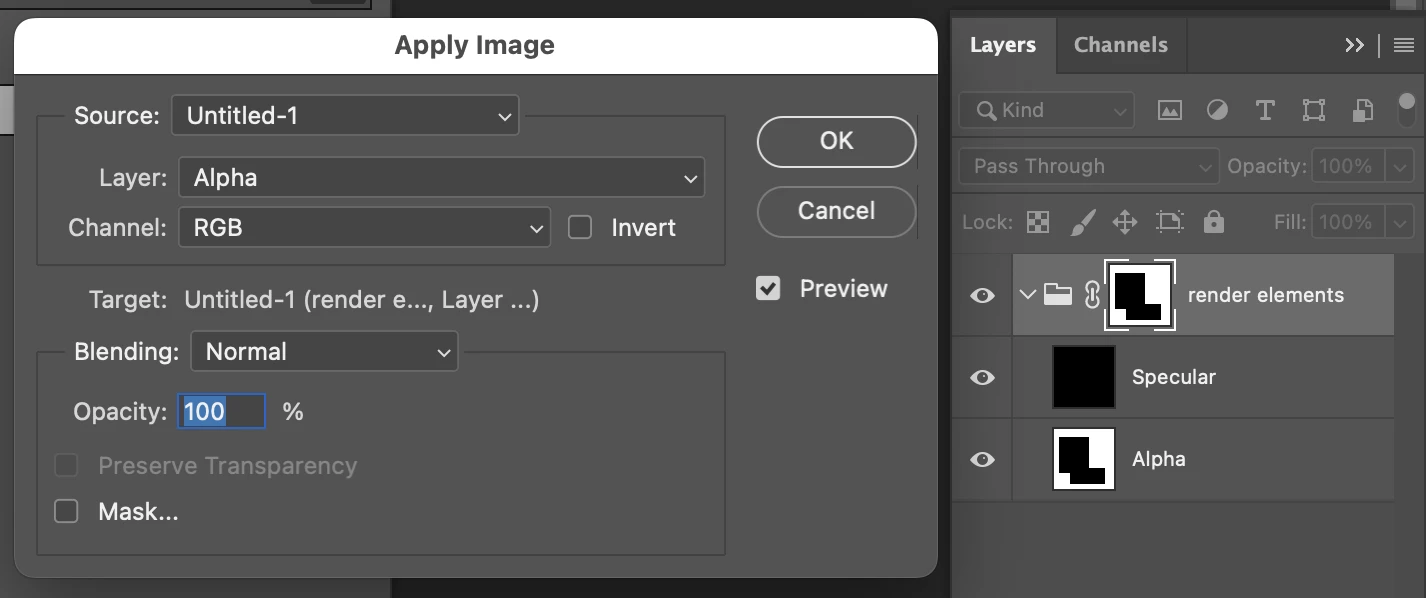
Presuming ExtendScript over UXP, target the destination layer group mask, then:
applyImageEvent("Alpha"); // string for the source layer name

function applyImageEvent(layerName) {
	var s2t = function (s) {
		return app.stringIDToTypeID(s);
	};
	var descriptor = new ActionDescriptor();
	var descriptor2 = new ActionDescriptor();
	var reference = new ActionReference();
	reference.putEnumerated( s2t( "channel" ), s2t( "channel" ), s2t( "RGB" ));
	reference.putName( s2t( "layer" ), layerName ); // source layer name
	descriptor2.putReference( s2t( "to" ), reference );
	descriptor2.putBoolean(s2t("preserveTransparency"), true );
	descriptor.putObject( s2t( "with" ), s2t( "calculation" ), descriptor2 );
	executeAction( s2t( "applyImageEvent" ), descriptor, DialogModes.NO );
}
If there are multiple layer names called "Alpha" then this will use the first layer name found, which may or may not be problematic.
P.S. If you do need to use copy/paste, ensure that you are targeting the correct destination and you may also need to enable and disable channel visibility.
Otherwise, you can load the composite/component RGB channel as a selection and create a new layer mask on the group using that selection.



 AdChoices