I just updated PS, and now my Actions just seem to be a click and done, and I can’t open the Action to see the individual steps. I need to be able to do that since sometimes I like to start mid way or only do a portion of an Action… There has to be a setting to change, right??
Correct answer Conrad_C
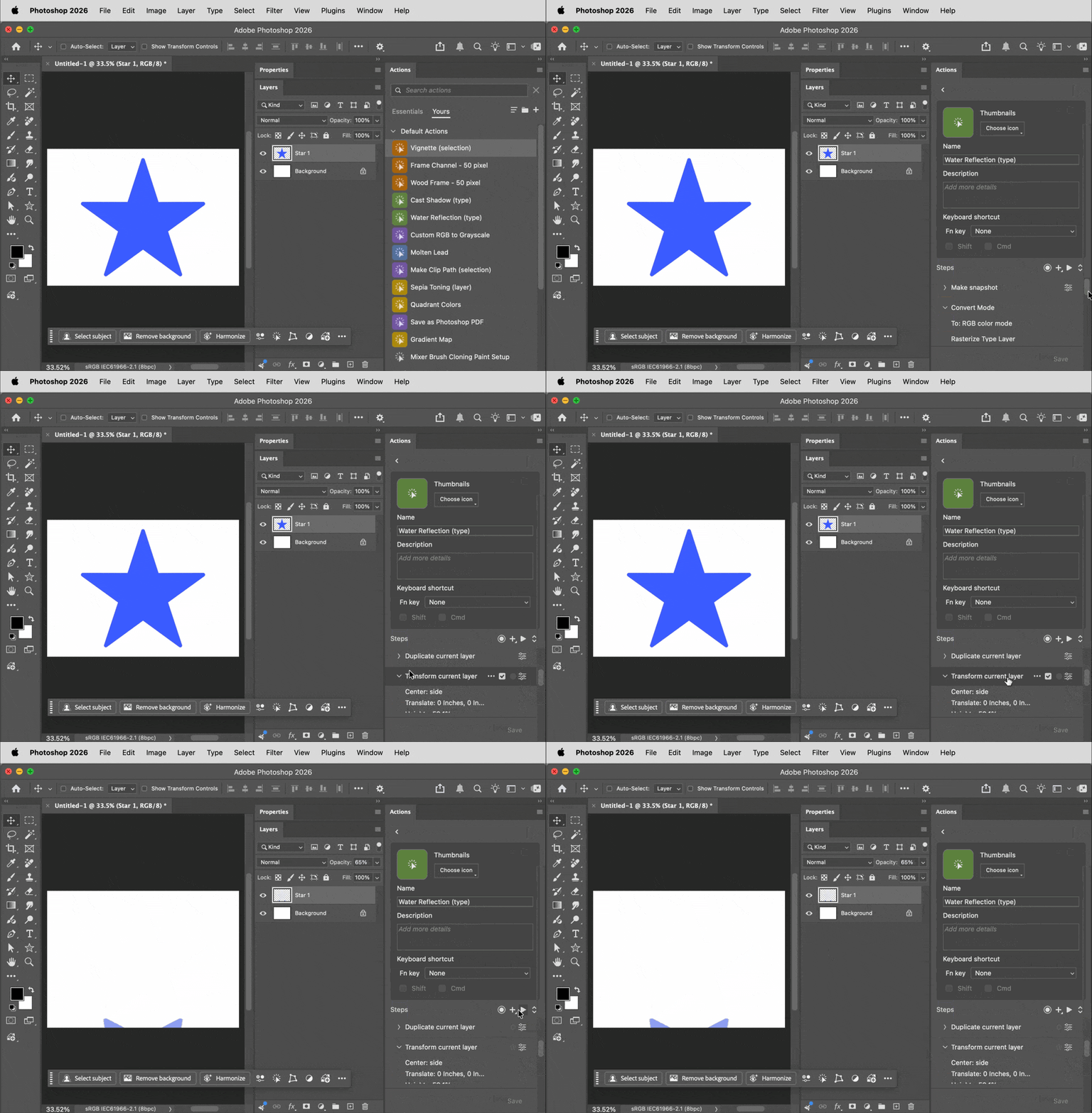
I played with this a little more, and I now think the feature request is already taken care of in the current version, as shown in the demo below. What you see me do is:
Click the action’s gear icon to go into Edit Action mode.
Scroll down to the step in the list where you want to start playing the action, and click that step to select it; it will now be highlighted. I selected the “Transform current layer” step.
Click the Play button (the right-facing triangle) that you see at the top of the Steps list. The action starts playing from the step you selected, similarly to how it works in Classic mode.
This action has a Duplicate Current Layer step, so normally the Star 1 layer would have been duplicated. But that didn't happen here, there are still just two layers: Star 1 and Background. The Duplicate Current Layer step was skipped, as well as all action steps before that one, because I chose to start playing the action from the “Transform current layer” step in the middle of the action.
Thanks for your help. I know that classic mode fixes the problem. The point is, though, why does Adobe constantly change things that don't need to be changed?
Thanks for your help. I know that classic mode fixes the problem. The point is, though, why does Adobe constantly change things that don't need to be changed?
Ah, well, I can’t talk for Adobe. That’s your personal opinion, which you are entitled to. Adobe, as the developers of the software, obviously have a different opinion.
Personally, I don’t believe that actions have evolved enough since they were initially introduced!Contextual actions were a start point and there have been some other smaller changes since then.
I’m glad that something other than a new “AI” bell and whistle has been added.
Had something similar happen before - usually it’s the action recording getting slightly corrupted or out of sync. Try recreating the action from scratch and see if it behaves normally. Also check if any steps depend on specific layer names or selections, because that can break easily. Resetting preferences can help too if things started acting weird all of a sudden.
Adobe, why? First, you changed the gradient tool, and now only the classic gradient tool is usable (for applying multiple gradients sequentially). And now it's the actions' turn. Directly clicking on the actions triggers them immediately. What?! And yet another tool in Photoshop that has to be switched to classic mode. Any suggestions?




 AdChoices