
Participant
July 22, 2021
Answered

PSB layers saving problem with actions updating them

  • July 22, 2021
  • 1 reply
  • 467 views

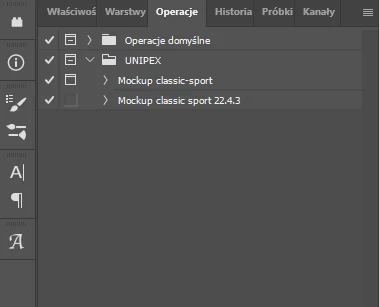
I use my action to open .psb layer in my file to update it (for mockup) and save it. Click another one, enter, update, and save, close, etc. Now in version 22.4.3 it asks me if I want to save .psb as a file on my computer or in a cloud. My action is now useless. Why can it not save in a file by action? When I open .psb layer and update it by myself and click Ctrl+S to save it, it saves normally. It doesn't ask me about saving it on computer or in a cloud. Why? 
This topic has been closed for replies.
Correct answer Geratius

Actually I found solution for my problem. I toggled off the dialog windows next to the name of the action. Now everything is ok. PSB - I meant Smart Objects but outside the file. External one. And Photoshop asked me if I want to save it on computer or in a cloud. Now it's not asking. The actions was to edit the container and "OK", which means "Save". You can close this thread.

1 reply

c.pfaffenbichler
Community Expert
Community Expert
July 22, 2021

Please read this (in particular the section titled "Supply pertinent information for more timely and effective answers”):

Community How-To Guide - Tips & Best Practices


Please post meaningful screenshots including all pertinent Panels (including the fully expanded Action in the Actions Panel) to illustrate your process. 

Assuming you mean Smart Objects where are they stored exactly when you open them? 

GeratiusAuthorCorrect answer
Participant
July 22, 2021

Actually I found solution for my problem. I toggled off the dialog windows next to the name of the action. Now everything is ok. PSB - I meant Smart Objects but outside the file. External one. And Photoshop asked me if I want to save it on computer or in a cloud. Now it's not asking. The actions was to edit the container and "OK", which means "Save". You can close this thread.