Participant
Mar 29, 2017 6:39 AM UTC
Answered

Punctuation moves to beginning of line of text

When I'm typing a line of text, if I have punctuation at the end of the line it moves it to the beginning of the line. I'm using CS6.

This topic is closed to new replies. Start a new post to keep the conversation going.
angus_3355Correct answer
Participant
Sep 25, 2026 9:51 AM UTC

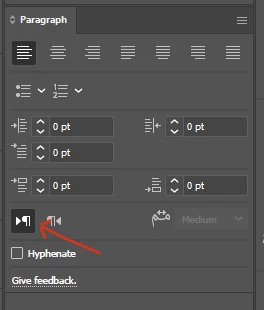
Windows > type > paragraph > left-to-right paragraph direction.


45 replies

the wussies
Participant
Apr 6, 2020 11:16 PM UTC

HELLO!
for illustrator and  photoshop 

it's the Paragraph Direction setting

it is in the paragraph window

there are 2 buttons to choose from  >Ph   Ph<

this will move your punctuation and numbering to the correct spot!


Translate
Suchi -_-
Participant
Aug 18, 2020 12:11 PM UTC

dude your a legend.  The only one with the answer but going by the feed everyone else ignored you to their detriment.


Translate
victoriam10576645
Participant
Apr 6, 2020 10:59 AM UTC

Hi there, 


I just downloaded the latest version of Adobe Photoshop CC and am having this same issue with the punctuation appearing at the beginning of words instead of at the end. I've tried to change all the Type preferences and nothing seems to be working 😞 Does anyone have any insight into what else I might be able to try? 


Thank you!

Translate
c.pfaffenbichler
Community Expert
Community Expert
Apr 6, 2020 11:13 AM UTC

»I've tried to change all the Type preferences and nothing seems to be working«

You could try to actually describe the specifics and post meaningful screenshots including the pertinent Panels and dialogs. 

Translate
Participant
Oct 8, 2021 8:23 PM UTC

Wow, you just come across as extremely smug in your messages.  You seem like you need a hug or maybe a hobby outside of trying to feel superior over people looking for help online.

Translate
kristellef69549574
Participant
Jan 15, 2019 10:09 PM UTC

I had this same problem. What worked was to change it to the type tool. For some reason, Illustrator automatically sets it to the right-to-left type tool. The shortcut is also linked to the right-to-left type tool as you can see in the photo. Make sure that when you type, it is set to the type tool, not the right-to-left tool. You also might want to set the shortcut to the type tool if you use shortcuts. Hope this helps!

Translate
Participant
Sep 17, 2019 1:36 PM UTC
c_pfaffenbichler why be so nasty, just don't comment if you have to comment with a snarky reply #behappy #getwellsoon
Translate
c.pfaffenbichler
Community Expert
Community Expert
Mar 29, 2017 7:19 AM UTC

Did you do a Forum search before posting?

Punctuation goes back to the beginning of the sentence

Translate
Participant
Mar 29, 2017 7:27 AM UTC

I tried to but somehow this result wasn't showing up for me--I don't know why. That fixed it, thanks!

Translate
Participating Frequently
Feb 16, 2022 10:21 PM UTC

It didn't work for me right away as well, but it worked once I changed it not through Preferences, but through Paragraph window


Make sure it is a window, not a widget in the panel / Go into the top corner meny (three lines icon) / Choose Single-line Composer.


Hope this helps!

Translate