Robotfist
Known Participant
March 15, 2022
Question

Puppet Warp is Cropping Parts of Layer

  • March 15, 2022
  • 12 replies
  • 1760 views

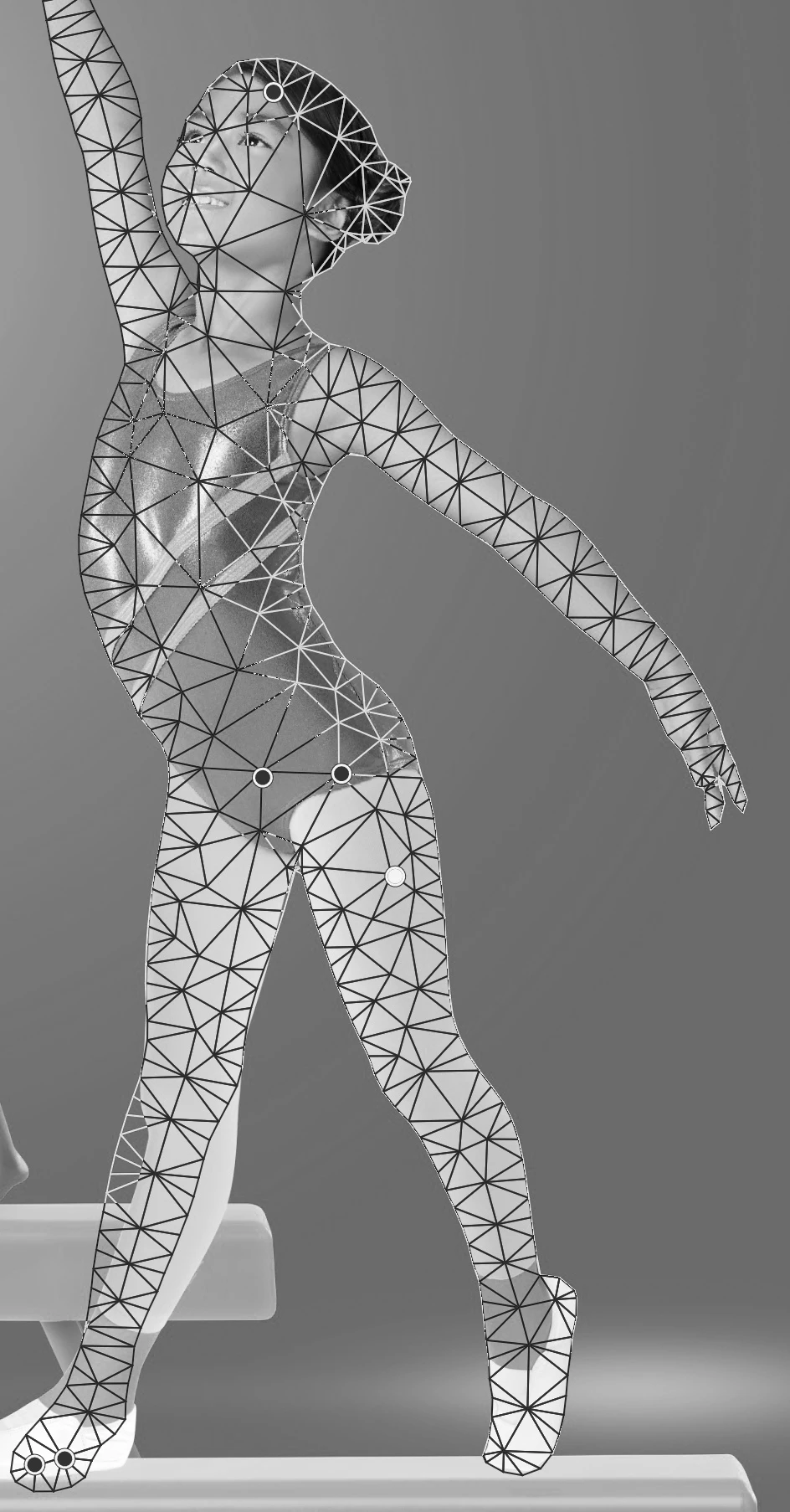
I am currrently trying to use the puppet warp tool to reposition a subject's arm and leg. Once I apply the puppet warp to the layer, it cuts off the subject's fingers and foot. I believe I am using the tool correctly. I made the layer a smart layer and applied about 6 pins. My image resolution is 24x32 at 300 dpi. Any ideas why this is happening? 

I've attached a portion of my image so you can see what's going on...
 

This topic has been closed for replies.

12 replies

Participant
November 26, 2024

Did you get an answer? It happens to me too!

Participating Frequently
March 16, 2022

That is correct. First adjust the expansion and then you can start the warping.

jane-e
Community Expert
Community Expert
March 16, 2022

"...it distorted the pose in the process"

By @Robotfist


Use more than six pins to "lock down" the parts you don't want to move.


At this point you might need to delete the current six points and start again. I think the default expansion is 2 pixels.


Jane


Robotfist
RobotfistAuthor
Known Participant
March 16, 2022

You can probably solve this by increasing the "Expansion" setting in the toolbar.

Ok, this did something. Expansion did seem to restore the tips of the fingers, but it distorted the pose in the process. I'm guessing this should be applied before posing?

Robotfist
RobotfistAuthor
Known Participant
March 16, 2022

Can I ask why is the image in Puppet Warp B&W while the other is in color?

It is in black and white because I wanted to modify it a bit from the original before it was posted. I am under an NDA and should not be posting content from my company.

Robotfist
RobotfistAuthor
Known Participant
March 16, 2022

Hi there. Unfortunately, I cannot share the whole project because there are certain parts of it (not seen here) that cannot be released to the public. My company does not allow assets to be posted at this stage. I might be able to release a modified version of the project though. I will have to ask.

Participating Frequently
March 16, 2022

You can probably solve this by increasing the "Expansion" setting in the toolbar.

jane-e
Community Expert
Community Expert
March 15, 2022


Can I ask why is the image in Puppet Warp B&W while the other is in color? Are these on two layers with a clipping mask? If so, can we see the Layers panel?


Also, personally I would use more than six pins to "lock down" the parts I don't want to move.


You made a SO. If you click the eyeball to hide the Puppet Warp, how do the fingers look?


Jane


Legend
March 15, 2022

Can you share the PSD where this is happening? Use dropbox or CC files to share a download link.

Ged_Traynor
Community Expert
Community Expert
March 15, 2022

I just tested it with Photoshop version 23.2.2 on Windows 10 and I'm not seeing the issue