
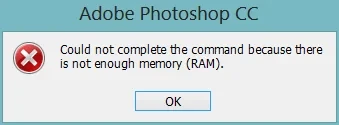
RAM Overload and out of memory (RAM) errors
My Workflow:
I work in the shoe sales industry. I use a 1000x1500px PSD file to scale down and position product photos. I then retouch them using Generative Fill, the Remove Tool, and other features. After that a create a copy backup file with all the photos of certain product, delete all the layers and continue with the next one. The source files I import are large (4480x6720px).
The Issue:
In previous versions of Photoshop (Pre v27), I had no RAM issues and could process a batch of 200 photos without stopping. However, with the new 2026 version (v27), my memory usage hits 90% after doing small batch of about 20-40 photos. Currently, the only solution is to close and restart Photoshop to clear the cache, I can also confirm using v26.7 version of Photoshop (2025) fixes the RAM problem.
Troubleshooting attempted so far:
Changed scratch disks
Adjusted max memory usage in Photoshop settings
Reset preferences
Used Edit -> Purge -> Purge All (this had no effect)
My Specs:
CPU: Ryzen 7 5800X3D
MOBO: MSI MAG B550 Tomahawk
GPU: MSI GeForce RTX 3090 SUPRIM X 24GB GDDR6X
RAM: G-SKILL RipjawsV 64GB 3200MHz CL16


 AdChoices