
Participant
January 13, 2023
Answered

Random Bugs CC 2023

  • January 13, 2023
  • 3 replies
  • 444 views

Hello,

I have recently been running into random problems with Photoshop 2023, especially with the letter 'T' on my keyboards and Undo command.


Most of the time when I use T to go to the Text tool or Ctrl-T the shortcuts work as expected, but sometimes I have to hold the T key while using that tool. Disabling Spring-loaded Tools stopped this, but it was weird it was only this key. T does not stick when typing or in other programs.


More importantly, my Undo shortcut (ctrl-Z) mostly works until it reverts my document back to when I first opened it! Using Shift-Ctrl-Z then redoes the first redo of my history, but I can only redo the first time. I am losing a lot of progress because this is randomly happening. Please help!


Travis
This topic has been closed for replies.
Correct answer Kevin Stohlmeyer

The undo issue has been noted and confirmed here:

https://community.adobe.com/t5/photoshop-ecosystem-bugs/p-undo-history-is-not-functioning-as-it-should-photoshop-v24-1/idi-p/13427210

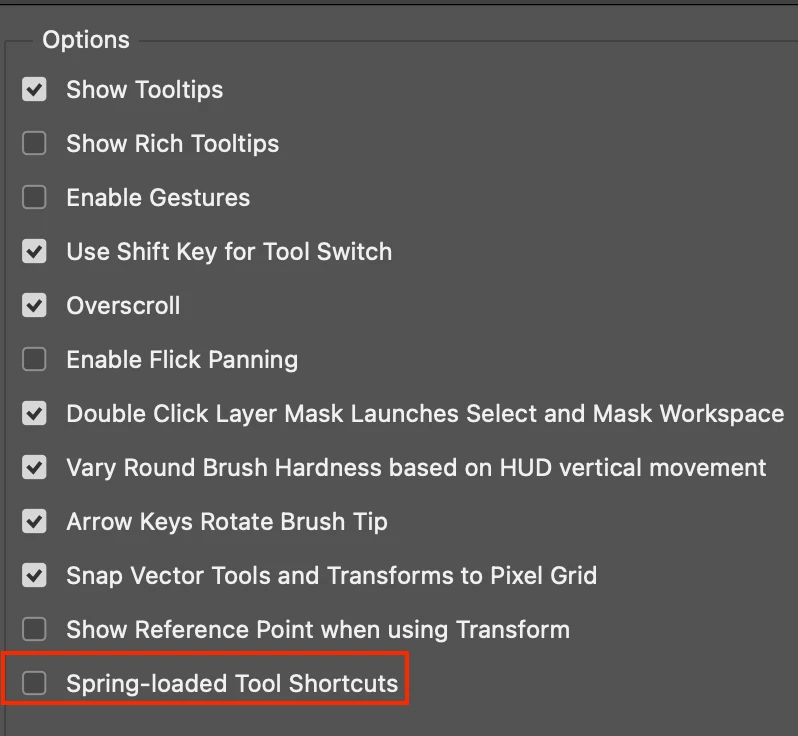
The type tool shortcut could be managed under Preferences/Tools/and unchecking Spring Loaded Tool Shortcuts.


3 replies

Participant
January 13, 2023

Awesome, thank you for the responses! I had never had Spring-Loaded Tools enabled before, so when it started happeneing I didn't know what to do; but yes, unchecking the box did stop it and resolve that problem. For transparency of reporting, though, I mainly wanted to inform that it was weird only one key was affected by that issue. Even when the s-l tools box was checked at 200ms other shortcuts like G or B worked just fine, and so did the key T most of the time (on 2 different PCs and 3 different keyboards, one new).

Thank you so much for the info about the undo behavior. Looking forward to the fix!!!


Travis

Kevin Stohlmeyer
Community Expert
Community Expert
January 13, 2023

Its a new feature.

Kevin Stohlmeyer
Community Expert
Kevin StohlmeyerCommunity ExpertCorrect answer
Community Expert
January 13, 2023

The undo issue has been noted and confirmed here:

https://community.adobe.com/t5/photoshop-ecosystem-bugs/p-undo-history-is-not-functioning-as-it-should-photoshop-v24-1/idi-p/13427210

The type tool shortcut could be managed under Preferences/Tools/and unchecking Spring Loaded Tool Shortcuts.


CShubert
Community Manager
Community Manager
January 13, 2023

Hi @Travis5D04 


Curious if you have tried changing the springboard keyboard shortcuts time? By default it is set to 200ms which is what it has been for years so if that doesn't work for your workflow, increase the timing or uncheck that option so that spring-loaded keyboard shortcuts are disabled if that fits your workflow.


Thank you,

Cory