
Participant
November 7, 2010
Question

Randomly losing pressure sensitivity in photoshop?

  • November 7, 2010
  • 11 replies
  • 38573 views

My tablet keeps randomly losing pressure sensitivity, like this:
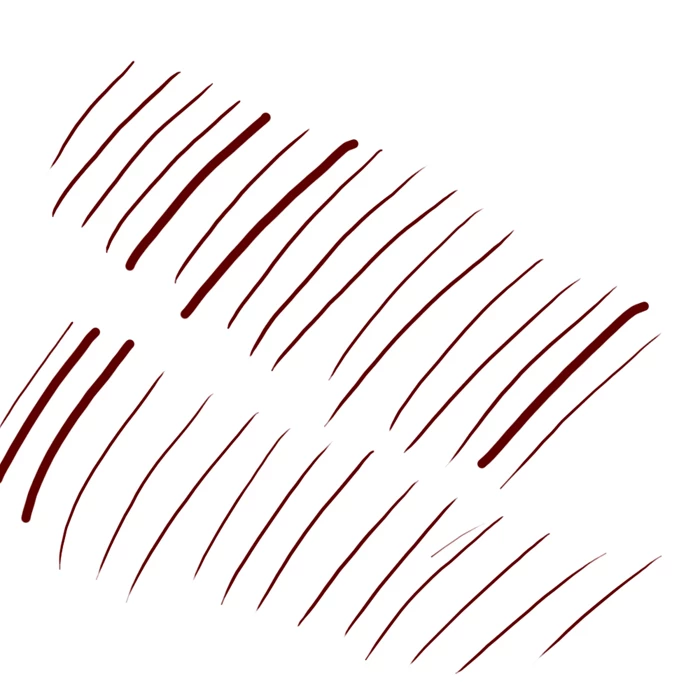
Every few strokes it throws in one or a few strokes without pressure sensitivity. There seems to be no pattern to this.

The weird thing is that this seems to only be happening in Photoshop - I tried Paint Tool SAI and everything seems to be working fine there.

I use a Wacom Intuos3, Photoshop CS4 and Windows XP. My tablet is five years old and quite beat up, so its entirely possible that this is my tablet's fault, although I find it hard to believe, since it's never glitched on me like this.

Things I've tried and haven't helped:

Re-installing my tablet driver, changed nothing

Changing my tablet pen's nib, nothing changed

Downloading and using the trial version of PS CS5, same problem persisted.

Has anyone had a similar problem? What can I do to fix this?

    This topic has been closed for replies.

    11 replies

    November 7, 2010

    You said that you reinstalled the tablet drivers. Are they the most current ones from wacom? (didn't specify, so i am asking)

    Latest video card drivers (new ones for nov, nvidia) 2 of the 6 drivers that came out in the last 6 months had problems working with PS with some systems. The oct/nov drivers worke great though.

    With your speakers are on, does it sound as though the tablet is disconnecting then reconnecting?

    The sound your pc would make if you remove and plug back in a usb. though there should be some lag in the brush strokes as it finds the new drivers.

    Did this start after a recent update to PS? If not, i assume that your PS is updated.

    Are you using more cpu/ram than normal. Open your task manager and see. Also with internet browser closed, are you using internet? It could be malware.

    I am jsut wondering if a fresh install of windows would fix the problem. That is often easier then trying to find a software problem. Though like you said, it could be hardware.

    Though they are most likley not the problems, it may give you an idea on where to look for the problem.

    Participating Frequently
    June 9, 2019

    I like how everyone always point the issue to other programs and drivers, when the issue is clearly Photoshops outdated calibration method. No other programs have issues like this except for Adobe programs. Trust me, I’ve tried them all... well most of them.

    So so if anyone is having issues with stroke calibration, pen pressure, lagging strokes, and other functions... don’t discount the program. It has been this way for years, so I don’t believe Adobe‘s engineers recognize the need to make changes. Your experience also varies based on whether you use Windows, or Mac. Some stylus drivers on the OS also override some features.

    I think it’s also also surprising how very few people complain about these issues. They can be quite destructive to your workflow.

    Participant
    January 12, 2022

    Here we are in 2022, and it continues... I've sent requests regarding this (and other) issues many times, but I'm only one person. Just wanted to mention that I agree with your comment!