

Rasterize Layer
Why [Alt+Shift+Ctrl+T] to Rasterize Layer concurrently generating multiple images & layers but if layer is not rasterize that will not do so?
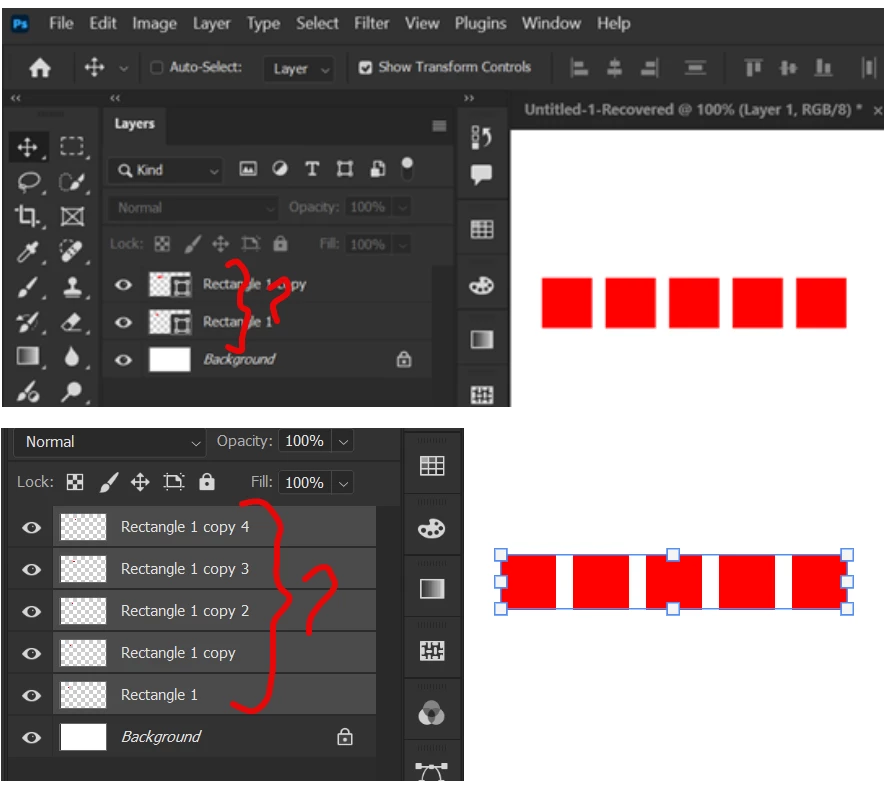

Hi @MahaB82A! Thank you for reaching out I'll try to explain what's going on. Photoshop treats Shapes and Pixels differently. When you use the "Step and Repeat" shortcut on a Shape layer, Photoshop keeps all the new copies inside that same layer to keep the file organized as a single vector object. However, Rasterized layers (pixels) don't have this "grouping" ability, so Photoshop is forced to create a brand-new layer for every copy it generates. If you want separate layers without losing quality, simply Convert to Smart Object before using the shortcut.
Hope this helps!
Already have an account? Login
No account yet? Create an account
Enter your E-mail address. We'll send you an e-mail with instructions to reset your password.
