First of all, your original image (6353 x 4240) has an aspect ratio of 1.5, and if you're resizing it to 1400 x 1050 (aspect ratio 1.33), you will be distorting the image, unless you cropped it first to a 1.33 aspect ratio.
For good sharpness, I suggest this workflow:
With the raw file open in Camera Raw, make sure that it has received proper sharpening in the Detail tab. The sharpening you do here is called Capture sharpening, and is meant to compensate for softness in the digital capture. Always apply sharpening at 1:1, any other view will be inaccurate and misleading because of image scaling.
The image should look sharp, but not too sharp. Too much sharpening looks worse than too little, so if in doubt, sharpen less.
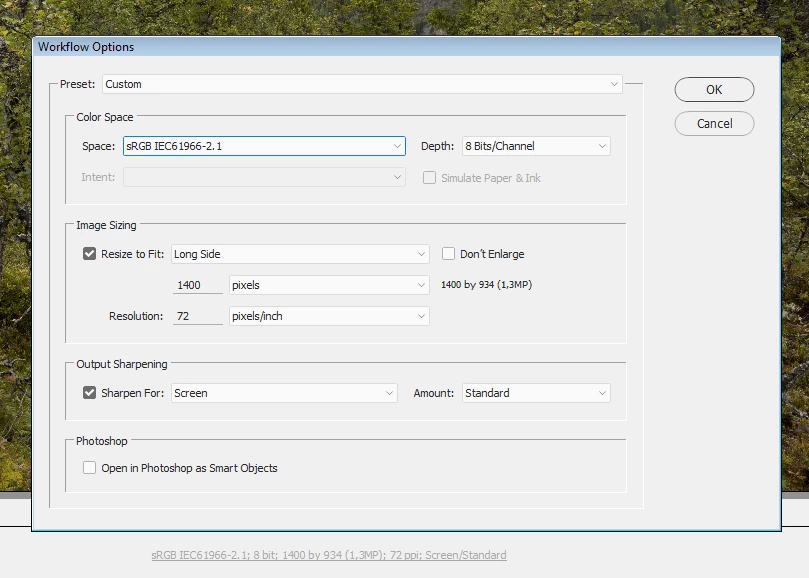
Now click the workflow options (underlined text) at the bottom of the screen.
This allows you to resize the image, to apply output sharpening (which is designed to compensate for the sharpness loss cause by resizing), and to choose a color profile. Try the settings in the screenshot below. Note that the resized image will be 1400 x 934.
When the image opens in Photoshop, save it as a jpg.

 AdChoices