
Inspiring
July 8, 2016
Answered

Reading text file and appending to start

  • July 8, 2016
  • 3 replies
  • 562 views

var file = File(myFilePath);

file.open("a", "TEXT");

//alert("file opened! it is: \n" + file);

while (!file.eof){ // Loop doesn't trigger here

    var line = file.readln();

    alert("line is:\n" + line);

}

file.close();

myFilePath is a string containing a file path to a text file on my disk.

Two questions here:
1) Why doesn't the while loop trigger? Is the position eof by default when opening up a file for append? ("a")
2) How do I open up a file for append-to-start ("a+")

The case is this:
I have an already existing file with some object properties. I want to open up said file and add additional properties to the top/start of it.
This topic has been closed for replies.
Correct answer JJMack

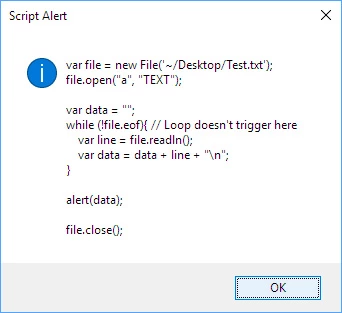
Does this script alert help?

What new eyes can do but mine are 75 years old with new lens though new is good.

3 replies

July 8, 2016

1) Why doesn't the while loop trigger? Is the position eof by default when opening up a file for append? ("a")

2) How do I open up a file for append-to-start ("a+")

1) From https://www.adobe.com/content/dam/Adobe/en/devnet/scripting/pdfs/javascript_tools_guide.pdf :

fileObj.open (mode[,type][,creator])

mode: A string indicating the read/write mode. One of:

- r: (read) Opens for reading. If the file does not exist or cannot be found, the call fails.

- w: (write) Opens a file for writing. If the file exists, its contents are destroyed. If the file does not exist, creates a new, empty file.

- e: (edit) Opens an existing file for reading and writing.

- a: (append) Opens the file in Append mode, and moves the current position to the end of the file.

2) Use the edit mode instead: "e"

var file = File (myFilePath);

if (file.open ("e"))

{

    var position = file.tell ();

    var contents = file.read ();

    file.seek (position);

    file.writeln ("Inserted Text");

    file.write (contents);

    file.close ();

}

Please note that right after opening the file in edit mode, the current position is not necessarily 0, since the text may be preceded by an invisible BOM (Byte-Order-Mark). In the case of UTF-8 encoding, for instance, 3 extra bytes (0xEF, 0xBB, 0xBF) may need to be skipped.

HTH,

--Mikaeru

Participant
July 8, 2016

1) Please check your filename encoding in myFilePath. To check your myFilePath add a  "file.exists" before you open the file.

    When this does not open the filename encoding is not correct when you are sure the file exists

2) append at the start is not supported by the native file I/O. Append is always at the end the file.

   therefore you the best you can do is: 

    - read the entire existing file into memory

    - create a new tempfile

    - write the new info into the tempfile

   - append the existing data from memory into the tempfile

   - delete the old "myFilePath" file

   - rename the tempfile to myFilePath

JJMack
Community Expert
JJMackCommunity ExpertCorrect answer
Community Expert
July 8, 2016

Does this script alert help?

What new eyes can do but mine are 75 years old with new lens though new is good.

JJMack