
b5photo
Participant
November 14, 2017
Answered

Receiving message The command "Make" is not currently available

  • November 14, 2017
  • 6 replies
  • 31594 views

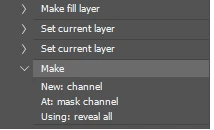
I have a variety of actions that use Make -> New: channel At: mask channel Using: reveal all

I am receiving an error message stating The command "Make" is not currently available.  I have a new laptop using Windows 10.  I was previously on Windows 7.  I upgraded to the latest version of Photoshop CC(Release 19.0) however reverting back to previous available versions has made no difference.  I had no issue prior to upgrading my laptop.  I appreciate any help that you can provide.

Thanks
    Correct answer b5photo

    I figured out the issue.  Inside Layers Palette -> Panel Options, I had to un-check Use Default Masks on Fill Layers.  In Adjustments Palette the Add Mask by Default needs to be checked. 

    Thanks

    6 replies

    Participant
    May 16, 2023

    I did the following and it fixed this problem:  I RESET ALL LOCKED SETTINGS in the Brush Settings panel, and I did the following:  Inside Layers Palette -> Panel Options, I had to un-check Use Default Masks on Fill Layers.  In Adjustments Palette the Add Mask by Default needs to be checked. Once I did all of these the process worked without errors.  The resulting image is in watercolor but looks odd, but I believe I will change that now by making changes to the design in the layers panel as the Adobe tutorial suggests.  

    Participant
    May 16, 2023

    Also fill in the focus area, do not just draw a line around it.

    JadedJester
    Participant
    January 27, 2022

    I had this issue today, and I found out it was because I'd accidentally put my document in Quick Mask Mode in the toolbar (square icon with circle inside it). Once i switched to Standard mode, actions worked again.

    Participant
    November 7, 2020

    That did not solve the problem for me unfortunately. Still getting the message "Make is not currently available".


    Participant
    December 13, 2021

    same - what is a step by step for enabling whatever the new "make" command is.

    JJMack
    Community Expert
    Community Expert
    December 13, 2021

    When the error message is being displayed on your screen. Look at the highlighted Step in the action in the action palette  that is not available expand the step's visibility so you cans see all the steps settings.  Then look at the state of the open document the step is failing on.  What does the step depend on that is not currently available.   What dependency is missing in the document.  Actions have dependencies if they are not meet Action steps will fail to work correctly or may not be available for use something required for the steps execution is missing or wrong. A prior step may not had done something it should  have done like fail to select some pixels or it did somthing that interfeared with the folloing steps execution,

    JJMack
    JJMack
    Community Expert
    Community Expert
    November 15, 2017

    I ask a very simple question. When that action failed with that error message.  Did the document active layer have a Layer mask..  If the document active layer had a layer mask the action could nor add a reveal all layer mask to the layer for the layer had a layer mask. That would cause the error.  The Action can run on document the layer have nor layer mask.  However if the current target layer has a layer mask when you play the action it will fail.

    Action steps may have dependencies.  It is very difficult to craft an action the will always play correctly on every document.  A document in CMYK mode can cause an action created for RGB mode documents to fail.   You may have use the action on thousands of documents.  That is no guarantee that the action will work on all documents.  Conditions can cause Action to fail. An  active selection may cause and action to fail.  A RAW file opened as a smart object layer will cause an action that select the background layer to fail for there is no background layer.  Most actions have dependencies.

    I have seen many poor action over the years.   I do not believe that I have ever downloaded an action that I did not edit to make it work better in my workflow.   I would never buy an action they are just a sequence id Photoshop steps.   I only download action to see how other user Photoshop.  Reading other actions can be very educational.

    Crafting Actions Package  UPDATED Aug 10, 2014 Added Conditional Action steps to Action Palette Tips.

    Contains

    Download

    JJMack
    b5photo
    b5photoAuthorCorrect answer
    Participant
    November 15, 2017

    I figured out the issue.  Inside Layers Palette -> Panel Options, I had to un-check Use Default Masks on Fill Layers.  In Adjustments Palette the Add Mask by Default needs to be checked. 

    Thanks

    JJMack
    Community Expert
    Community Expert
    November 15, 2017

    Yes Adobe added some bug in CS4 when they added the Adjustment Panel.  Its fly-out menu Item can brake actions if you change some items from Adobe's default settings. Actions that add Adjustment layers will likely fail one way or another.   I Asked many at Adobe to fix this bug by removing the to bad options from the fly-out menu they act more like Photoshop Preferences. The Problem is Actions and Scripts can not change then or even find out how they are set.   The option may change the way Photoshop behaves where steps will not play the way they were recorded.  However Photoshop does not always work the way the menu Item are set. So if you  have a broken action you can edit it and force it to work.   If there is a selection a layer mask will be addled when the menu item is set not to add a layer mask and  the Adjustment  layer will be clipped if when your record the step using the layer menu and add the clip option in its the pop-up dialog.   I do not know why Adobe chooses not to fix some reported and acknowledge bugs.  I gave up year ago fighting with Adobe I work around the bugs Adobe does not fix.

    JJMack
    JJMack
    Community Expert
    Community Expert
    November 14, 2017

    When you get this message does the current layer in the document have a layer mask? If it does the message is correct for the layer has a layer mask.  You can not create an additional raster reveal all layer make on a layer that has a mask.  Actions have dependences when these are not meet actions fail.  Command not available is a common error message one gets when a command requirement is missing.

    This is a proper error message in the following example.

    JJMack
    b5photo
    b5photoAuthor
    Participant
    November 14, 2017

    These are a set of actions that I purchased over 3 years ago and have used thousands of times(many other users would have the same actions set).  They have never thrown an error so I am not following how this is now all of the sudden an issue.  The only thing that has changed is the device that I am using, the operating system and the version of Photoshop. I don't have a great working knowledge of building actions at this level so I guess at this point I am looking for advice on how I could change the action set in order to correct and not affect the overall functionality of what the action was trying to accomplish.  Thanks

    Chuck Uebele
    Community Expert
    Community Expert
    November 14, 2017

    Have you tried re-recording that step? I got PS to give me that error if the layer already had a layer mask.