dawnsing
Participating Frequently
June 30, 2025
Answered

Recently updated iOS and now print settings have changed and my colors are not printing accurately.

  • June 30, 2025
  • 2 replies
  • 292 views

I recently updated my MAC operating system and now the printer options have changed.  I want to select "printer manages colors" as well as my preferred printer profile for the paper I use.  However, the printer profile drop down menu is grayed out unless I choose "photoshop manages colors", which I don't want.  Is there a way to select "Printer manages colors" AND my preferred printer profile for my specific paper?  Thank you for any help!!

Correct answer D Fosse

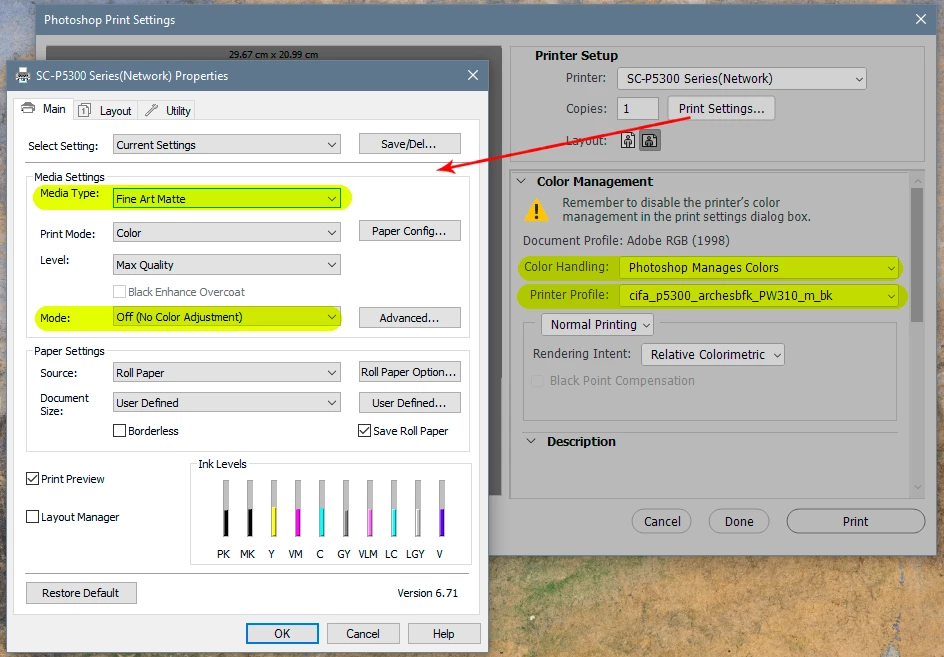
Icc profiles don't apply if "printer manages color". Then it's all done under the covers in the printer driver. You send it standard RGB (sRGB, Adobe RGB etc) and it converts internally.


You do need to choose media type (paper type) in the printer driver, but that's all you can do. Check in the documentation for the paper what this should be set to. Note again - this is not icc profiles, just a paper manufacturer recommended setting for media type.


To use icc profiles you need to let Photoshop manage color. Then you need to turn off all color management in the printer driver.


2 replies

D Fosse
Community Expert
D FosseCommunity ExpertCorrect answer
Community Expert
June 30, 2025

Icc profiles don't apply if "printer manages color". Then it's all done under the covers in the printer driver. You send it standard RGB (sRGB, Adobe RGB etc) and it converts internally.


You do need to choose media type (paper type) in the printer driver, but that's all you can do. Check in the documentation for the paper what this should be set to. Note again - this is not icc profiles, just a paper manufacturer recommended setting for media type.


To use icc profiles you need to let Photoshop manage color. Then you need to turn off all color management in the printer driver.


dawnsing
dawnsingAuthor
Participating Frequently
June 30, 2025

Thank you for the info, however I don't want Photoshop to manage the colors.  When I do, they're wayyyyyyy off!  Much worse than the issue I'm trying to resolve by using Printer Manages Colors.  Before I updated my operating system, I was able to select Printer Manages Colors, along with the specific printer profile for the paper I use.  I'm using a fine art printer to create fine art prints, so I need the colors to be as close as I can to the original art. I was able to do this before the iOS update.

D Fosse
Community Expert
Community Expert
June 30, 2025

No, it has never worked that way. You cannot use icc profiles with "printer manages color" and you never could (except of course that the document itself has an embedded icc profile).


The only variable with "printer manages color" is the media type setting in the printer driver.


And all that said, if you're not getting an accurate result with "Photoshop manages color", then one of the marked settings in my screenshot above is incorrect (or possibly that the file is untagged and doesn't have a document profile at all, which it needs to have).

dawnsing
dawnsingAuthor
Participating Frequently
June 30, 2025

The ICC Profiles are what I'm not able to choose unless I select "Photoshop manages color".  


I've downloaded the most current printer driver from Canon and have deleted and reinstalled my printer.  I've also closed Photoshop and restarted it.