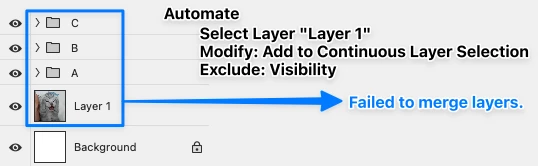
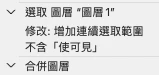
Why is it that when I record an action, I hold Shift and click C, B, A, and Layer 1 to merge the layers into D, but when I run the action, it always gets stuck with an error at Layer 1?
When I record it again, it puts my layer order into a group. What operations should I avoid?
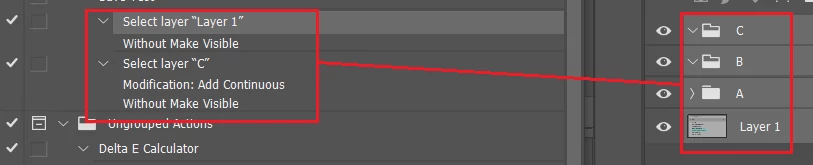
Actions record explicitly when using the cursor with absolute values, such as layer names:
Where as keyboard shortcuts for layer navigation when recording actions are relative and often safer on different files that don’t match layer names. You would need to add the Shift key modifier to the following keycuts for "continuous".
Select/target front (top) layer = Option/Alt+.
Select/target next layer up = Option/Alt + ] Select/target next layer down = Option/Alt + [ Select/target back (bottom) layer = Option/Alt + ,
Move current target layer to front (top) layer = Command/Control + Shift + ] Move current target layer up = Command/Control + ] Move current target layer down = Command/Control + [ Move current target layer to back (bottom) layer = Command/Control + Shift + [
Sorry, I must have overlooked the second screenshot …
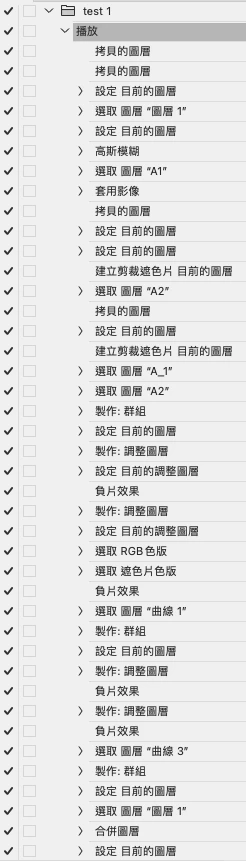
In the Action you seem to select layers with names like »A_1« and »A2« – those appear to be missing in the layered file, so the Action failing would seem expected.
Actions record explicitly when using the cursor with absolute values, such as layer names:
Where as keyboard shortcuts for layer navigation when recording actions are relative and often safer on different files that don’t match layer names. You would need to add the Shift key modifier to the following keycuts for "continuous".
Select/target front (top) layer = Option/Alt+.
Select/target next layer up = Option/Alt + ] Select/target next layer down = Option/Alt + [ Select/target back (bottom) layer = Option/Alt + ,
Move current target layer to front (top) layer = Command/Control + Shift + ] Move current target layer up = Command/Control + ] Move current target layer down = Command/Control + [ Move current target layer to back (bottom) layer = Command/Control + Shift + [




 AdChoices