
Participant
May 12, 2018
Answered

Rectangle tool

  • May 12, 2018
  • 5 replies
  • 861 views

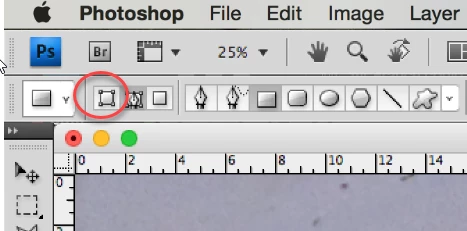
Help!  I'm a novice but have used this tool many times.  However today, the Rectangle tool (line) works but does NOT create a new layer, so I cannot move it.  Also no color pick box appears.  What setting have a inadvertantly changed?
    This topic has been closed for replies.
    Correct answer davescm

    Hi

    You have the tool set to create a shape path. Click one to the left where shown and it will create a shape layer

    Dave

    5 replies

    Participant
    May 12, 2018

    Ahhhhhhh!  Viola!  You are a miracle worker!!!  I was desperate with no where to turn.  Dave--Thank you, thank you thank you!!!  for taking the time to help me.  I am in your debt.  Have an awesome, incredible day!  and blessings to you.

    davescm
    Community Expert
    Community Expert
    May 12, 2018

    Haha - no problem, it's what we are here for

    Dave

    Participant
    May 12, 2018

    Oops that didn't work. (My 1st time obviously).  Maybe this will work.

    davescm
    Community Expert
    davescmCommunity ExpertCorrect answer
    Community Expert
    May 12, 2018

    Hi

    You have the tool set to create a shape path. Click one to the left where shown and it will create a shape layer

    Dave

    Participant
    May 12, 2018

    Here is a screenshot of what my desktop looks like:

    davescm
    Community Expert
    Community Expert
    May 12, 2018

    That doesn't look like a screenshot of your desktop 

    Dave

    davescm
    Community Expert
    Community Expert
    May 12, 2018

    Hi

    In the options bar look for Shape,  a fill color and ensure it is set to new layer

    Dave

    Myra Ferguson
    Community Expert
    Community Expert
    May 12, 2018

    When you have the line tool selected, does the option bar at the top say Pixels instead of Shape or Path?