

Participant
August 4, 2020
질문

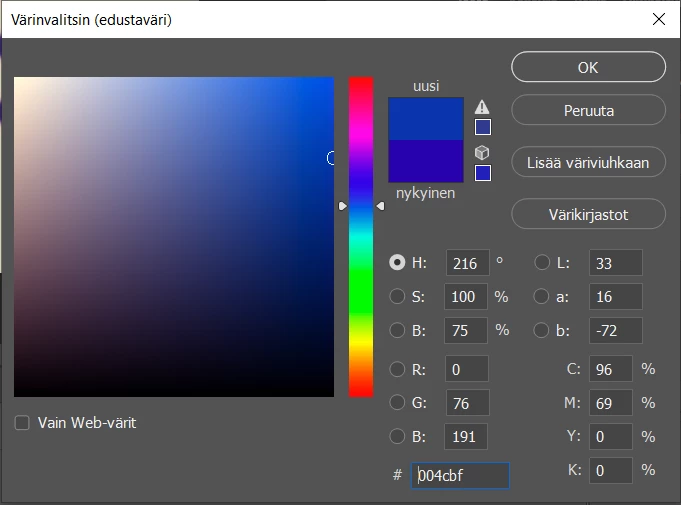
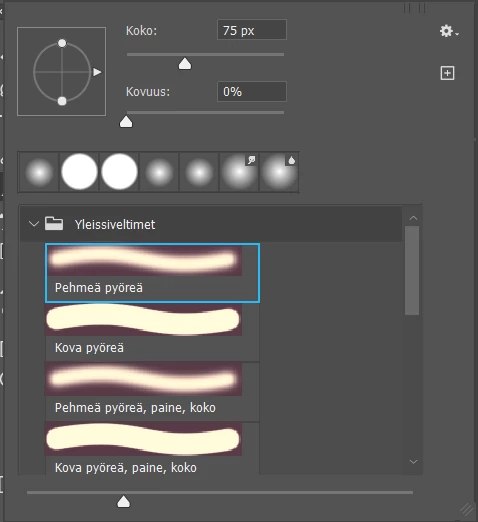
Red underline in brushes/color picker gone red

  • August 4, 2020
  • 2 답변들
  • 295 조회

So, I have this issue where my color picker and brushes are underlined with red. What should I do? Is it a setting?

이 주제는 답변이 닫혔습니다.

2 답변

davescm
Community Expert
Community Expert
August 4, 2020

That looks like a broken monitor profile, which is set in your operating system.

Either create a new profile using a calibrator and reload it, or temporarily, go to Windows > Settings > System > Display > Advanced display settings > Display Adapter Properties > Colour Management >Colour management and set the monitor display to sRGB IEC61966-2.1   (you may have to click "Add" first)


Dave

c.pfaffenbichler
Community Expert
Community Expert
August 4, 2020

Does turning off »Use Graphics Processor« in the Performance Preferences (Photoshop > Preferences > Performance > Graphic Processor Settings) and restarting Photoshop have any bearing on the issue? 

Sammy98작성자
Participant
August 4, 2020

No it did not help.