

wckdtall
Inspiring
March 6, 2025
Question

Refine Mask only for Marquee selection

  • March 6, 2025
  • 1 reply
  • 270 views

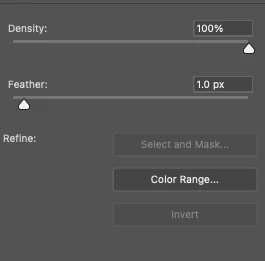
I've noticed you're unable to select a marquee around an area of a mask, and "select and mask" only that portion. I think before the properties panel, you were able to do this, through refine mask? I did launch that dialog, but it doesn't composite the refined area over new area, it simply changes the selection.

Select and mask is grayed out when there's a selection. Does this feature no longer exist? Did it ever? I tend to select portions of existing masks to revise based on clothing, or hair or skin, so I just want to focus on a portion at a time.
 

1 reply

CMass
Community Manager
Community Manager
March 6, 2025

Hey @iamwickedtall, 


I'd be happy to help troubleshoot. Can you also share your system info? You can find this by going to Help > System Info copying and pasting into a text file and attaching it here. Do you remember in which version this started to happen? 


^CM

wckdtall
wckdtallAuthor
Inspiring
March 7, 2025

Here's are the main specs on my system config, I don't want to post the entire thing into a public forum. I don't know which version of Photoshop this started in, I hadn't had to mask regularly, that's where if this wasn't how the featured was intended to be used let me know. My use case, I have an existing mask, I select an area of it with a marquee, and want to use "select and mask" to adjust the edges of only that area in place. 

  Adobe Photoshop Version: 26.3.0 20250122.r.156 bfca642  x64
  macOS: Sequoia 15.3.1
  Model Name:	MacBook Pro
  Model Identifier:	MacBookPro16,1
  Processor Name:	8-Core Intel Core i9
  Processor Speed:	2.3 GHz
  Number of Processors:	1
  Total Number of Cores:	8
  L2 Cache (per Core):	256 KB
  L3 Cache:	16 MB
  Hyper-Threading Technology:	Enabled
  Memory:	32 GB