

Branko Teršek
Known Participant
May 3, 2026
Answered

Reflection removal

  • May 3, 2026
  • 5 replies
  • 77 views

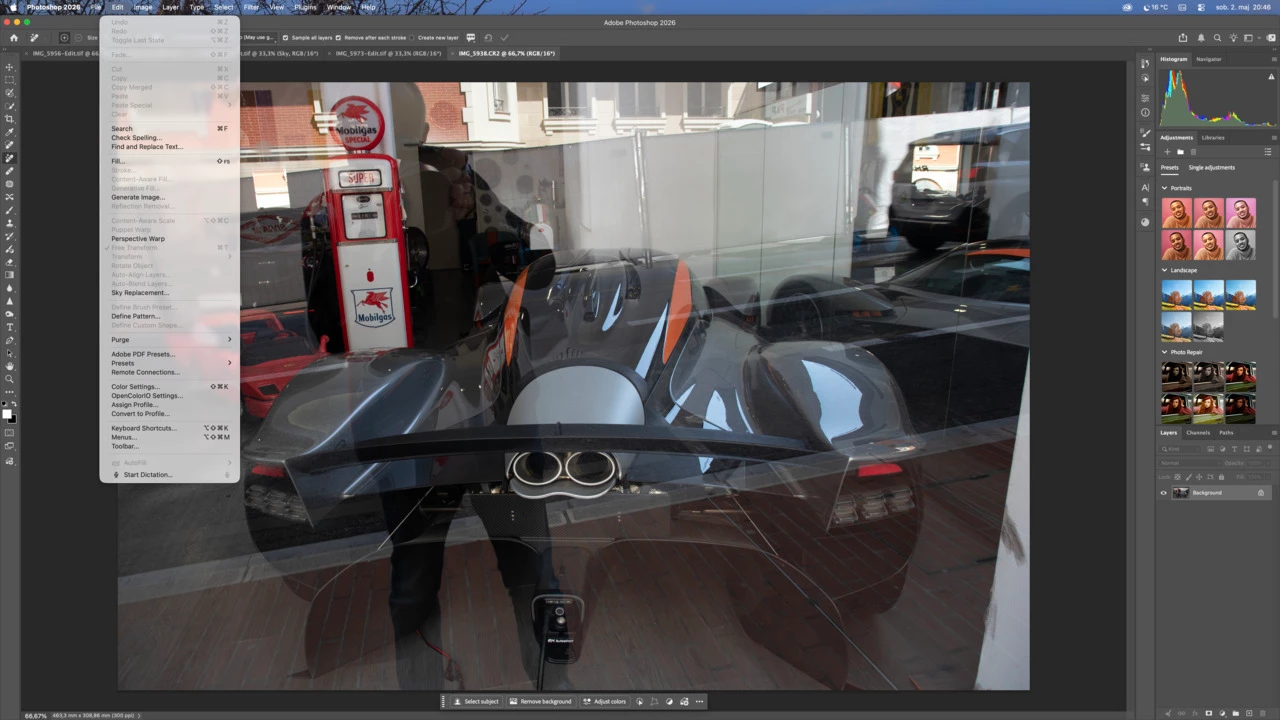
I'm using PS and when I wanted to use Reflection removal the object tab is dead or not colored black. It just doesn't work. Can anyone help? I'm using a MAC computer and RAW format.
Thanks for the answer and best regards to all.
Branko
 

    Correct answer Vaibhav2653204627dn

    Hi ​@Branko Teršek the current Photoshop 27.6 build supports only RGB 8 bit images for reflection removal. Having said that the win arm doesn't support this feature

    5 replies

    jane-e
    Community Expert
    Community Expert
    May 4, 2026

    @Branko Teršek 


    I have no idea if this will work, but you might try this:

    • In a copy of the document, convert to 8-bit, as per Vaibhav’s post
    • Copy or move the reflection layer that gets created to your 16-bit document

    Let us know if this works — we are all still learning about this new feature.


    Are you using winARM? Two people have mentioned this, but you are not one of them. You specified that you are using a Mac.


    Jane

    Vaibhav2653204627dnCorrect answer
    Adobe Employee
    May 4, 2026

    Hi ​@Branko Teršek the current Photoshop 27.6 build supports only RGB 8 bit images for reflection removal. Having said that the win arm doesn't support this feature

    D Fosse
    Community Expert
    Community Expert
    May 4, 2026

    I think it’s time to pause a bit. Even if you could get Reflection Removal to work, this image is a tall order! There’s much more reflection than actual image here.


    In the future, use a polarizer on the lens.

    Branko Teršek
    Known Participant
    May 4, 2026

    I believe it is a difficult task, which I have at least partially completed in LR. It is not a problem that it is a difficult task, the problem is that the tab in PS is not working.


    jane-e
    Community Expert
    Community Expert
    May 3, 2026

    “The Distraction Removal tool is currently not available on WinARM machines.”


    @Branko Teršek 


    Although WinARM can actually be run on Silicon Macs using applications such as Parallels and VMWare, I don’t see those running in your screenshot. Can you confirm your setup for us?


    What is your (exact) version of Photoshop and your OS?


    Jane


    Branko Teršek
    Known Participant
    May 4, 2026

    Adobe Photoshop Version: 27.6.0 20260422.r.11 4804c18  arm64 (final, Release) Number of Launches: 528 Operating System: Mac OS 26.4.1 System architecture: Apple M1 Max, DOTPROD, HybridCPU(8:2) Physical processor count: 10 Built-in memory: 65536 MB Free memory: 16109 MB Memory available to Photoshop: 61584 MB Memory used by Photoshop: 70 % Crash Handler: Adobe DCX Version: 9.22.0 SAM SDK Version: 15.1.0 ACP.local Status:  - SDK Version: 5.11.0  - Core Sync Status: Reachable and compatible  - Core Sync Running: 7.8.10.1  - Min Core Sync Required: 4.3.66.28 Live Edit Client SDK Version: v6.1.1 Adobe Firefly: Please use any generative AI feature to view the latest version. OpenColorIO version: 2.4.2 C2PA library version: Adobe CAI SDK: adobe_api/1.22.3 NGL Version: 1.42.0.5 Chalkboard: Disabled. Chalkboard Doc Create: Disabled. Precise Color Management for HDR Display: Disabled. Alias Layers: Disabled. Highbeam: Enabled. Touch Bar Property Feedback: Enabled. Image tile size: 1024K Image cache levels: 4 Font Preview: Medium HarfBuzz Version: 11.0.0 TextEngine: ATE

    Nancy OShea
    Community Expert
    Community Expert
    May 3, 2026

    The Distraction Removal tool is currently not available on WinARM machines.

    https://helpx.adobe.com/camera-raw/using/remove-reflections.html


    Hope that helps.


    Nancy O'Shea— Product User & Community Expert
    Branko Teršek
    Known Participant
    May 4, 2026

    The problem is that the Reflection removal tab is dead. I'm watching the footage from Matt Kloskowski and he has the Reflection tab blacked out. First he clicks Edit and then he has Reflection blacked out. I also talked to him and he recommended that I contact Adobe support, but unfortunately they only have artificial intelligence that has no idea what the customer wants. So I turned to the community for help.

    jane-e
    Community Expert
    Community Expert
    May 4, 2026

    @Branko Teršek wrote: I contact Adobe support, but unfortunately they only have artificial intelligence 


    To get past the bot when you contact Adobe Customer Care, you need to type “agent” to get a human. Be sure to get a case number, and ask for tier 2 support or a supervisor if you are still not getting to assistance you need.


    Do you have a link to the video from Matt K?


    Jane