Participating Frequently
April 23, 2025
Answered

regarding adding a gradient to a selected shape

  • April 23, 2025
  • 2 replies
  • 613 views

Hi, when I select a shape and add a gradient to its edge by dragging the cursor through its side, the shape is deselected after the first drag of the cursor. My question is how to keep the shape selected when dragging the cursor a number of times through the other edges of the shape in order to add the gradient to the other edges.

Correct answer Trevor.Dennis

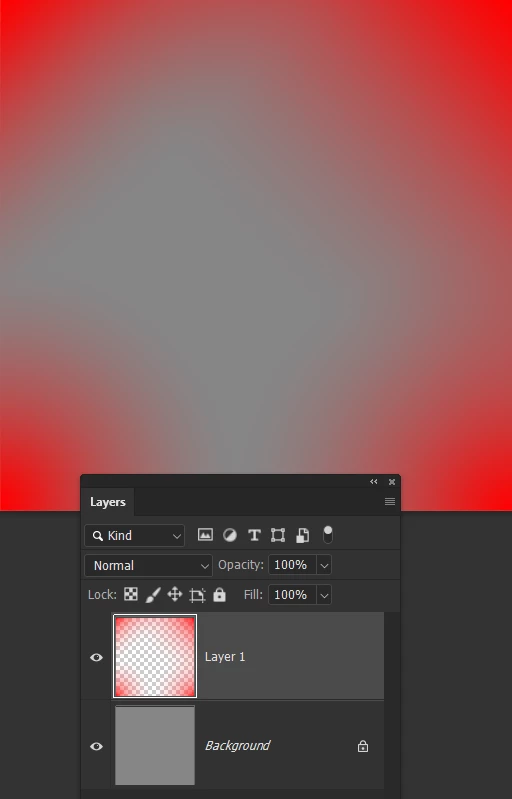
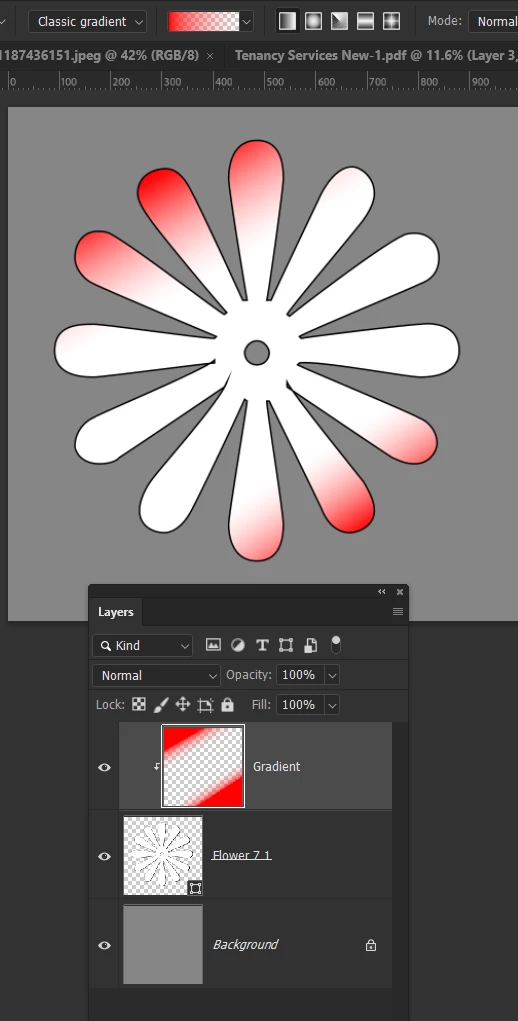
This only works if your gradient has just one colour, but if you set it to Foreground to Transparent, you can make multiple passes with the gradient tool without overwriting the previous gradient. 

It will work on any shape or layer or even and empty layer.

To cover a Shape create a new layer above the Shape, and clip it to the shape layer.  (Alt Ctrl G)

Then add the gradients to the new layer.


Or you can use it on an ampty layer

2 replies

Trevor.Dennis
Community Expert
Trevor.DennisCommunity ExpertCorrect answer
Community Expert
April 23, 2025

This only works if your gradient has just one colour, but if you set it to Foreground to Transparent, you can make multiple passes with the gradient tool without overwriting the previous gradient. 

It will work on any shape or layer or even and empty layer.

To cover a Shape create a new layer above the Shape, and clip it to the shape layer.  (Alt Ctrl G)

Then add the gradients to the new layer.


Or you can use it on an ampty layer

Participating Frequently
April 23, 2025
Dear Sir/ Madam
Thank you for your reply and your clarifications
Loay
c.pfaffenbichler
Community Expert
Community Expert
April 23, 2025

Could you please post screenshots with the pertinent Panels (Toolbar, Layers, Options Bar, Properties, …) visible to clarify what you are trying to describe? 

Participating Frequently
April 23, 2025

Thank you for your reply

When I select a shape, I add the gradient to its edge by dragging the cursor through its side, the shape is deselected after the first drag of the cursor. My question is how to keep the shape selected when dragging the cursor a number of times through the other edges of the shape in order to add the gradient to the other edges?

Anshul_Saini
Community Manager
Community Manager
April 23, 2025

Thanks for sharing the screenshot — it really helps clarify the issue, @Loay25073522cj4s.


It looks like you’re using a Gradient Fill layer with a mask applied to a rectangular shape. When you’re dragging to apply the gradient, you’re editing the gradient directly, not painting or blending it onto the shape’s edges one by one. Photoshop doesn’t treat gradient edits this way — it replaces the previous gradient rather than layering new ones, which is why it seems like your “selection” is lost after each drag.

Do you have any sample images or a look you want to achieve? If so, we can guide you in achieving that. 

Best,

Anshul Saini