

IveL
Inspiring
April 4, 2026
Answered

Regression in v27.5: UI freezes when using Brush Hardness slider /NVIDIA Quadro T1000 (Studio)

  • April 4, 2026
  • 4 replies
  • 50 views

Adjusting the Brush Hardness slider causes Photoshop v27.5 to completely hang. The UI becomes unresponsive until the window is minimized and restored. After restoring, the slider value remains unchanged.

Device: Lenovo ThinkPad P15 Gen 1
GPU: NVIDIA Quadro T1000 (Studio Driver 573.91)
OS: Windows 11

Interaction with the Hardness slider triggers a full application freeze.
The freeze is temporarily bypassed by toggling the window (Minimize/Restore), but the setting isn't applied.
Comparison: Version 27.3 exhibited slight lag during the same action but functioned correctly. Version 27.5 is unusable in this regard.

No effect:
Toggling "GPU Compositing" in Performance settings.
Testing with both a mouse and a stylus (Windows Ink is disabled).


Request:
This appears to be a regression in the UI rendering engine specifically affecting Quadro T1000 hardware or similar Turing-based mobile workstation GPUs. Please investigate the compatibility of the new "Native Canvas" or UI overlay system with these drivers.
Correct answer IveL

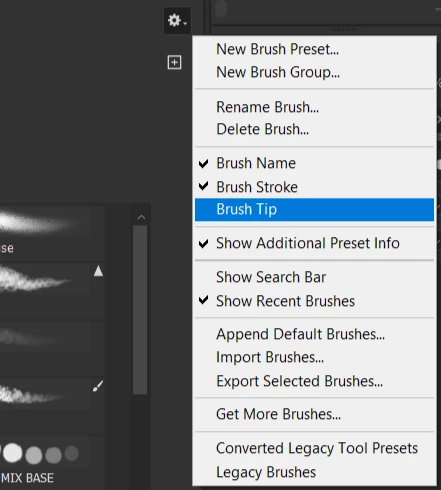
Disabling Brush Tip display in the brush picker got rid of the issue


4 replies

D Fosse
Community Expert
Community Expert
April 5, 2026

Still sounds like a GPU-related problem.


Is this a dual graphics laptop? To rule out GPU conflicts (which is a common problem), try to disable the integrated GPU in Windows.


The reason this is a common problem, is that there is no way for Photoshop to control which GPU is called. That is entirely at the mercy of how the laptop manufacturer has configured the two GPU drivers and their interaction with the operating system.

IveL
IveLAuthor
Inspiring
April 5, 2026

Intel integrated graphics were already disabled in the BIOS

IveL
IveLAuthor
Inspiring
April 4, 2026

Sorry for the misunderstanding, but enabling Windows Ink only made the freeze issue less frequent; it still persists...

IveL
IveLAuthor
Inspiring
April 4, 2026

!!!!!!! Subsequent bugs found:
Broken Stylus Right-Click: With Windows Ink enabled, the stylus right-click does not trigger the context menu on document tabs (cannot close tabs or manage windows).
Visual Artifacts: Immediately after switching back to Photoshop, stylus clicks trigger a distracting "ripple" circle around the cursor.
Note: The circular animation is not linked to the "Show visual feedback" setting in Windows Pen & Windows Ink settings.

IveL
IveLAuthor
Inspiring
April 4, 2026

Enabling Windows Ink for Photoshop fixed it