
juhoh16939234
Participant
Feb 9, 2022 12:28 PM UTC
Question

Remove background not working

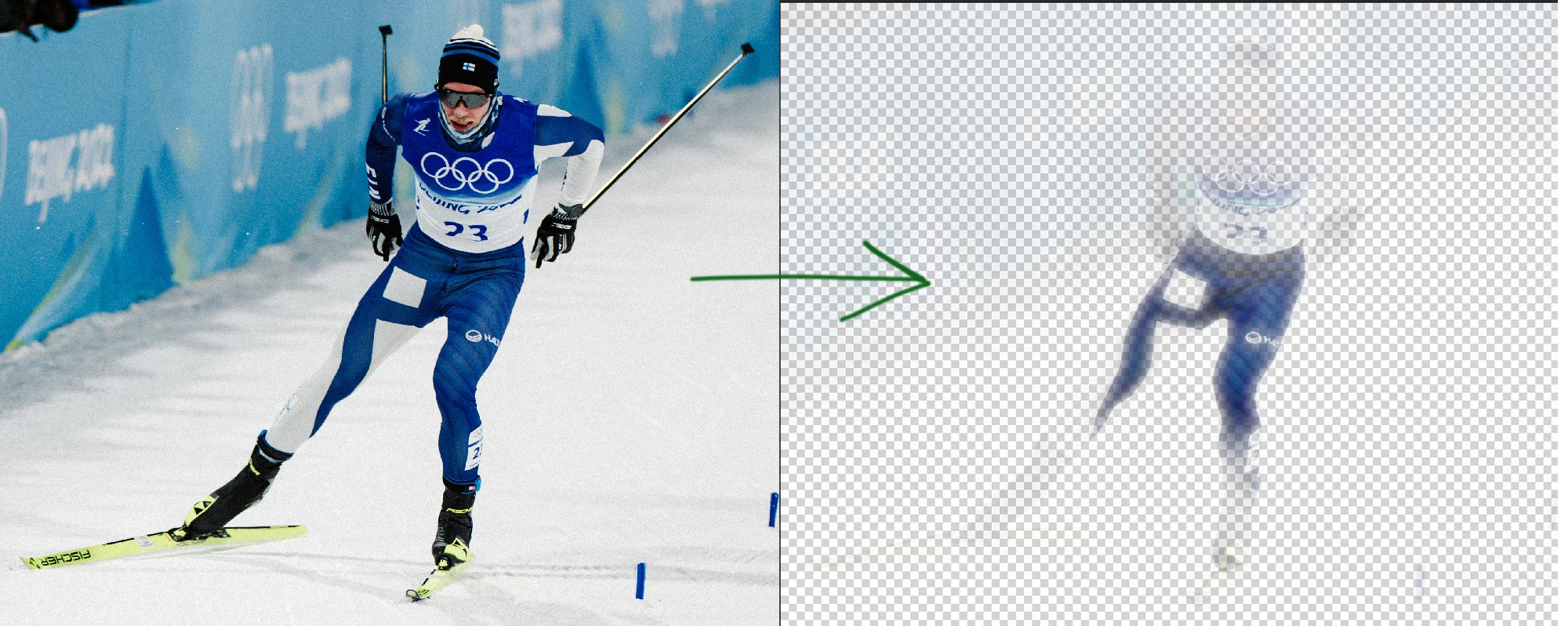
I'm having trouble using the "remove background" or "select subject" tool in Photoshop 23.1.1 using the new Macbook Pro 16" M1 model. 

When I click "remove background" it will do horrible job and leaving the object full of gradient mask and mess. When I try this with my old iMac, it works correctly. Is there something I'm missing here? Can I somehow adjust this feature? 
 

This topic is closed to new replies. Start a new post to keep the conversation going.

7 replies

debbiei92824745
Participating Frequently
Jun 23, 2023 12:01 AM UTC

I'm having the same trouble.  Did you ever get an answer?

Thanks

Translate
Trevor.Dennis
Community Expert
Community Expert
Jun 23, 2023 12:11 AM UTC

Debbie, are you also using a Mac, and if yes, which OS version?

Translate
debbiei92824745
Participating Frequently
Jun 23, 2023 12:15 AM UTC

Yes, I'm on an IMac.  Where do I find which version I'm using?


Translate
Ged_Traynor
Community Expert
Community Expert
Feb 9, 2022 12:49 PM UTC

Hi

Try running Photoshop under Rosetta

https://helpx.adobe.com/photoshop/kb/photoshop-for-apple-silicon.html

Translate