Jason Newton
Inspiring
July 18, 2017
Answered

Remove Banding caused by scanner

  • July 18, 2017
  • 2 replies
  • 8476 views

Hi there,

I wondered if anyone could help me. I have a number of images that have been sent to me that need cleaning up - especially the removal of a sort of colour banding across the image that I think might have been caused during the original scanning.

I have enclosed an image to give you some idea of the problem. Can this be solved with some action or something?

Any help would be greatly appreciated.

Kind Regards

    Correct answer davescm

    On that particular example the red channel does not show the coloured  moire patterning.

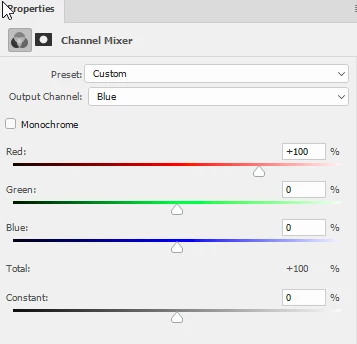
    So I set the channel mixer to 100% red 0% green and 0% blue for all three channels. This gave a black and white version without the tint.

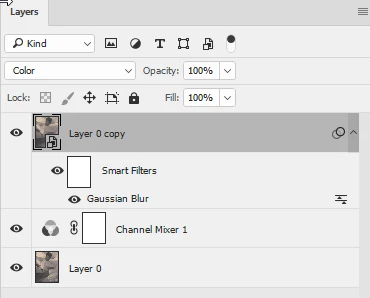
    Then I duplicated the original and applied a Gaussian blur to blur the patterning. Then set that layer to color blending mode

    Dave

    2 replies

    Participating Frequently
    May 1, 2025

    Would you please tell me how I can remove these bandings?

    davescm
    Community Expert
    davescmCommunity ExpertCorrect answer
    Community Expert
    July 18, 2017

    On that particular example the red channel does not show the coloured  moire patterning.

    So I set the channel mixer to 100% red 0% green and 0% blue for all three channels. This gave a black and white version without the tint.

    Then I duplicated the original and applied a Gaussian blur to blur the patterning. Then set that layer to color blending mode

    Dave

    Jason Newton
    Inspiring
    July 18, 2017

    Thanks so much, Dave. That is exactly what I am looking for. Much appreciated your time and advice.

    Best Wishes

    davescm
    Community Expert
    Community Expert
    July 18, 2017

    You're welcome

    Dave