
Participating Frequently
October 3, 2025
Answered

Remove tool stuck/not working

  • October 3, 2025
  • 7 replies
  • 421 views

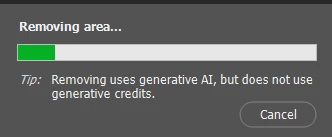
As the title says, remove tool keeps getting stuck loading as shown in the preview below.

It worked fine last night. Drivers and software are up to date. Tried fiddling with settings as suggested with to people with similar issues, still the same. Tried reinstalling, same thing.
 

Correct answer it0mac

Surprisingly, it started responding faster for me when removing objects. It seems like the servers are doing much better now, but I’m not sure yet — still keeping an eye on it.

7 replies

Participating Frequently
October 3, 2025

Yooo, no way, now it does work.. Thanks bro, you brought me luck!

So after all it was an issue on their side.. But I was checking the adobe status site and it seemed all fine there..

it0macCorrect answer
Participating Frequently
October 3, 2025

Surprisingly, it started responding faster for me when removing objects. It seems like the servers are doing much better now, but I’m not sure yet — still keeping an eye on it.

Participating Frequently
October 4, 2025

aaand now it doesn't work anymore, yikes.

Participating Frequently
October 3, 2025

It works for me on web too, but I don't think that it's the same thing. It gives quite awful results. Currently trying to setup a virtual machine and will try it on there, if that doesn't work, I'll try it using another account.

Will follow up soon

Participating Frequently
October 3, 2025

I also tried it through the web version, and it works there. So if a staff member tested it on the website, it probably worked for them. But I’m using the desktop version.

Participating Frequently
October 3, 2025

The generation works, but it’s veeeery slow. I also tried it on another device — it removes a small area, but it takes about 5 minutes. It definitely shouldn’t be like that. This is clearly a problem on their side. I’m from Ukraine, and I don’t think it’s such a global issue if two different users are experiencing the same thing.

Srishti Bali
Community Manager
Community Manager
October 16, 2025

Hi @Njegos33816000icf3


Apologies for the delayed response, and thank you for your patience. I hope the issue with the Remove tool is resolved by now. If not, could you please share a few more details so we can help you better?

  • The exact version of Photoshop you’re using?

  • Version of operating system (Windows/macOS)?

  • Does the issue occur with all images or only specific ones?

  • Did you try resetting Photoshop preferences to see if that makes any difference? Please make sure to create a backup of your Preferences folder before resetting, as it will restore settings to the default. You can follow the steps shared here: https://adobe.ly/46Wmk6x;


This will help us investigate the behavior more accurately and guide you accordingly.

 
Regards,
Srishti
Participating Frequently
October 16, 2025

Yes, it got resolved in the following days. A few other people from my region that I talked to had same issues as well.

Participating Frequently
October 3, 2025

Just finished a remote session with support agent, they've tried what I did already. Nothing worked. The only thing is that I didn't try it on another device, or maybe a with a different account, because it may be related to that, but agent says that it's probably something device wise.
Generative AI works, but slower than usual. It's weird that gen ai works, which is cloud based obviously, but cloud based remove tool doesn't?

Participating Frequently
October 3, 2025

I’m having the same error. I tried on different devices and even on different internet networks. Sometimes it goes through, but other times it says: “could not complete your request.” I don’t know what to do about it.