
fashionable_think5334
Participant
April 10, 2026
Answered

removed tool

  • April 10, 2026
  • 3 replies
  • 49 views

I use photoshop for basic things. I updated my apps and now I can't find the tool that will select a color you click on a graphic that removes it. 

    Correct answer melissapiccone

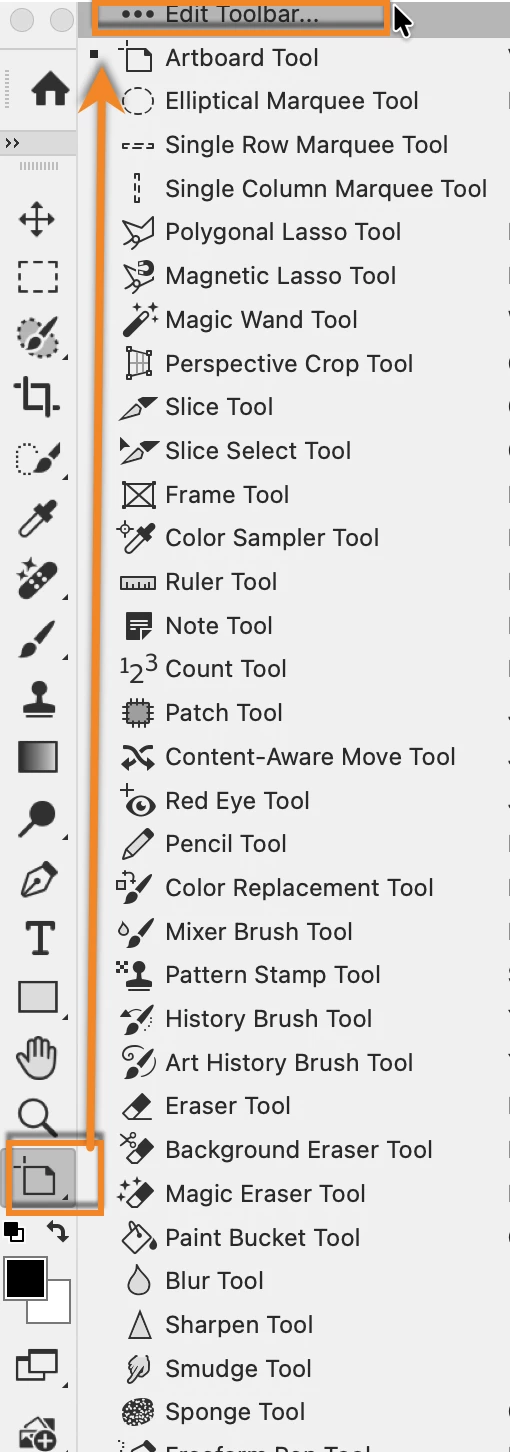
    I suspect you mean the magic wand. You might be using the core tools workspace which has it hidden. At the bottom of the toolbar, just under the zoom tool and above the color chips, you should see a …. If you right click, you can edit the toolbar and find your missing tools. 
     

    3 replies

    melissapiccone
    Community Expert
    melissapicconeCommunity ExpertCorrect answer
    Community Expert
    April 10, 2026

    I suspect you mean the magic wand. You might be using the core tools workspace which has it hidden. At the bottom of the toolbar, just under the zoom tool and above the color chips, you should see a …. If you right click, you can edit the toolbar and find your missing tools. 


    Melissa Piccone | Adobe Trainer | Online Courses Author | Fine Artist
    fashionable_think5334
    Participant
    April 18, 2026

    yes thank you so much!!!!

    jane-e
    Community Expert
    Community Expert
    April 10, 2026

    @fashionable_think5334 wrote:  I can't find the tool that will select a color


    If you are trying to select a color and then delete everything using that color, you might be looking for the Magic Wand tool. It shares space with the Quick Selection tool by default and uses the W shortcut.


    Please clarify if this does not answer your question.


    Jane


    Inspiring
    April 10, 2026

    That sounds like either the Background Eraser or Magic Eraser, which are both under the Eraser icon: