
Participating Frequently
October 19, 2020
Question

Removing unwanted border lines from shapes
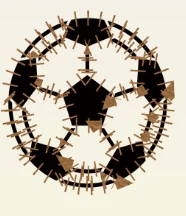
  • October 19, 2020
  • 2 replies
  • 2512 views


Hello, I'm a photoshop novoce, and I've created a logo using several shapes like the one pictured above.  All of the shapes have these horizontal lines around their borders, which show up when I export the photo, and I have not been able to figure out how to remove them. 


Any help anyone could give me would be much appreciated!


Thanks!


This topic has been closed for replies.

2 replies

Dave Creamer of IDEAS
Community Expert
Community Expert
October 19, 2020

You mention "horizontal lines" but I don't see any actual horizontal lines in the image. Are you referring to the lines sticking out of the edge of the ball?

David Creamer: Community Expert (ACI and ACE 1995-2023)
Participating Frequently
October 19, 2020

Right, more accurately I would say lines perpindicular to all of the shapes I have created.

Dave Creamer of IDEAS
Community Expert
Community Expert
October 20, 2020

You should be able to select the internal white areas if they are on a separate layer or layers and move them above the lines. (Just the white areas not including any lines.) If the white areas are transparent, you can still select them all, make a new layer, and fill with white.


You can do something similar for the black shapes, but you will have to contract the edges of the selection so the stitch lines still show. 


The outer edge can be clipped to the shape.

David Creamer: Community Expert (ACI and ACE 1995-2023)
JonathanArias
Legend
October 19, 2020

You should make logos in illustrator, not photoshop.

may I move this post to the illustrator forum?


thanks

jonathan

[moderator]

Participating Frequently
October 19, 2020

I have almost completed the project, and just need help with this issue in photoshop.  Unless they have the exact same interface, moving this post to illustrator will not actually help me resolve my issue.

JonathanArias
Legend
October 20, 2020

Very good

thank you