
m0rf3us 05
Participant
January 21, 2018
Answered

Rendering 4K at 30fps timelapses ERROR

  • January 21, 2018
  • 1 reply
  • 15889 views

Hi all, when I try to render video of a timelapse at 3940x2160 at 30fps, Photoshop pops up a dialog box stating "The dimensions or frame rate are too large", I've attached a screenshot of the error and the render menu below:
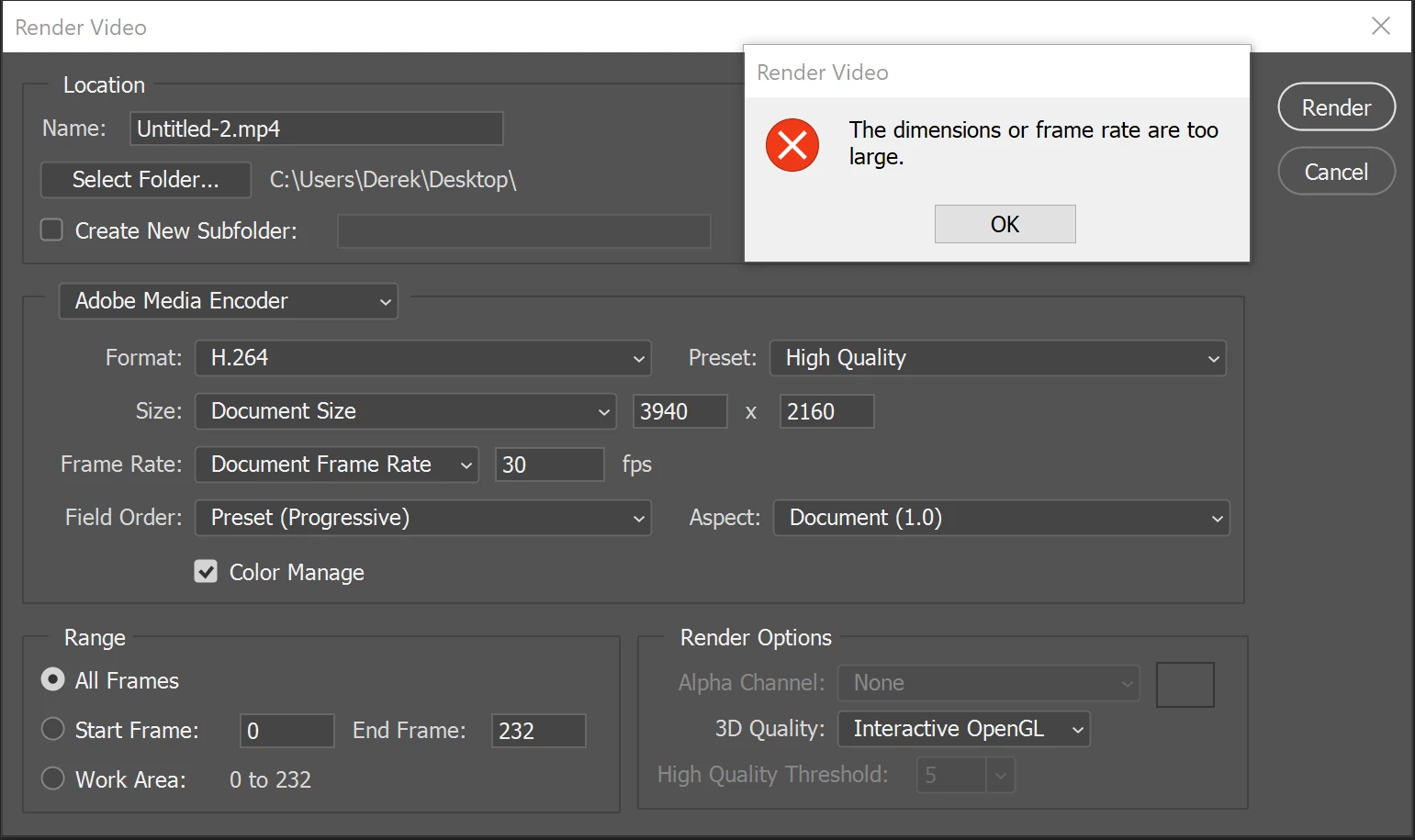
Is there any way render a video with these dimensions and framerate?

Thanks in advance for any help!

Derek

This topic has been closed for replies.
Correct answer davescm

Hi

UHD video is 3840x2160  so you can try that and it should render

Dave

1 reply

davescm
Community Expert
davescmCommunity ExpertCorrect answer
Community Expert
January 21, 2018

Hi

UHD video is 3840x2160  so you can try that and it should render

Dave

m0rf3us 05
Participant
January 21, 2018

Oh my gosh, I can't believe I did that!  I know better too.  Shoot.  Thanks!!!!

davescm
Community Expert
Community Expert
January 21, 2018

No worries - it's easily done

Dave