
Inspiring
November 21, 2025
Answered

Repeat Shape Outside of Shape

  • November 21, 2025
  • 3 replies
  • 59 views

Hi, I am trying to make repeating shapes from this porcupine shape. This is just a poorly done example I tried making in photoshop using the stroke blending option.
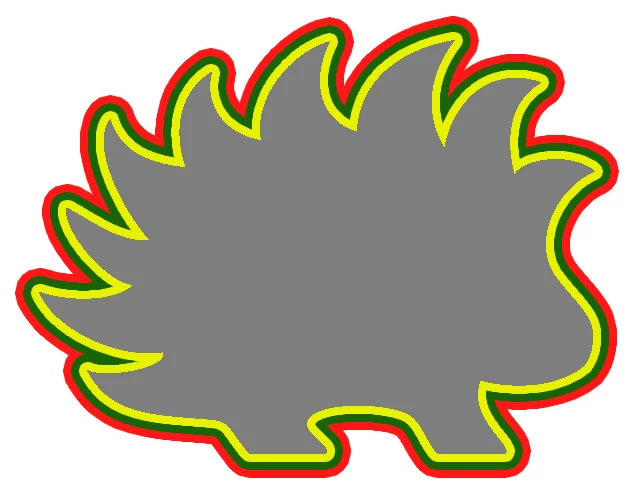
This might be something that can only be done in Illustrator, I am not sure. I'd like to take the original shape of the porcupine and make it 3% bigger everytime but stay conformed to the shape. It's easy to do with a circle or square (using actions in photoshop) but not with an irregular shape like this. I'd like for each shape to be its own layer so I can change the color and opacity. Any suggestions? Thank you in advance.

Correct answer c.pfaffenbichler

The image you posted does not actually show the shape being repeated and scaled but strokes being added, which changes the shape (except for circles, squares and other regular shapes).

Please clarify if the stroke-approach is what you want to achieve. 


Illustrator would likely be the better application for the vector-output but a Photoshop approach with Smart Object instances seems possible. 

3 replies

c.pfaffenbichler
Community Expert
Community Expert
January 27, 2026

To clarify what I meant a screenshot that shows the two different effects. 


Either way I would recommend using Smart Object instances with Layer Styles (either Stroke or Color Overlay) so one can edit the original shape in the Smart Object and have all the objects update simultaneously. 


Edit: The Layer Style Stroke has two drawbacks, though. It has a size limitation and it can become »blocky«. Shape Layer Strokes on the other hand work on vector data and subsequently provide better results. 

c.pfaffenbichler
Community Expert
c.pfaffenbichlerCommunity ExpertCorrect answer
Community Expert
January 27, 2026

The image you posted does not actually show the shape being repeated and scaled but strokes being added, which changes the shape (except for circles, squares and other regular shapes).

Please clarify if the stroke-approach is what you want to achieve. 


Illustrator would likely be the better application for the vector-output but a Photoshop approach with Smart Object instances seems possible. 

Sameer K
Community Manager
Community Manager
November 21, 2025

Hey, @rite_oak. Welcome to the Photoshop Community. I'll help you figure this out in one way,I am sure our Experts will have 6 more ways to do this.


Here is a video I found on the internet that walks through a similar workflow that you can adapt into your work stream to get desired results: https://adobe.ly/4abWSf0


I hope this helps. Thanks!
Sameer K
(Type '@' and type my name to mention me when you reply)