Looking for a simple script to select a group of 2-20 images and load them into a stack. Some may have one or two layers, and I want them to come with the files and stay in order.
I have poked around a lot and haven't found anything like this.... sorry!!
/* Stacker - To Groups Retaining Source Layers v1-4.jsx Stephen Marsh
3rd November 2023 - v1.0, Stacks to layers using ungrouped smart objects 3rd November 2023 - v1.1, Stacks to layers without leveraging smart objects 3rd November 2023 - v1.2, Stacks to groups 16th July 2026 - v1.3, Added a GUI and various user options 17th July 2026 - v1.4, Added an option to convert each source layer into its own individual Smart Object before grouping
https://community.adobe.com/t5/photoshop-ecosystem-discussions/request-photoshop-script-load-files-to-stack-including-layers-in-order/td-p/14202346 Based on: https://community.adobe.com/t5/photoshop-ecosystem-discussions/combining-tiffs/m-p/13475955 https://community.adobe.com/t5/photoshop-ecosystem-discussions/layers-creating-layers/td-p/13252109 */
#target photoshop
if (app.documents.length === 0) { (function () { var STRIP_EXTENSION = true; // false to retain the source file extension
var dialogResult = showStackerDialog(); if (dialogResult === null) { return; // user cancelled }
var savedDisplayDialogs = app.displayDialogs; app.displayDialogs = DialogModes.NO; var origUnits = app.preferences.rulerUnits; app.preferences.rulerUnits = Units.PIXELS;
var inputFolder = dialogResult.folder;
// Choose alignment methods based on the user's selection // AdCH/AdCV = centre horizontal/vertical (default), AdLf/AdTp = left/top var alignMethodH = dialogResult.alignTopLeft ? 'AdLf' : 'AdCH'; var alignMethodV = dialogResult.alignTopLeft ? 'AdTp' : 'AdCV';
// Add or remove file extensions as required var inputFiles = inputFolder.getFiles(/\.(jpg|jpeg|tif|tiff|png|psd|psb|gif|webp)$/i); inputFiles.sort(); if (dialogResult.reverseOrder) { inputFiles.reverse(); }
if (inputFiles.length === 0) { alert('No matching image files were found in the selected folder.'); app.displayDialogs = savedDisplayDialogs; app.preferences.rulerUnits = origUnits; return; }
var firstFile = app.open(File(inputFiles[0])); activeDocument.duplicate("Stacker", false); if (activeDocument.mode === DocumentMode.BITMAP) { activeDocument.changeMode(ChangeMode.GRAYSCALE); activeDocument.changeMode(ChangeMode.RGB); } else if (activeDocument.mode === DocumentMode.INDEXEDCOLOR) { activeDocument.changeMode(ChangeMode.RGB); } firstFile.close(SaveOptions.DONOTSAVECHANGES); var docStack = app.documents[0]; activeDocument = docStack;
// Convert a Background layer (if any) to a normal layer so it can be grouped try { docStack.backgroundLayer.isBackgroundLayer = false; } catch (e) {}
// Group the first file's layer(s) into a set named after the source file selectAllLayers();
// Convert each of the first file's layers into its own individual smart object (optional) if (dialogResult.convertLayersToSmartObjects) { convertLayersToIndividualSmartObjects(docStack, docStack.layers.length); }
groupTargetedLayers(getGroupName(inputFiles[0]));
// Optionally create a smart object from the group if (dialogResult.convertToSmartObjects) { executeAction( stringIDToTypeID( "newPlacedLayer" ), undefined, DialogModes.NO ); }
for (var i = 1; i < inputFiles.length; i++) { var remainingFiles = app.open(File(inputFiles[i])); if (activeDocument.mode === DocumentMode.BITMAP) { activeDocument.changeMode(ChangeMode.GRAYSCALE); activeDocument.changeMode(ChangeMode.RGB); } else if (activeDocument.mode === DocumentMode.INDEXEDCOLOR) { activeDocument.changeMode(ChangeMode.RGB); } selectAllLayers(); var layerCountBeforeAdd = docStack.layers.length; remainingFiles.layers[0].duplicate(docStack, ElementPlacement.PLACEATBEGINNING); remainingFiles.close(SaveOptions.DONOTSAVECHANGES);
// The just-duplicated layer(s) are already targeted/selected in docStack; activeDocument = docStack;
// Optionally convert each newly-added layer into its own individual smart object if (dialogResult.convertLayersToSmartObjects) { var newlyAddedLayerCount = docStack.layers.length - layerCountBeforeAdd; convertLayersToIndividualSmartObjects(docStack, newlyAddedLayerCount); }
// group them into a set named after this source file groupTargetedLayers(getGroupName(inputFiles[i]));
// Optionally create a smart object from the group if (dialogResult.convertToSmartObjects) { executeAction( stringIDToTypeID( "newPlacedLayer" ), undefined, DialogModes.NO ); }
// Align the new group (centred or top-left, per the user's selection) align2SelectAll(alignMethodH); align2SelectAll(alignMethodV); }
// Expand the canvas to fit layer content activeDocument.revealAll(); //deselectLayers();
// Collapse all groups/sets //executeAction( stringIDToTypeID( "collapseAllGroupsEvent" ), new ActionDescriptor(), DialogModes.NO );
// End of script notification app.beep(); alert(inputFiles.length + ' files stacked into named groups (retaining layers)!'); app.displayDialogs = savedDisplayDialogs; app.preferences.rulerUnits = origUnits;
////////// Functions //////////
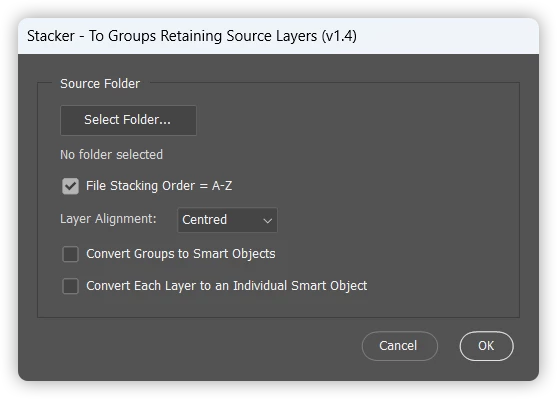
// scriptUI function showStackerDialog() { var dlg = new Window('dialog', 'Stacker - To Groups Retaining Source Layers (v1.4)'); dlg.orientation = 'column'; dlg.alignChildren = ['fill', 'top']; dlg.spacing = 10; dlg.margins = 16;
// Panel containing folder selection and user options var sourcePanel = dlg.add('panel', undefined, 'Source Folder'); sourcePanel.orientation = 'column'; sourcePanel.alignChildren = ['fill', 'top']; sourcePanel.margins = 16; sourcePanel.spacing = 8;
var reverseOrderCheckbox = sourcePanel.add('checkbox', undefined, 'File Stacking Order = A-Z'); // True = Reversed order to A-Z, False = Default order Z-A reverseOrderCheckbox.value = true;
// Keep the label in sync with the checkbox state reverseOrderCheckbox.onClick = function () { reverseOrderCheckbox.text = reverseOrderCheckbox.value ? 'File Stacking Order = A-Z' : 'File Stacking Order = Z-A'; };
var smartObjectCheckbox = sourcePanel.add('checkbox', undefined, 'Convert Groups to Smart Objects'); smartObjectCheckbox.value = false; // Default = Off
var perLayerSmartObjectCheckbox = sourcePanel.add('checkbox', undefined, 'Convert Each Layer to an Individual Smart Object'); perLayerSmartObjectCheckbox.value = false; // Default = Off
var selectedFolder = null;
selectFolderBtn.onClick = function () { var folder = Folder.selectDialog('Select the folder containing files to stack (retaining layers):'); if (folder !== null) { selectedFolder = folder; folderPathText.text = folder.fsName; } };
function getGroupName(fileObj) { var fileName = fileObj.name; // File.name can come back URI-encoded (e.g. spaces as %20); // decode it so group names show real characters, not escape sequences. try { fileName = decodeURIComponent(fileName); } catch (e) { // Malformed escape sequence (e.g. a literal "%" in the filename) - keep original } if (!STRIP_EXTENSION) { return fileName; } var dotIndex = fileName.lastIndexOf('.'); return (dotIndex > 0) ? fileName.substring(0, dotIndex) : fileName; }
function groupTargetedLayers(groupName) { var desc = new ActionDescriptor(); var ref = new ActionReference(); ref.putClass(stringIDToTypeID("layerSection")); desc.putReference(charIDToTypeID("null"), ref); var layerListRef = new ActionReference(); layerListRef.putEnumerated(charIDToTypeID("Lyr "), charIDToTypeID("Ordn"), charIDToTypeID("Trgt")); desc.putReference(charIDToTypeID("From"), layerListRef); executeAction(charIDToTypeID("Mk "), desc, DialogModes.NO); if (groupName) { try { activeDocument.activeLayer.name = groupName; } catch (e) {} } }
function convertLayersToIndividualSmartObjects(doc, count) { // Converts the top "count" layers (indices 0..count-1) of "doc" into // separate embedded Smart Objects, one at a time, then re-targets all // of them together so a subsequent groupTargetedLayers() call picks them all up. if (!count || count < 1) { return; } for (var j = 0; j < count; j++) { try { targetOnlyLayer(doc.layers[j]); executeAction( stringIDToTypeID( "newPlacedLayer" ), undefined, DialogModes.NO ); } catch (e) {} } targetLayerRange(doc, count); }
function targetOnlyLayer(layer) { // Targets (selects) a single specific layer, replacing any existing selection var desc = new ActionDescriptor(); var ref = new ActionReference(); ref.putIdentifier(charIDToTypeID('Lyr '), layer.id); desc.putReference(charIDToTypeID('null'), ref); executeAction(charIDToTypeID('slct'), desc, DialogModes.NO); }
function targetLayerRange(doc, count) { // Targets (selects) the top "count" layers (indices 0..count-1) of "doc" // together, replacing any existing selection for (var j = 0; j < count; j++) { var layer = doc.layers[j]; var desc = new ActionDescriptor(); var ref = new ActionReference(); ref.putIdentifier(charIDToTypeID('Lyr '), layer.id); desc.putReference(charIDToTypeID('null'), ref); if (j > 0) { desc.putEnumerated(stringIDToTypeID('selectionModifier'), stringIDToTypeID('selectionModifierType'), stringIDToTypeID('addToSelection')); } executeAction(charIDToTypeID('slct'), desc, DialogModes.NO); } }
function align2SelectAll(method) { /* AdLf = Align Left AdRg = Align Right AdCH = Align Centre Horizontal AdTp = Align Top AdBt = Align Bottom AdCV = Align Centre Vertical */ activeDocument.selection.selectAll(); var desc = new ActionDescriptor(); var ref = new ActionReference(); ref.putEnumerated(charIDToTypeID("Lyr "), charIDToTypeID("Ordn"), charIDToTypeID("Trgt")); desc.putReference(charIDToTypeID("null"), ref); desc.putEnumerated(charIDToTypeID("Usng"), charIDToTypeID("ADSt"), charIDToTypeID(method)); try { executeAction(charIDToTypeID("Algn"), desc, DialogModes.NO); } catch (e) {} activeDocument.selection.deselect(); }
function selectAllLayers(ignoreBackground) { // Select all layers (doesn't include Background) try { var desc = new ActionDescriptor(); var ref = new ActionReference(); ref.putEnumerated(charIDToTypeID('Lyr '), charIDToTypeID('Ordn'), charIDToTypeID('Trgt')); desc.putReference(charIDToTypeID('null'), ref); executeAction(stringIDToTypeID('selectAllLayers'), desc, DialogModes.NO); } catch (e) {} if (!ignoreBackground) { // Add Background Layer to the selection (if it exists) try { activeDocument.backgroundLayer; var bgID = activeDocument.backgroundLayer.id; var ref = new ActionReference(); var desc = new ActionDescriptor(); ref.putIdentifier(charIDToTypeID('Lyr '), bgID); desc.putReference(charIDToTypeID('null'), ref); desc.putEnumerated(stringIDToTypeID('selectionModifier'), stringIDToTypeID('selectionModifierType'), stringIDToTypeID('addToSelection')); desc.putBoolean(charIDToTypeID('MkVs'), false); executeAction(charIDToTypeID('slct'), desc, DialogModes.NO); } catch (e) {} } }
function deselectLayers() { var desc01 = new ActionDescriptor(); var ref01 = new ActionReference(); ref01.putEnumerated(charIDToTypeID('Lyr '), charIDToTypeID('Ordn'), charIDToTypeID('Trgt')); desc01.putReference(charIDToTypeID('null'), ref01); executeAction(stringIDToTypeID('selectNoLayers'), desc01, DialogModes.NO); }
})();
} else { alert('Please close all open files before running this script...'); }
/* Stacker - To Groups Retaining Source Layers v1-4.jsx Stephen Marsh
3rd November 2023 - v1.0, Stacks to layers using ungrouped smart objects 3rd November 2023 - v1.1, Stacks to layers without leveraging smart objects 3rd November 2023 - v1.2, Stacks to groups 16th July 2026 - v1.3, Added a GUI and various user options 17th July 2026 - v1.4, Added an option to convert each source layer into its own individual Smart Object before grouping
https://community.adobe.com/t5/photoshop-ecosystem-discussions/request-photoshop-script-load-files-to-stack-including-layers-in-order/td-p/14202346 Based on: https://community.adobe.com/t5/photoshop-ecosystem-discussions/combining-tiffs/m-p/13475955 https://community.adobe.com/t5/photoshop-ecosystem-discussions/layers-creating-layers/td-p/13252109 */
#target photoshop
if (app.documents.length === 0) { (function () { var STRIP_EXTENSION = true; // false to retain the source file extension
var dialogResult = showStackerDialog(); if (dialogResult === null) { return; // user cancelled }
var savedDisplayDialogs = app.displayDialogs; app.displayDialogs = DialogModes.NO; var origUnits = app.preferences.rulerUnits; app.preferences.rulerUnits = Units.PIXELS;
var inputFolder = dialogResult.folder;
// Choose alignment methods based on the user's selection // AdCH/AdCV = centre horizontal/vertical (default), AdLf/AdTp = left/top var alignMethodH = dialogResult.alignTopLeft ? 'AdLf' : 'AdCH'; var alignMethodV = dialogResult.alignTopLeft ? 'AdTp' : 'AdCV';
// Add or remove file extensions as required var inputFiles = inputFolder.getFiles(/\.(jpg|jpeg|tif|tiff|png|psd|psb|gif|webp)$/i); inputFiles.sort(); if (dialogResult.reverseOrder) { inputFiles.reverse(); }
if (inputFiles.length === 0) { alert('No matching image files were found in the selected folder.'); app.displayDialogs = savedDisplayDialogs; app.preferences.rulerUnits = origUnits; return; }
var firstFile = app.open(File(inputFiles[0])); activeDocument.duplicate("Stacker", false); if (activeDocument.mode === DocumentMode.BITMAP) { activeDocument.changeMode(ChangeMode.GRAYSCALE); activeDocument.changeMode(ChangeMode.RGB); } else if (activeDocument.mode === DocumentMode.INDEXEDCOLOR) { activeDocument.changeMode(ChangeMode.RGB); } firstFile.close(SaveOptions.DONOTSAVECHANGES); var docStack = app.documents[0]; activeDocument = docStack;
// Convert a Background layer (if any) to a normal layer so it can be grouped try { docStack.backgroundLayer.isBackgroundLayer = false; } catch (e) {}
// Group the first file's layer(s) into a set named after the source file selectAllLayers();
// Convert each of the first file's layers into its own individual smart object (optional) if (dialogResult.convertLayersToSmartObjects) { convertLayersToIndividualSmartObjects(docStack, docStack.layers.length); }
groupTargetedLayers(getGroupName(inputFiles[0]));
// Optionally create a smart object from the group if (dialogResult.convertToSmartObjects) { executeAction( stringIDToTypeID( "newPlacedLayer" ), undefined, DialogModes.NO ); }
for (var i = 1; i < inputFiles.length; i++) { var remainingFiles = app.open(File(inputFiles[i])); if (activeDocument.mode === DocumentMode.BITMAP) { activeDocument.changeMode(ChangeMode.GRAYSCALE); activeDocument.changeMode(ChangeMode.RGB); } else if (activeDocument.mode === DocumentMode.INDEXEDCOLOR) { activeDocument.changeMode(ChangeMode.RGB); } selectAllLayers(); var layerCountBeforeAdd = docStack.layers.length; remainingFiles.layers[0].duplicate(docStack, ElementPlacement.PLACEATBEGINNING); remainingFiles.close(SaveOptions.DONOTSAVECHANGES);
// The just-duplicated layer(s) are already targeted/selected in docStack; activeDocument = docStack;
// Optionally convert each newly-added layer into its own individual smart object if (dialogResult.convertLayersToSmartObjects) { var newlyAddedLayerCount = docStack.layers.length - layerCountBeforeAdd; convertLayersToIndividualSmartObjects(docStack, newlyAddedLayerCount); }
// group them into a set named after this source file groupTargetedLayers(getGroupName(inputFiles[i]));
// Optionally create a smart object from the group if (dialogResult.convertToSmartObjects) { executeAction( stringIDToTypeID( "newPlacedLayer" ), undefined, DialogModes.NO ); }
// Align the new group (centred or top-left, per the user's selection) align2SelectAll(alignMethodH); align2SelectAll(alignMethodV); }
// Expand the canvas to fit layer content activeDocument.revealAll(); //deselectLayers();
// Collapse all groups/sets //executeAction( stringIDToTypeID( "collapseAllGroupsEvent" ), new ActionDescriptor(), DialogModes.NO );
// End of script notification app.beep(); alert(inputFiles.length + ' files stacked into named groups (retaining layers)!'); app.displayDialogs = savedDisplayDialogs; app.preferences.rulerUnits = origUnits;
////////// Functions //////////
// scriptUI function showStackerDialog() { var dlg = new Window('dialog', 'Stacker - To Groups Retaining Source Layers (v1.4)'); dlg.orientation = 'column'; dlg.alignChildren = ['fill', 'top']; dlg.spacing = 10; dlg.margins = 16;
// Panel containing folder selection and user options var sourcePanel = dlg.add('panel', undefined, 'Source Folder'); sourcePanel.orientation = 'column'; sourcePanel.alignChildren = ['fill', 'top']; sourcePanel.margins = 16; sourcePanel.spacing = 8;
var reverseOrderCheckbox = sourcePanel.add('checkbox', undefined, 'File Stacking Order = A-Z'); // True = Reversed order to A-Z, False = Default order Z-A reverseOrderCheckbox.value = true;
// Keep the label in sync with the checkbox state reverseOrderCheckbox.onClick = function () { reverseOrderCheckbox.text = reverseOrderCheckbox.value ? 'File Stacking Order = A-Z' : 'File Stacking Order = Z-A'; };
var smartObjectCheckbox = sourcePanel.add('checkbox', undefined, 'Convert Groups to Smart Objects'); smartObjectCheckbox.value = false; // Default = Off
var perLayerSmartObjectCheckbox = sourcePanel.add('checkbox', undefined, 'Convert Each Layer to an Individual Smart Object'); perLayerSmartObjectCheckbox.value = false; // Default = Off
var selectedFolder = null;
selectFolderBtn.onClick = function () { var folder = Folder.selectDialog('Select the folder containing files to stack (retaining layers):'); if (folder !== null) { selectedFolder = folder; folderPathText.text = folder.fsName; } };
function getGroupName(fileObj) { var fileName = fileObj.name; // File.name can come back URI-encoded (e.g. spaces as %20); // decode it so group names show real characters, not escape sequences. try { fileName = decodeURIComponent(fileName); } catch (e) { // Malformed escape sequence (e.g. a literal "%" in the filename) - keep original } if (!STRIP_EXTENSION) { return fileName; } var dotIndex = fileName.lastIndexOf('.'); return (dotIndex > 0) ? fileName.substring(0, dotIndex) : fileName; }
function groupTargetedLayers(groupName) { var desc = new ActionDescriptor(); var ref = new ActionReference(); ref.putClass(stringIDToTypeID("layerSection")); desc.putReference(charIDToTypeID("null"), ref); var layerListRef = new ActionReference(); layerListRef.putEnumerated(charIDToTypeID("Lyr "), charIDToTypeID("Ordn"), charIDToTypeID("Trgt")); desc.putReference(charIDToTypeID("From"), layerListRef); executeAction(charIDToTypeID("Mk "), desc, DialogModes.NO); if (groupName) { try { activeDocument.activeLayer.name = groupName; } catch (e) {} } }
function convertLayersToIndividualSmartObjects(doc, count) { // Converts the top "count" layers (indices 0..count-1) of "doc" into // separate embedded Smart Objects, one at a time, then re-targets all // of them together so a subsequent groupTargetedLayers() call picks them all up. if (!count || count < 1) { return; } for (var j = 0; j < count; j++) { try { targetOnlyLayer(doc.layers[j]); executeAction( stringIDToTypeID( "newPlacedLayer" ), undefined, DialogModes.NO ); } catch (e) {} } targetLayerRange(doc, count); }
function targetOnlyLayer(layer) { // Targets (selects) a single specific layer, replacing any existing selection var desc = new ActionDescriptor(); var ref = new ActionReference(); ref.putIdentifier(charIDToTypeID('Lyr '), layer.id); desc.putReference(charIDToTypeID('null'), ref); executeAction(charIDToTypeID('slct'), desc, DialogModes.NO); }
function targetLayerRange(doc, count) { // Targets (selects) the top "count" layers (indices 0..count-1) of "doc" // together, replacing any existing selection for (var j = 0; j < count; j++) { var layer = doc.layers[j]; var desc = new ActionDescriptor(); var ref = new ActionReference(); ref.putIdentifier(charIDToTypeID('Lyr '), layer.id); desc.putReference(charIDToTypeID('null'), ref); if (j > 0) { desc.putEnumerated(stringIDToTypeID('selectionModifier'), stringIDToTypeID('selectionModifierType'), stringIDToTypeID('addToSelection')); } executeAction(charIDToTypeID('slct'), desc, DialogModes.NO); } }
function align2SelectAll(method) { /* AdLf = Align Left AdRg = Align Right AdCH = Align Centre Horizontal AdTp = Align Top AdBt = Align Bottom AdCV = Align Centre Vertical */ activeDocument.selection.selectAll(); var desc = new ActionDescriptor(); var ref = new ActionReference(); ref.putEnumerated(charIDToTypeID("Lyr "), charIDToTypeID("Ordn"), charIDToTypeID("Trgt")); desc.putReference(charIDToTypeID("null"), ref); desc.putEnumerated(charIDToTypeID("Usng"), charIDToTypeID("ADSt"), charIDToTypeID(method)); try { executeAction(charIDToTypeID("Algn"), desc, DialogModes.NO); } catch (e) {} activeDocument.selection.deselect(); }
function selectAllLayers(ignoreBackground) { // Select all layers (doesn't include Background) try { var desc = new ActionDescriptor(); var ref = new ActionReference(); ref.putEnumerated(charIDToTypeID('Lyr '), charIDToTypeID('Ordn'), charIDToTypeID('Trgt')); desc.putReference(charIDToTypeID('null'), ref); executeAction(stringIDToTypeID('selectAllLayers'), desc, DialogModes.NO); } catch (e) {} if (!ignoreBackground) { // Add Background Layer to the selection (if it exists) try { activeDocument.backgroundLayer; var bgID = activeDocument.backgroundLayer.id; var ref = new ActionReference(); var desc = new ActionDescriptor(); ref.putIdentifier(charIDToTypeID('Lyr '), bgID); desc.putReference(charIDToTypeID('null'), ref); desc.putEnumerated(stringIDToTypeID('selectionModifier'), stringIDToTypeID('selectionModifierType'), stringIDToTypeID('addToSelection')); desc.putBoolean(charIDToTypeID('MkVs'), false); executeAction(charIDToTypeID('slct'), desc, DialogModes.NO); } catch (e) {} } }
function deselectLayers() { var desc01 = new ActionDescriptor(); var ref01 = new ActionReference(); ref01.putEnumerated(charIDToTypeID('Lyr '), charIDToTypeID('Ordn'), charIDToTypeID('Trgt')); desc01.putReference(charIDToTypeID('null'), ref01); executeAction(stringIDToTypeID('selectNoLayers'), desc01, DialogModes.NO); }
})();
} else { alert('Please close all open files before running this script...'); }
Try this script, it's a little rough and hasn't had exhaustive testing...
No docs should be open, input is the entire top-level of a selected folder and file types can be added or removed via the inputFiles variable. The layer stack will be aligned to the upper left position. The colour mode and profile of the first document opened/stacked will be used for subsequent layers.
Update: I have rewritten this code to a 1.2 version so that smart objects are no longer leveraged to retain the layers, this will make the script compatible with older versions of Photoshop that don't have the native option to "unpack" a smart object to layers.
/*
Stacker - To Groups Retaining Source Layers.jsx
3rd November 2023 - v1.2, Stephen Marsh
https://community.adobe.com/t5/photoshop-ecosystem-discussions/request-photoshop-script-load-files-to-stack-including-layers-in-order/td-p/14202346
Based on:
https://community.adobe.com/t5/photoshop-ecosystem-discussions/combining-tiffs/m-p/13475955
https://community.adobe.com/t5/photoshop-ecosystem-discussions/layers-creating-layers/td-p/13252109
*/

#target photoshop

if (app.documents.length === 0) {
    (function () {
        var savedDisplayDialogs = app.displayDialogs;
        app.displayDialogs = DialogModes.NO;
        var origUnits = app.preferences.rulerUnits;
        app.preferences.rulerUnits = Units.PIXELS;

        var inputFolder = Folder.selectDialog('Select the folder containing files to stack (retaining layers):');
        if (inputFolder === null) {
            return;
        }

        // Add or remove file extensions as required
        var inputFiles = inputFolder.getFiles(/\.(jpg|jpeg|tif|tiff|png|psd|psb|gif|webp)$/i);
        inputFiles.sort().reverse();

        var firstFile = app.open(File(inputFiles[0]));
        activeDocument.duplicate("Stacker", false);
        if (activeDocument.mode === DocumentMode.BITMAP) {
            activeDocument.changeMode(ChangeMode.GRAYSCALE);
            activeDocument.changeMode(ChangeMode.RGB);
        } else if (activeDocument.mode === DocumentMode.INDEXEDCOLOR) {
            activeDocument.changeMode(ChangeMode.RGB);
        }
        firstFile.close(SaveOptions.DONOTSAVECHANGES);
        var docStack = app.documents[0];
        activeDocument = docStack;

        for (var i = 1; i < inputFiles.length; i++) {
            var remainingFiles = app.open(File(inputFiles[i]));
            if (activeDocument.mode === DocumentMode.BITMAP) {
                activeDocument.changeMode(ChangeMode.GRAYSCALE);
                activeDocument.changeMode(ChangeMode.RGB);
            } else if (activeDocument.mode === DocumentMode.INDEXEDCOLOR) {
                activeDocument.changeMode(ChangeMode.RGB);
            }
            selectAllLayers();
            remainingFiles.layers[0].duplicate(docStack, ElementPlacement.PLACEATBEGINNING);
            remainingFiles.close(SaveOptions.DONOTSAVECHANGES);
            // Align the layers horizontally and vertically
            align2SelectAll('AdCH');
            align2SelectAll('AdCV');
        }

        // Expand the canvas to fit layer content
        activeDocument.revealAll();
        //deselectLayers();
        alert(inputFiles.length + ' files stacked (retaining layers)!');
        app.displayDialogs = savedDisplayDialogs;
        app.preferences.rulerUnits = origUnits;


        ////////// Functions //////////

        function align2SelectAll(method) {
            /*
            AdLf = Align Left
            AdRg = Align Right
            AdCH = Align Centre Horizontal
            AdTp = Align Top
            AdBt = Align Bottom
            AdCV = Align Centre Vertical
            */
            activeDocument.selection.selectAll();
            var desc = new ActionDescriptor();
            var ref = new ActionReference();
            ref.putEnumerated(charIDToTypeID("Lyr "), charIDToTypeID("Ordn"), charIDToTypeID("Trgt"));
            desc.putReference(charIDToTypeID("null"), ref);
            desc.putEnumerated(charIDToTypeID("Usng"), charIDToTypeID("ADSt"), charIDToTypeID(method));
            try {
                executeAction(charIDToTypeID("Algn"), desc, DialogModes.NO);
            } catch (e) {}
            activeDocument.selection.deselect();
        }

        function selectAllLayers(ignoreBackground) {
            // Select all layers (doesn't include Background)
            try {
                var desc = new ActionDescriptor();
                var ref = new ActionReference();
                ref.putEnumerated(charIDToTypeID('Lyr '), charIDToTypeID('Ordn'), charIDToTypeID('Trgt'));
                desc.putReference(charIDToTypeID('null'), ref);
                executeAction(stringIDToTypeID('selectAllLayers'), desc, DialogModes.NO);
            } catch (e) {}
            if (!ignoreBackground) {
                // Add Background Layer to the selection (if it exists)
                try {
                    activeDocument.backgroundLayer;
                    var bgID = activeDocument.backgroundLayer.id;
                    var ref = new ActionReference();
                    var desc = new ActionDescriptor();
                    ref.putIdentifier(charIDToTypeID('Lyr '), bgID);
                    desc.putReference(charIDToTypeID('null'), ref);
                    desc.putEnumerated(stringIDToTypeID('selectionModifier'), stringIDToTypeID('selectionModifierType'), stringIDToTypeID('addToSelection'));
                    desc.putBoolean(charIDToTypeID('MkVs'), false);
                    executeAction(charIDToTypeID('slct'), desc, DialogModes.NO);
                } catch (e) {}
            }
        }

        function deselectLayers() {
            var desc01 = new ActionDescriptor();
            var ref01 = new ActionReference();
            ref01.putEnumerated(charIDToTypeID('Lyr '), charIDToTypeID('Ordn'), charIDToTypeID('Trgt'));
            desc01.putReference(charIDToTypeID('null'), ref01);
            executeAction(stringIDToTypeID('selectNoLayers'), desc01, DialogModes.NO);
        }

    })();

} else {
    alert('Please close all open files before running this script...');
}
@ethank21106708 – What's the earliest version of Photoshop that will use the script? I have a quick hack to an existing script that may work in Photoshop 2021 (v22) or higher. It could possibly work in earlier versions, I am not sure when the layer panel menu item for "Convert to Layers" was introduced.




 AdChoices