neilg42
January 20, 2026
Answered

Reset button for radial blur

  • January 20, 2026
  • 2 replies
  • 95 views

I frequently use the radial blur tool in PS and would love to see a reset button on the tool (similar to that on the curves tool etc.). This is because, when I have moved the centre point of the blur for one image, if I then open another image to apply a different radial blur, I have to close the whole app to get the middle of the blur to be at the centre of the image, and that is a big waste of time. 

Better yet, a button on the tool that allows the user to place the centre of the effect directly on the image in the workspace (similar to how the eyedropper tool can pick locations on an image). This kind of adaption would allow multiple repositioning attempts and take away the guesswork when moving the centre in the box on the pop-up window for the tool. 

Correct answer Ged_Traynor

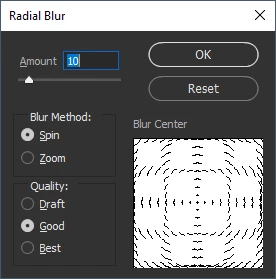
@neilg42 pressing the alt key on the radial blur dialog gives you the reset option

2026-01-20 14_08_20-Radial Blur.png

2 replies

Jeff Arola
Community Expert
Community Expert
January 20, 2026

If you use the Ctrl key (Cmd key on a Mac) that will reset the Radial Blur default settings.


rb.png

neilg42
neilg42Author
January 20, 2026

That's the one, thank you.

I still think that having an option to set the location directly on the image in the workspace would be a good thing.

Ged_Traynor
Community Expert
Ged_TraynorCommunity ExpertCorrect answer
Community Expert
January 20, 2026

@neilg42 pressing the alt key on the radial blur dialog gives you the reset option

2026-01-20 14_08_20-Radial Blur.png

neilg42
neilg42Author
January 20, 2026

Thank you. This does in part solve the issue, however, it resets to a previous setting, but does not revert to the original settings from the tool. That is the issue I have.