



Reset New Document Panel Location
This has been annoying me for ages, and I have spent a fair bit of time trying to resolve it.
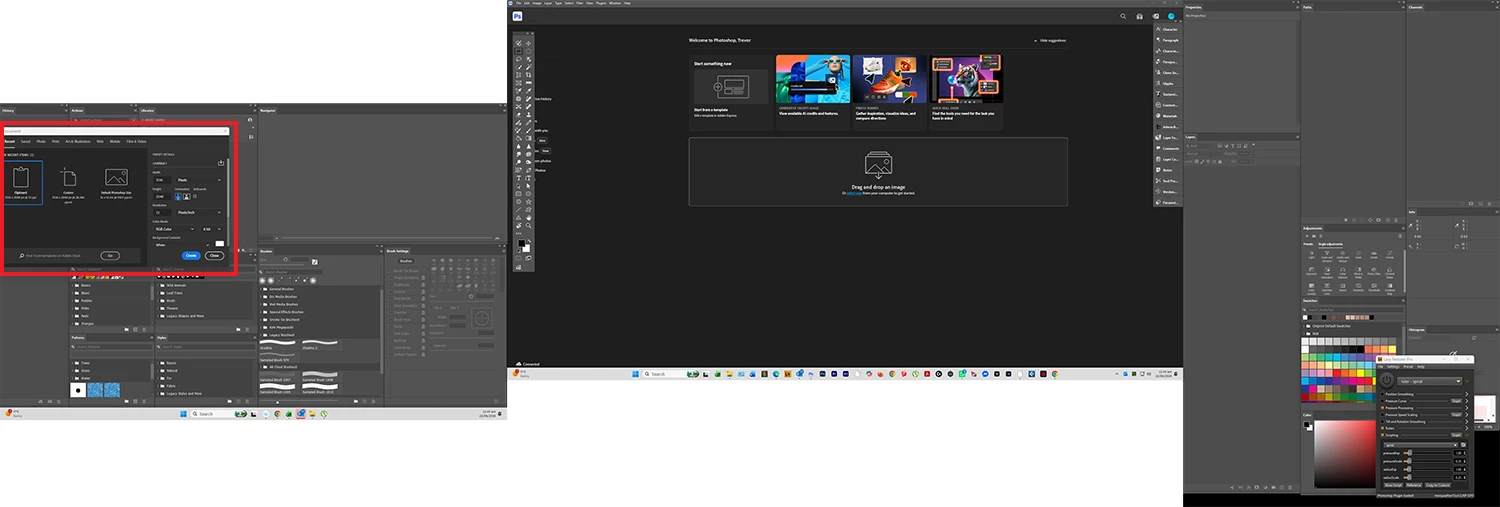
I like to use the modern New Document panel but it insists on parking itself way over on the left of my left (of three) screens.
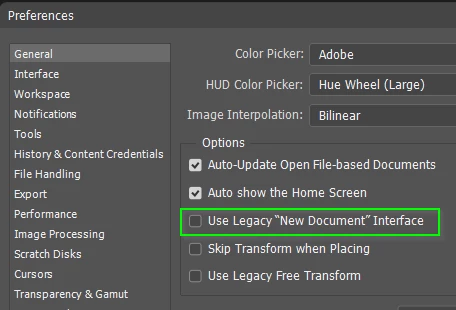
I obviously have Use Legacy New Document Interface unchecked.
I’ve reset preferences.
Tried different workspaces including Essentials (default) with everything on a single screen.
It only does this with the Beta version. The Release version works fine.
I’ve reset AppData \ Roaming \ Adobe \ CCX Welcome to CCX Welcome.old as per a suggestion in Google’s Ai summarizer
I’ve replaced all of the beta workspace .psp files with the same files from the release version.
I am reluctant to try doing the same with the preferences file because who knows what differences there between the versions? I’ve looked through and compared the Preferences and can’t see anything obviously different between them.

OK, I have now tried replacing the beta preferences with the release preferences. It didn’t update right after opening the beta version, but did when I closed it. I tried New Document at each stage, and it is still over on the left.
Any ideas guys? I could make do with the legacy panel, but I like the extra features.
It is probably not system specific because it only happens with the beta version.
I could try the nuclear option and delete the entire Settings folder. That will lose the custom workspaces, but I have them copied. OK, I tried that and it fixed it.
I’ve copied the workspace .psp files from release to beta Settings folder, and it has stayed fixed. I also had to copy Actions.psp across, but now everything is working. Something in the Settings file was amiss. There are a couple of likely candidates looking through the file names, but I’ve spent long enough on this, and it’s working now.
As a last thought, the act of writing this question and trying to demonstrate that I had tried to fix it, has led me to tracking down the problem. I’ll post this anyway, but add (Solved) to the subject line. (which I was not able to do :-( )
 AdChoices