Known Participant
Jul 15, 2026 10:08 AM UTC
Answered

restore the "Delete Hidden Layers" command in the Layers panel menu.

Please restore the "Delete Hidden Layers" command in the Layers panel menu.

In recent versions of Photoshop (27.8), the Delete Hidden Layers command has disappeared from the Layers panel menu. It used to be available directly from the panel and was an essential productivity feature for many professional users.

Removing this shortcut forces users to perform additional steps for a very common housekeeping task. This is a regression in usability rather than an improvement.

Please restore Delete Hidden Layers to the Layers panel menu, where it was for many years. It was easy to find, consistent with professional workflows, and saved valuable time when cleaning complex PSD files.

Many long-time Photoshop users rely on this command every day. Bringing it back would improve workflow efficiency at virtually no cost.

Thanks a lot in advance

Best regards

Cleo (senior art director and graphic designer with over 20 years of daily Photoshop use)

    Jeff Arola
    Jeff ArolaCorrect answer
    Community Expert
    Jul 15, 2026 2:31 PM UTC

    What operating system are you using?


    Have you checked under Edit>Menus>Panel>Menus>Layers to verify the Delete Hidden Layers menu item is not disabled?


    Could you post a screenshot of what your seeing?


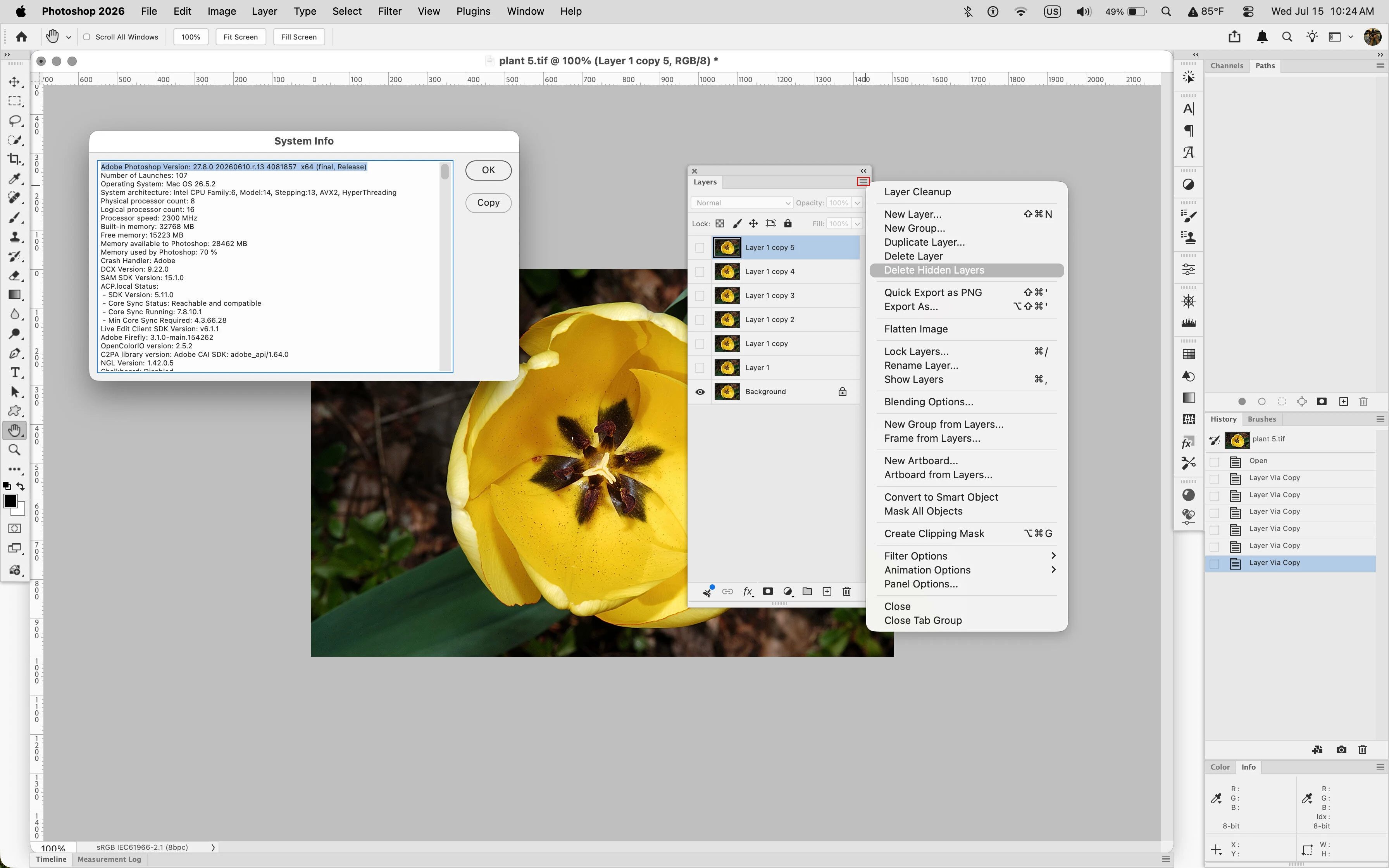
    Delete Hidden Layers still appears on the Layers panel fly-out menu here with Photoshop 2026 (ps ver 27.8) running on macOS Tahoe 26.5.2.


    8 replies

    Participant
    Oct 19, 2026 1:16 PM UTC

    The option is in the menu but is hidden because there is a hidden layer somewhere that is locked with "lock all attributes," and it is not possible to delete everything because that layer is also included.

    Translate
    Participant
    Oct 19, 2026 4:45 PM UTC

    Yes, that’s correct.
    Sorry for my misspelling

    Hidden, locked layers need hidden options!
    What new devilry is this XD


    Translate
    Participant
    Oct 15, 2026 9:59 AM UTC

    Notocen that If any hidden layer is locked delete hidden layers isn’t  available.

    Translate
    Jeff Arola
    Community Expert
    Community Expert
    Sep 16, 2026 7:50 PM UTC

    Where is Delete Hidden Layers missing from menus that it was before?


    Can you post screenshots that show Delete Hidden Layers is not on any of the Layers menus in Photoshop 2026 (ps ver 27.10)?

    Translate
    cbesett
    Inspiring
    Sep 16, 2026 8:47 PM UTC

    I think i figured out the issue.  If the Auto Select by Group is check on the top bar you will not see the Delete Hidden Layers.  I never have that checked but in some update it got checked and i didn’t notice.  As soon as I unchecked that -- the Delete Hidden Layers choice came back.

    Translate
    cbesett
    Inspiring
    Sep 16, 2026 6:42 PM UTC

    I agree -- I’m horrified this is missing.  And no the above solution didn’t help.

    Translate
    Jeff Arola
    Community Expert
    Jeff ArolaCommunity ExpertCorrect answer
    Community Expert
    Jul 15, 2026 2:31 PM UTC

    What operating system are you using?


    Have you checked under Edit>Menus>Panel>Menus>Layers to verify the Delete Hidden Layers menu item is not disabled?


    Could you post a screenshot of what your seeing?


    Delete Hidden Layers still appears on the Layers panel fly-out menu here with Photoshop 2026 (ps ver 27.8) running on macOS Tahoe 26.5.2.


    Translate
    robertw44482386
    Inspiring
    Jul 15, 2026 1:45 PM UTC

    Not that it is a solution but a temproary workaround could be to use the “Kind” dropdown at the top of the layers pallette and drop it to “Not Visible.” Then you can quickly select all layers (it will only show invisible layers at this point) and delete.

    Translate