
Participant
June 5, 2025
Question

Returning GPU unknown problem

  • June 5, 2025
  • 2 replies
  • 229 views

Version: Photoshop V 25.12.3 (V26.2 doesn't work either)

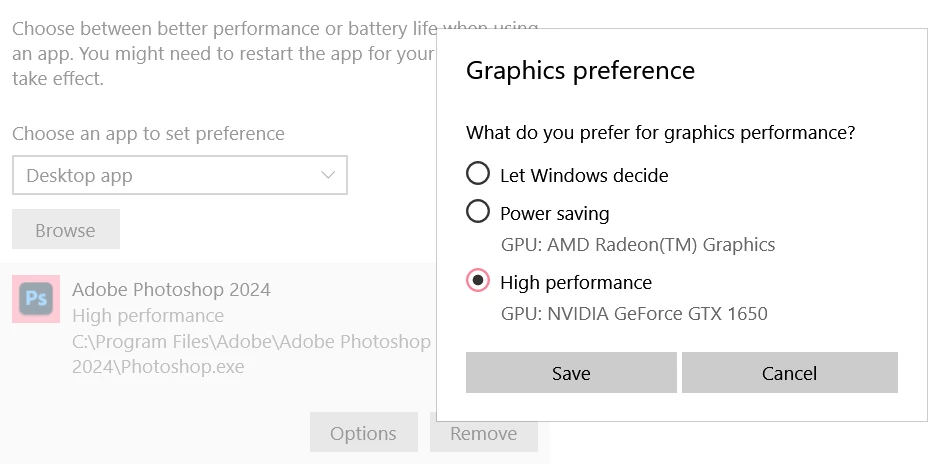
Platform: Lenovo Legion with Nvidia driver 576.52 (latest version)

Basic steps: Opening photoshop

Expected result: GPU supported
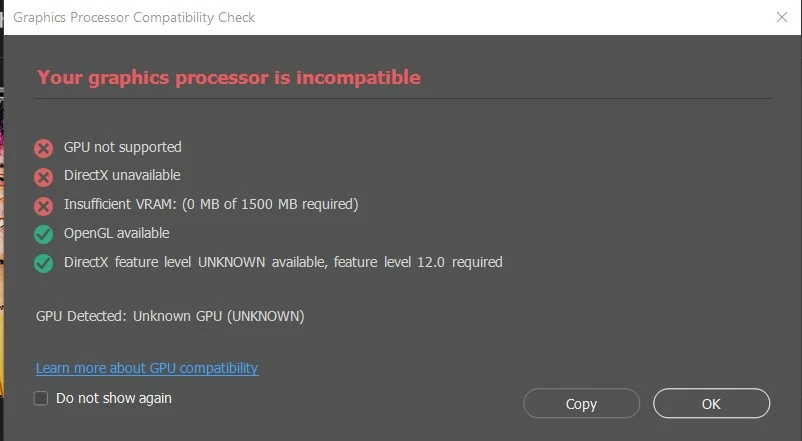
Actual result: GPU not supported, DirectX unavailable, Insufficient VRAM

The day I updated photoshop and updated my driver, it worked perfectly. Now the issue of my GPU nog being found is back.
I have tried following (https://helpx.adobe.com/photoshop/kb/troubleshoot-gpu-graphics-card.html#gpu-compatibility-check) but it doesn't work.
2 replies

AxelMatt
Community Expert
Community Expert
June 13, 2025

Unfortunately you haven't given us any further information about your system. Therefore, all proposed solutions are a look into the crystal ball.


Please provide a copy of your 'System Info'. This can be get from the Photoshop menu item Help > System Info. There's a copy button in the System Info dialog. Press this button and paste the info into your next forum post.


Is your system up-to-date? Do you have installed all recent updates and patches for the operating system and the device drivers, especially the graphic driver. Please make also sure that you have installed the Studio version and not the Game Ready version of your NVidia driver.


If you have buldin a CPU with an internal graphic processor disable the processor internal graphic card. The internal GPU can sometimes caused several issues. Open the Windows Device Manager, right-click the card's name and choose Disable.  


My System: Intel i7-8700K - 64GB RAM - NVidia Geforce RTX 3060 - Windows 11 Pro 25H2 -- LR-Classic 15 - Photoshop 27 - Nik Collection 8 - PureRAW 6 - Topaz Photo AI
Srishti_Bali
Legend
June 12, 2025

Hi @Kris33427769dq5h


Sorry to hear you're facing this issue. I hope it's been resolved by now — but if not, we’d be happy to help you troubleshoot further. Could you please share a few more details to help us better understand the situation?

  • Full system information (Help > System Info in Photoshop)

  • Operating system version — and whether any system updates were recently installed or are pending

  • Whether the latest GPU driver is installed.


Looking forward to your response!


Regards,

Srishti