Participating Frequently
November 8, 2021
Answered

RGB Colour displaying like CMYK in 2022 PSD

  • November 8, 2021
  • 18 replies
  • 1411 views

Can anyone tell me why there is such a difference in RGB colour from Photoshop 2021 to Photoshop 2022?
And more importntly how to fix it?
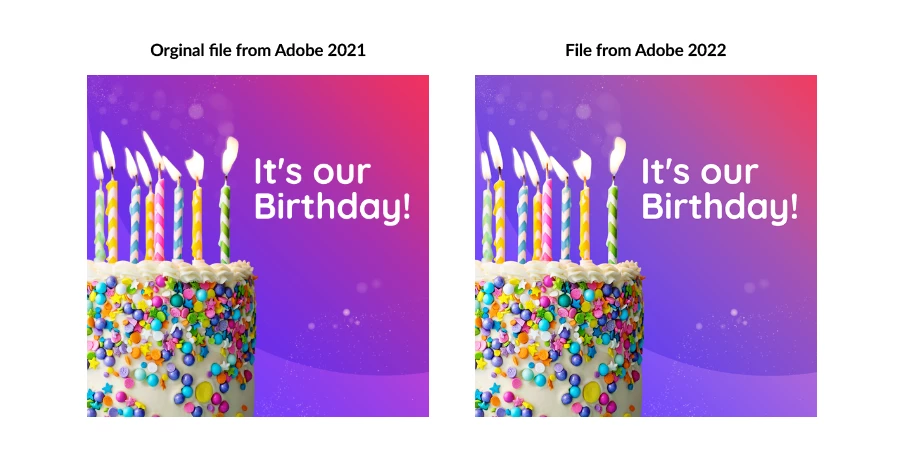
Below is a comparrisson image. Same file. One jpeg saved yesterday and one saved today


Correct answer Chain83
quote

If the PSD displays correctly in both versions, the jpgs should also display correctly, provided that you follow the exact same procedure in Save for Web, checking both Convert to sRGB and Embed profile.

But in a previous post you say that both jpgs are in Adobe RGB, so I'm confused.


By @Per Berntsen 


The problem isn't in the export (so not sure why that is even mentioned here as it just confuses things). In his screenshot you can see the two images look different in the two versions already when he opens them. So the problem is present when you open a document from the old version of Photoshop in the new version of Photoshop.


Specifically, the blending of the gradient differs. (Overall colors are correct).


This is because Adobe created the new "Perceptual" and "Linear" gradient modes in the latest update, but forgot to make gradients made in older versions default to "Classic". This means that all documents made in older versions of photoshop that use gradients will appear wrong in the new version. Yay.


18 replies

Participating Frequently
November 8, 2021

It's the same for both programs 

Legend
November 8, 2021

Next question; please show the settings you use to Save/Export the JPEG. Especially those related to profiles. 

Participating Frequently
November 8, 2021

Both are Saying "Adobe (1998) (8bpc)"

Per Berntsen
Community Expert
Community Expert
November 8, 2021

"Below is a comparrisson image. Same file. One jpeg saved yesterday and onesaved today"


So it's two different jpgs, right?

What is the embedded profile for each of these files?

Click the little arrow in the status bar and choose Document Profile to check.


Participating Frequently
November 8, 2021

Sorry mate, I thought they had uploaded as well. Here are the screen shots. The colour settings are exactly the same between the 2 photoshops. It was the first thing I looked at 

Legend
November 8, 2021

I only see two pictures, looking a little difference. Check, I don't see two sets of Colour Settings. 

Participating Frequently
November 8, 2021

It's the file attachemnt on the bottom of my post 🙂 

Legend
November 8, 2021

Please show screen shots of the colour settings in the two Photoshops.