Inspiring
April 28, 2026
Answered

Rotate object creates Glitched results

  • April 28, 2026
  • 71 replies
  • 557 views

I don’t think the rotate object feature is working correctly on my pc. I have Intel Arc graphics, and here’s an example of the results I’m getting when I test this with some stock images.


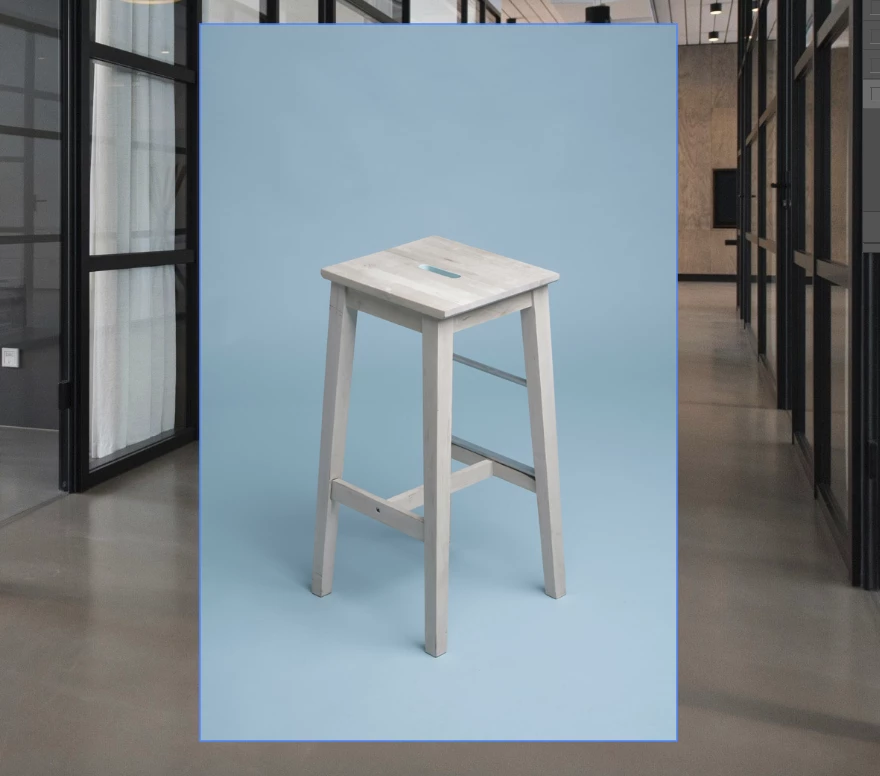
Source images before rotation
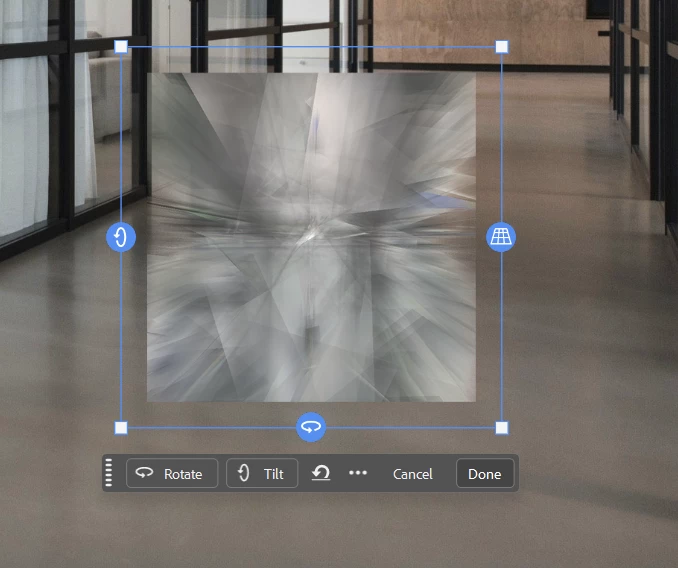
Image I’m trying to rotate

As you can see, after it processes the image to prepare for rotation, I just get a jumbled mess. I’ve tried this with a couple of different images and get the same type of result no matter what. I also made sure the images are 8 bit RGB as I saw those being requirements for the feature.


I’m just wondering if this is a problem with my machine or an actual bug in the software.

    Correct answer Sameer K

    Alright! 
    ​@FFSB - You’re working on a ARM-based Windows machine. Similar to the Remove Tool not being available for ARM devices, there could be a underlying gap in compatibility here. I am checking in with the team.

    ​@jamie_0983 - As per the System info, there could be two points of failure.

    1. Your machine only has an intergrated Intel HD Graphics adapter which may not be sufficient for the current and modern features. Please update the GPU drivers from Intel’s official website, or check if a discrete/dedicated GPU can be added to the machine. 
    2. A group of our user report failures across Remove Tool, & Select Subject if their Windows username contains non-ASCII / Unicode characters, such as yours C:\Users\JGILLH~1\
      Head here to learn more about this and find a possible workaround too: 


    ​@i-b-tex - Please check if the either of the above mentioned points help and let me know how it goes. Also, please do share the System info from Photoshop.


    ​@Jeronimo_Prosegur - I’ve merged your report here. Please check if either of the above mentioned points help. Your machine has two GPUs, Intel(R) UHD Graphics & NVIDIA Quadro T2000 with Max-Q Design. Please update the GPU drivers & then follow the steps n the content here to configure the default GPU for Photoshop: 


    Let me know how it goes. Thanks!
    Sameer K

    71 replies

    Participant
    May 13, 2026

    Same issue, I tried what has been told previously, not better, this function is not working.

    I have also enough credits in my enterprise account.

    Should I try to use the beta instead of release 27.6.0 ?

    Participant
    May 13, 2026

    Hi there, 

    I encountered the same problem.

    I had already contact with Adobe support and they checked my system.

    I have everything new installed, driver, creative cloud, new installation of PS without any plugins. But still the same error. 
    a friend of mine locked in on to my computer with his account and it worked perfectly.

    So, I’m really frustrated about this issue. 

    It should have something to do with my account. 
     

    Maybe somebody else has an answer for this problem

    I would appreciate it

    JellyBelly112
    Participant
    May 12, 2026

    ​@ah photography I also am running into this issue, were you able to resolve it?

    ah photography
    Participant
    May 12, 2026

    Not yet, but I just realized that sometimes it works and sometimes it doesn’t. I think it’s related to the docs. Also ngl, I tried it and the results were pretty bad, especially with people and animals, so I just ignored it and lost interest.
    There also haven’t really been many replies or discussions about it, except for Claire H.’s comment, which was somewhat helpful but still pretty limited.

    Abderrahmene
    Claire H.
    Community Manager
    Community Manager
    May 11, 2026

    Hi @rchanlv, Thanks for reaching out! Have you removed the background from your object before trying to rotate it? Here are the steps to rotating objects using the new tool in Photoshop:

    I hope this helps! ^CH

    Participant
    May 20, 2026

    I followed all this, updated to release 27.7.0 with the hope that the problem will be fixed, and I still get the same message “We’ve encountered an issue and can’t complete….. Thanks for your patience...” I am but I saw different users in Adobe Community having the same issue with this function. Could you tell us what’s wrong and how to correct please? I just want to mention that in my case, I have an enterprise licence. Thanks for your support.

    Claire H.
    Community Manager
    Community Manager
    May 20, 2026

    Hi ​@Pascal5C73, Sometimes certain functions are not enabled with enterprise accounts, so I recommend contacting your admin to double-check that you have access to all GenAI features. In the meantime, can you confirm a few things?

    • Ensure the image is in RGB color mode and 8-bit/channel. You can do this by selecting Image > Mode in Photoshop.
    • Go to Edit > Preferences > Performance in Photoshop and ensure that the Use Graphics Processor option is enabled.

    Meanwhile, you can try resetting Photoshop's preferences using the steps here: https://adobe.ly/4jmvs7u. Please back up your settings before resetting the preferences. You can check:  https://adobe.ly/3YW1WOu. If none of these steps work, let us know, and we can continue troubleshooting. I hope this helps!

    rchanlv
    Participant
    May 11, 2026

    Hello,


    I have the latest version of Photoshop installed. I did made sure the file was at RGB 8-bits. I selected image, pressed crtl+T, and clicked the Rotate Object button from the Contextual Task Bar. A pop up window with message “Finding the subject in the image...” then “Preparing rotatable object...” After that, nonthing happened. I didn’t see any new anchors on the image that allow me to rotate the image as if it went back to normal free transform anchors. Does anyone know why would Photoshop acts like this?

    I am using MacBook Pro with M4 Max chip.


    Nancy OShea
    Community Expert
    Community Expert
    May 5, 2026
    1. Right-click the Start menu and select Device Manager
    2. Expand Display adapters to see your graphics card(s).
    3. Right-click your graphics card and select Update driver.
    4. Choose Search automatically for updated driver software. Windows will search online and install the latest driver.
    5. Restart your computer once the update completes.
      You can also reinstall or roll back drivers if needed by selecting Uninstall device or Properties > Driver > Roll Back Driver in Device Manager.

    Using Manufacturer Software

    For NVIDIA, AMD, or Intel graphics cards, you can use their dedicated software:

    • NVIDIA: Download drivers from the NVIDIA Drivers page or use GeForce Experience to automatically detect and install updates 
    • AMD: Use AMD Radeon Software to check for updates and install the latest drivers.
    • Intel: Use Intel Driver & Support Assistant to detect and update Intel graphics drivers.

    Tips and Precautions

    • Create a System Restore Point before updating drivers to revert changes if issues occur 
    • Close unnecessary applications during installation to prevent conflicts.
    • Check for multiple graphics adapters (e.g., integrated Intel and discrete NVIDIA) and update both if applicable 
    • Regularly updating drivers ensures better performance, bug fixes, and compatibility with software & games. 


    Nancy O'Shea— Product User & Community Expert
    Claire H.
    Community Manager
    Community Manager
    May 5, 2026

    Hi @ah photography, Thanks for reaching out! Let's try a few things to get this fixed:

    1. Check Generative Credits Balance: Rotate Object costs 20 credits per use

    2. The layer must contain a single object with background removed (transparency around the object). Must have an active layer selection in the Layers panel.

    3. Try manually resetting your Photoshop preferences: https://adobe.ly/4thfDDU. Remember to back up your settings before doing the preference reset: https://adobe.ly/4thq5ve


    Can you try with a completely different, simple object (e.g., a coffee mug, a shoe, a vase) to confirm whether the issue is image-specific? ^CH

    ah photography
    Participant
    May 5, 2026

    hello Claire thanks for the reply 
    -I can confirm that I have enough credit to do tha task
    -the layer it does contain only subject with transparency Alpha and active in the layer panel (u cant even transform tool if tha layer wasn't active tho).
    -I tried on different image size like 1k,2k,4k / 16:9 or 4:5 it didn’t work 


    Abderrahmene
    Participant
    May 20, 2026

    Same to me, same problem with the new release 27.7.0.

    Any help on this?


    I even tried with a banana, an object all Youtubers used for the demo.

    So it worked for some guys, why is it not working for us...

    ah photography
    Participant
    May 5, 2026

    hi folks, when i try to rotate obect inside photoshop I get toast says : 
    “We encountered an issue with your results. Please
    view our guidelines and try again”.
    I have tried a workarounds from my end but didn’t fix the issue
    like:
    -Convert it to smart object 
    -resterize the layer
    -chenge Document Color mode RGB 8bit, 16Bit 
    i tried other features like generative fill, harmonize etc.. it does work meaning no connection issue bfom my end

    Im on Photoshop Official Release 27.6.0, not beta 


    Abderrahmene
    CMass
    Community Manager
    Community Manager
    May 4, 2026

    Hey @jt20042,

    I understand how this can feel confusing when you’re not quite sure what steps to take—I’m happy to help you through it.

    Could you share your System Info? You can find it by going to Help > System Info. Once it opens, please copy the full details into a text file and attach it to your reply. That will help me take a closer look and guide you more accurately.


    ^CM

    Participating Frequently
    May 5, 2026

    Sorry for taking so long, here’s my information.:


    Adobe Photoshop Version: 27.6.0 20260422.r.11 4804c18  x64 (final, Release)
    Number of Launches: 13
    Operating System: Windows 11 64-bit
    Version: 11 or greater 10.0.26200.8328
    System architecture: Intel CPU Family:6, Model:10, Stepping:3, AVX2, AVX-VNNI, HybridCPU(2:8), HyperThreading
    Physical processor count: 10
    Logical processor count: 12
    Processor speed: 2611 MHz
    Built-in memory: 16025 MB
    Free memory: 10262 MB
    Memory available to Photoshop: 11796 MB
    Memory used by Photoshop: 70 %
    Crash Handler: Adobe
    DCX Version: 9.22.0
    SAM SDK Version: 15.1.0
    ACP.local Status:
     - SDK Version: 5.11.0
     - Core Sync Status: Reachable and compatible
     - Core Sync Running: 7.8.10.1
     - Min Core Sync Required: 4.3.66.28
    Live Edit Client SDK Version: v6.1.1
    Adobe Firefly: Please use any generative AI feature to view the latest version.
    OpenColorIO version: 2.4.2
    C2PA library version: Adobe CAI SDK: adobe_api/1.22.3
    NGL Version: 1.42.0.5
    Chalkboard: Disabled.
    Chalkboard Doc Create: Disabled.
    D3D12Warp renderer: Disabled.
    Precise Color Management for HDR Display: Disabled.
    Alias Layers: Disabled.
    Highbeam: Enabled.
    Image tile size: 1024K
    Image cache levels: 4
    Font Preview: Large
    HarfBuzz Version: 11.0.0
    TextEngine: ATE 7.11.0 (9f0ecee)
     ======= GPU
    Native API stable: True
    OpenCL API stable: True
    GPUDeny:               0
    GPUForce:              0
    useGPU:                1
    useOpenCL:             1
    isGPUCapable:          1
    isGPUAllowed:          1
    GPUName:               Intel(R) Graphics
    GPUVendor:             INTEL
    Intel(R) Graphics  UNKNOWN, INTEL
    IsNativeGPUCapable:    1
    IsOpenCLGPUCapable:    1
    HasSufficientRAM:      1
      GPU accessible RAM:                 8,529 MB
      Required GPU accessible RAM:        1,500 MB
    UseGraphicsProcessorChecked:   1
    UseOpenCLChecked:              1
    Windows remote desktop:  0
    Windows available feature level:     12.1
    Windows required feature level:      12.0
    Windows has required feature level:  1
    Display: 1
      Display Bounds: (0, 0) -> (1920, 1080)
      Display scale: 1.25
      Main Display
      Display Type: SDR
      Display Profile: sRGB IEC61966-2.1
     ------- Sniffer output
    [0 ms]
      Launch GPUSnifferThread

    [0 ms]
      Start RunAllAPIs

    [0 ms]
      C:\Program Files\Adobe\Adobe Photoshop 2026\sniffer.exe -baseTimeMS=83733383 -comment=Photoshop Version: Adobe Photoshop 27.6.0 20260422.r.11 4804c18 x64

    [1 ms]
      Start GetSnifferResult

    [594 ms]
      Start sniffer 2026-05-05 14:14:55
      # Photoshop Version: Adobe Photoshop 27.6.0 20260422.r.11 4804c18 x64
      C:\Program Files\Adobe\Adobe Photoshop 2026\sniffer.exe -baseTimeMS=83733383 -comment=Photoshop Version: Adobe Photoshop 27.6.0 20260422.r.11 4804c18 x64
      
      {69 ms}
      Start platform native
        # displays:                   1
        Display 0
          Display:                      \\.\DISPLAY1
          Main:                         TRUE
          Built in:                     FALSE
          Stereo:                       FALSE
          Bounds:                       (0, 0) -> (1,920, 1,080)
          Dimensions:                   (1,920 1,080)
          Display scale:                1.25
          Physical size:                (0 0)
          Pixel size:                   (0 0)
          Dynamic range:                (0 1)
          Attached Device:              (DeviceID name=Intel(R) Graphics index=0)
        
        # devices:                    1
        Device 0
          Name:                         Intel(R) Graphics
          Preferred:                    TRUE
          Power Envelope:               UNKNOWN
          Attachment:                   UNKNOWN
          # attached displays:          1
            \\.\DISPLAY1
          GPU accessible RAM:                8,529 MB
          VRAM:                                128 MB
          Dedicated System RAM:                  0 MB
          Shared System RAM:                 8,401 MB
          API version:                  12.1 (12.1)
          Device version:               12.0 (12.0)
          Vendor name:                  INTEL
          Driver date:                  2025-09-12  000000.000000-000
          Driver age:                   8 months
          Driver version:               32.0.101.7076
          Supports UMA:                 SUPPORTED
          D3D-ID:                       42924
      End platform native
      {145 ms}
      
      {145 ms}
      Start platform OpenCL
        # displays:                   0
        
        # devices:                    1
        Device 0
          Name:                         Intel(R) Graphics
          Preferred:                    TRUE
          Power Envelope:               INTEGRATED
          Attachment:                   UNKNOWN
          # attached displays:          0
          GPU accessible RAM:                7,425 MB
          VRAM:                              7,425 MB
          Dedicated System RAM:                  0 MB
          Shared System RAM:                     0 MB
          API version:                  3.0 (OpenCL 3.0 )
          Device version:               3.0 (OpenCL 3.0 NEO )
          Vendor name:                  INTEL
          Driver date:                  UNKNOWN
          Driver age:                   UNKNOWN
          Driver version:               UNKNOWN
          Bandwidth:                    58 GB / s
          Compute score:                768.676
          Device name string:           Intel(R) Graphics
          Device vendor string:         Intel(R) Corporation
          Platform name string:         Intel(R) OpenCL Graphics
          Platform vendor string:       Intel(R) Corporation
      End platform OpenCL
      {556 ms}
      
      Exit code kExitNormal
      End sniffer 2026-05-05 14:14:55
    [kStatusNormal, kExitNormal]

    [595 ms]
      Finish RunAllAPIs

    [596 ms]
      Finish GetSnifferResult

     ------- Sniffer output
     ======= GPU
    License Type: Subscription
    Serial number: 90970013141689528511
    GUIDBucket: 
    Composite Core GPU (comp_core_gpu): on 
    Composite Core Threads (MultithreadedCompositing): on 
    Composite Core UI (CompositingDocumentTabUI): off 
    Composite Core Feature Prefs (CompCoreFeaturePrefs): off 

    Application folder: C:\Program Files\Adobe\Adobe Photoshop 2026\
    Temporary file path: C:\Users\jt200\AppData\Local\Temp\
    Photoshop scratch has async I/O enabled
    Scratch volume(s):
      Startup, 475.8G, 362.5G free
    Required Plugins folder: C:\Program Files\Adobe\Adobe Photoshop 2026\Required\Plug-ins\
    Primary Plugins folder: C:\Program Files\Adobe\Adobe Photoshop 2026\Plug-ins\

    Installed components:
       ACE.dll   ACE 2026/03/16-15:31:09   26.G.363513f   26.G.363513f
       act_tracing.dll   Adobe Common Toolkit   1.0.70   
       AdobeGrowthSDK.dll   Adobe Growth SDK   1.4.0.206   
       AdobeLinguistic.dll   Adobe Linguistic Library   69ef127   
       AdobeOwl.dll   Adobe Owl   5.5.0   
       AdobePDFL.dll   PDFL 2026/03/10-19:11:41   26.G.a61aa2c   26.G.a61aa2c
       AdobePIP.dll   Adobe Product Improvement Program   8.2.0.16   
       AdobeSVGAGM.dll   AdobeSVGAGM   26.G.76b11ac   26.G.76b11ac
       AdobeXMP.dll   Adobe XMP Core 2025/12/08-20:50:21   25.G.d20e466   25.G.d20e466
       AdobeXMPFiles.dll   Adobe XMP Files 2025/12/08-20:50:21   25.G.d20e466   25.G.d20e466
       AGM.dll   AGM 2026/03/16-15:31:09   26.G.363513f   26.G.363513f
       AID.dll   AID DLL   1.0.0.58   
       AIDE.dll   AIDE 2026/03/17-10:23:39   26.G.9e4b1c4   26.G.9e4b1c4
       aifm.dll   AIFM   1.0   23.68434
       AILib.dll   Adobe Illustrator 2026   30.0.0   
       aiport.dll   AIPort   1.0   23.68434
       ARE.dll   ARE 2026/03/16-15:31:09   26.G.363513f   26.G.363513f
       AXE8SharedExpat.dll   AXE8SharedExpat 2025/12/15-18:34:26   25.G.64f06ab   25.G.64f06ab
       AXEDOMCore.dll   AXEDOMCore 2025/12/15-18:34:26   25.G.64f06ab   25.G.64f06ab
       BIB.dll   BIB 2026/03/16-15:31:09   26.G.363513f   26.G.363513f
       BIBUtils.dll   BIBUtils 2026/03/16-15:31:09   26.G.363513f   26.G.363513f
       concrt140.dll   Microsoft® Visual Studio®   14.42.34438.0   
       CoolType.dll   CoolType 2026/03/16-15:31:09   26.G.363513f   26.G.363513f
       CRClient.dll   Adobe Crash Reporter Client DLL   26.5.0.202506270759_7140322   
       cudart64_12.dll   NVIDIA CUDA 12.4.127 Runtime   6,14,11,12040   
       DirectML.dll   DirectML Redistributable Library   1.15.4+241025-1615.1.dml-1.15.fac7597   
       dnssd.dll   Bonjour   3,0,0,2   
       dvaaccelerate.dll   Adobe DVA 2025   25.2.0   
       dvaadameve.dll   Adobe DVA 2025   25.2.0   
       dvaappsupport.dll   Adobe DVA 2025   25.2.0   
       dvaaudiodevice.dll   Adobe DVA 2025   25.2.0   
       dvaaudiotoolkit.dll   Adobe DVA 2025   25.2.0   
       dvacore.dll   Adobe DVA 2025   25.2.0   
       dvacrashhandler.dll   Adobe DVA 2025   25.2.0   
       dvaevefactory.dll   Adobe DVA 2025   25.2.0   
       dvamarshal.dll   Adobe DVA 2025   25.2.0   
       dvamediatypes.dll   Adobe DVA 2025   25.2.0   
       dvametadata.dll   Adobe DVA 2025   25.2.0   
       dvametadataapi.dll   Adobe DVA 2025   25.2.0   
       dvametadataUI.dll   Adobe DVA 2025   25.2.0   
       dvanet.dll   Adobe DVA 2025   25.2.0   
       dvaplayer.dll   Adobe DVA 2025   25.2.0   
       dvascripting.dll   Adobe DVA 2025   25.2.0   
       dvastorage.dll   Adobe DVA 2025   25.2.0   
       dvatemporalxmp.dll   Adobe DVA 2025   25.2.0   
       dvatransport.dll   Adobe DVA 2025   25.2.0   
       dvaui.dll   Adobe DVA 2025   25.2.0   
       dvauxphost.dll   Adobe DVA 2025   25.2.0   
       dvauxpui.dll   Adobe DVA 2025   25.2.0   
       dvavulcansupport.dll   Adobe DVA 2025   25.2.0   
       dvaworkspace.dll   Adobe DVA 2025   25.2.0   
       dynamic-torqnative.dll   Unified Extensibility Platform   uxp-9.2.0-uxp   
       dynamiclink.dll   Adobe DVA 2025   25.2.0   
       ExtendScript.dll   ExtendScript 2022/08/18-12:50:45   82.4   82.4
       filterport.dll   FilterPort   1.1   BUILDVERSION
       icucnv77.dll   International Components for Unicode    Build 14.3.3.9087c7c   
       icuin77.dll   International Components for Unicode    Build 14.3.3.9087c7c   
       icuuc77.dll   International Components for Unicode    Build 14.3.3.9087c7c   
       ippcc.dll   ippCC. Intel(R) Integrated Performance Primitives. Color Conversion.   2021.6 (r0xbffe3c5b)   
       ippcck0.dll   ippCC. Intel(R) Integrated Performance Primitives. Color Conversion.   2021.6 (r0xbffe3c5b)   
       ippccl9.dll   ippCC. Intel(R) Integrated Performance Primitives. Color Conversion.   2021.6 (r0xbffe3c5b)   
       ippccy8.dll   ippCC. Intel(R) Integrated Performance Primitives. Color Conversion.   2021.6 (r0xbffe3c5b)   
       ippcore.dll   core. Intel(R) Integrated Performance Primitives. Core Library.   2021.6 (r0xbffe3c5b)   
       ippcv.dll   ippCV. Intel(R) Integrated Performance Primitives. Computer Vision.   2021.6 (r0xbffe3c5b)   
       ippcvk0.dll   ippCV. Intel(R) Integrated Performance Primitives. Computer Vision.   2021.6 (r0xbffe3c5b)   
       ippcvl9.dll   ippCV. Intel(R) Integrated Performance Primitives. Computer Vision.   2021.6 (r0xbffe3c5b)   
       ippcvy8.dll   ippCV. Intel(R) Integrated Performance Primitives. Computer Vision.   2021.6 (r0xbffe3c5b)   
       ippi.dll   ippIP. Intel(R) Integrated Performance Primitives. Image Processing.   2021.6 (r0xbffe3c5b)   
       ippik0.dll   ippIP. Intel(R) Integrated Performance Primitives. Image Processing.   2021.6 (r0xbffe3c5b)   
       ippil9.dll   ippIP. Intel(R) Integrated Performance Primitives. Image Processing.   2021.6 (r0xbffe3c5b)   
       ippiy8.dll   ippIP. Intel(R) Integrated Performance Primitives. Image Processing.   2021.6 (r0xbffe3c5b)   
       ipps.dll   ippSP. Intel(R) Integrated Performance Primitives. Signal Processing.   2021.6 (r0xbffe3c5b)   
       ippsk0.dll   ippSP. Intel(R) Integrated Performance Primitives. Signal Processing.   2021.6 (r0xbffe3c5b)   
       ippsl9.dll   ippSP. Intel(R) Integrated Performance Primitives. Signal Processing.   2021.6 (r0xbffe3c5b)   
       ippsy8.dll   ippSP. Intel(R) Integrated Performance Primitives. Signal Processing.   2021.6 (r0xbffe3c5b)   
       ippvm.dll   ippVM. Intel(R) Integrated Performance Primitives. Vector Math.   2021.6 (r0xbffe3c5b)   
       ippvmk0.dll   ippVM. Intel(R) Integrated Performance Primitives. Vector Math.   2021.6 (r0xbffe3c5b)   
       ippvml9.dll   ippVM. Intel(R) Integrated Performance Primitives. Vector Math.   2021.6 (r0xbffe3c5b)   
       ippvmy8.dll   ippVM. Intel(R) Integrated Performance Primitives. Vector Math.   2021.6 (r0xbffe3c5b)   
       JP2KLib.dll   JP2KLib 2025/12/10-16:41:35   25.G.5526fbf   25.G.5526fbf
       libcrypto-3-x64.dll   The OpenSSL Toolkit   3.0.19   
       libifcoremd.dll   Intel(r) Visual Fortran Compiler   10.0 (Update A)   
       libiomp5md.dll   Intel(R) OpenMP* Runtime Library   5.0   
       libmmd.dll   Intel(R) C/C++/Fortran Compiler   Mainline   
       libssl-3-x64.dll   The OpenSSL Toolkit   3.0.19   
       LogSession.dll   LogSession   8.2.0.16   
       mediacoreif.dll   Adobe DVA 2025   25.2.0   
       mfc140.dll   Microsoft® Visual Studio®   14.42.34438.0   
       mfc140chs.dll   Microsoft® Visual Studio®   14.42.34438.0   
       mfc140cht.dll   Microsoft® Visual Studio®   14.42.34438.0   
       mfc140deu.dll   Microsoft® Visual Studio®   14.42.34438.0   
       mfc140enu.dll   Microsoft® Visual Studio®   14.42.34438.0   
       mfc140esn.dll   Microsoft® Visual Studio®   14.42.34438.0   
       mfc140fra.dll   Microsoft® Visual Studio®   14.42.34438.0   
       mfc140ita.dll   Microsoft® Visual Studio®   14.42.34438.0   
       mfc140jpn.dll   Microsoft® Visual Studio®   14.42.34438.0   
       mfc140kor.dll   Microsoft® Visual Studio®   14.42.34438.0   
       mfc140rus.dll   Microsoft® Visual Studio®   14.42.34438.0   
       mfc140u.dll   Microsoft® Visual Studio®   14.42.34438.0   
       mfcm140.dll   Microsoft® Visual Studio®   14.42.34438.0   
       mfcm140u.dll   Microsoft® Visual Studio®   14.42.34438.0   
       mkl_avx2.2.dll   Intel(R) oneAPI Math Kernel Library   2022.1   
       mkl_avx512.2.dll   Intel(R) oneAPI Math Kernel Library   2022.1   
       mkl_core.2.dll   Intel(R) oneAPI Math Kernel Library   2022.1   
       mkl_def.2.dll   Intel(R) oneAPI Math Kernel Library   2022.1   
       mkl_mc3.2.dll   Intel(R) oneAPI Math Kernel Library   2022.1   
       mkl_sequential.2.dll   Intel(R) oneAPI Math Kernel Library   2022.1   
       mkl_vml_avx2.2.dll   Intel(R) oneAPI Math Kernel Library   2022.1   
       mkl_vml_avx512.2.dll   Intel(R) oneAPI Math Kernel Library   2022.1   
       mkl_vml_def.2.dll   Intel(R) oneAPI Math Kernel Library   2022.1   
       mkl_vml_mc3.2.dll   Intel(R) oneAPI Math Kernel Library   2022.1   
       MPS.dll   MPS 2026/03/13-21:58:34   26.G.1e11f13   26.G.1e11f13
       msvcp140.dll   Microsoft® Visual Studio®   14.42.34438.0   
       msvcp140_1.dll   Microsoft® Visual Studio®   14.42.34438.0   
       msvcp140_2.dll   Microsoft® Visual Studio®   14.42.34438.0   
       msvcp140_atomic_wait.dll   Microsoft® Visual Studio®   14.42.34438.0   
       msvcp140_codecvt_ids.dll   Microsoft® Visual Studio®   14.42.34438.0   
       onnxruntime.dll   Microsoft® Windows® Operating System   1.23.0   
       onnxruntime_providers_openvino.dll   Microsoft® Windows® Operating System   1.23.0   
       onnxruntime_providers_shared.dll   Microsoft® Windows® Operating System   1.23.0   
       opencv_world4120.dll   OpenCV library   4.12.0   
       openvino.dll   OpenVINO toolkit   2025.2.1-19180-b76ccb46ae6-epalmer/2025_2_patch_mem_weights   
       openvino_auto_batch_plugin.dll   OpenVINO toolkit   2025.2.1-19180-b76ccb46ae6-epalmer/2025_2_patch_mem_weights   
       openvino_auto_plugin.dll   OpenVINO toolkit   2025.2.1-19180-b76ccb46ae6-epalmer/2025_2_patch_mem_weights   
       openvino_c.dll   OpenVINO toolkit   2025.2.1-19180-b76ccb46ae6-epalmer/2025_2_patch_mem_weights   
       openvino_hetero_plugin.dll   OpenVINO toolkit   2025.2.1-19180-b76ccb46ae6-epalmer/2025_2_patch_mem_weights   
       openvino_intel_cpu_plugin.dll   OpenVINO toolkit   2025.2.1-19180-b76ccb46ae6-epalmer/2025_2_patch_mem_weights   
       openvino_intel_gpu_plugin.dll   OpenVINO toolkit   2025.2.1-19180-b76ccb46ae6-epalmer/2025_2_patch_mem_weights   
       openvino_intel_npu_plugin.dll   OpenVINO toolkit   2025.2.1-19180-b76ccb46ae6-epalmer/2025_2_patch_mem_weights   
       openvino_onnx_frontend.dll   OpenVINO toolkit   2025.2.1-19180-b76ccb46ae6-epalmer/2025_2_patch_mem_weights   
       pdfport.dll   PDFPort 2020/11/19-11:34:27   79.625377   79.625377
       Plugin.dll   Adobe Photoshop 2026   27.6   
       PlugPlugExternalObject.dll   Adobe(R) CEP PlugPlugExternalObject Standard Dll (64 bit)   12.0.0   
       PlugPlugOwl.dll   Adobe(R) CSXS PlugPlugOwl Standard Dll (64 bit)   12.0.0.14   
       PSCloud.dll                                                   1.0.0.1   
       PSRes.dll   Adobe Photoshop 2026   27.6   
       PSViews.dll   Adobe Photoshop 2026   27.6   
       ScCore.dll   ScCore 2022/08/18-12:50:45   82.4   82.4
       SVGRE.dll   SVGRE   26.G.26f6fc0   26.G.26f6fc0
       svml_dispmd.dll   Intel(R) C/C++/Fortran Compiler   Mainline   
       vcamp140.dll   Microsoft® Visual Studio®   14.42.34438.0   
       vccorlib140.dll   Microsoft® Visual Studio®   14.42.34438.0   
       vcomp140.dll   Microsoft® Visual Studio®   14.42.34438.0   
       vcruntime140.dll   Microsoft® Visual Studio®   14.42.34438.0   
       vcruntime140_1.dll   Microsoft® Visual Studio®   14.42.34438.0   
       vcruntime140_threads.dll   Microsoft® Visual Studio®   14.42.34438.0   
       VulcanControl.dll   Vulcan Application Control Library   7.2.0.34   
       VulcanMessage5.dll   Vulcan Message Library   7.2.0.34   
       WinRTSupport.dll   Adobe Photoshop Windows RT Support   1.0.1.0   
       Unified Extensibility Platform  uxp-9.2.0-uxp
       UPIC  2.6.0


    Required plugins:

       Accented Edges 27.6 - from the file “Filter Gallery.8bf”
       Adaptive Wide Angle 27.6 - from the file “Adaptive Wide Angle.8bf”
       Angled Strokes 27.6 - from the file “Filter Gallery.8bf”
       Average 27.6 - from the file “Average.8bf”
       Bas Relief 27.6 - from the file “Filter Gallery.8bf”
       BMP 27.6 - from the file “Standard MultiPlugin.8bf”
       Camera Raw 18.3 - from the file “Camera Raw.8bi”
       Camera Raw Filter 18.3 - from the file “Camera Raw.8bi”
       Chalk && Charcoal 27.6 - from the file “Filter Gallery.8bf”
       Charcoal 27.6 - from the file “Filter Gallery.8bf”
       Chrome 27.6 - from the file “Filter Gallery.8bf”
       Cineon 27.6 - from the file “Cineon.8bi”
       Clouds 27.6 - from the file “Clouds.8bf”
       Color Halftone 27.6 - from the file “Standard MultiPlugin.8bf”
       Colored Pencil 27.6 - from the file “Filter Gallery.8bf”
       Conté Crayon 27.6 - from the file “Filter Gallery.8bf”
       Craquelure 27.6 - from the file “Filter Gallery.8bf”
       Crop and Straighten Photos 27.6 - from the file “CropPhotosAuto.8li”
       Crop and Straighten Photos Filter 27.6 - from the file “Standard MultiPlugin.8bf”
       Crosshatch 27.6 - from the file “Filter Gallery.8bf”
       Crystallize 27.6 - from the file “Standard MultiPlugin.8bf”
       Cutout 27.6 - from the file “Filter Gallery.8bf”
       Dark Strokes 27.6 - from the file “Filter Gallery.8bf”
       De-Interlace 27.6 - from the file “Standard MultiPlugin.8bf”
       Dicom 27.6 - from the file “Dicom.8bi”
       Difference Clouds 27.6 - from the file “Clouds.8bf”
       Diffuse Glow 27.6 - from the file “Filter Gallery.8bf”
       Displace 27.6 - from the file “Standard MultiPlugin.8bf”
       Dry Brush 27.6 - from the file “Filter Gallery.8bf”
       Entropy 27.6 - from the file “statistics.8ba”
       Export Color Lookup Tables 27.6 - from the file “Export3DLUT.8be”
       Extrude 27.6 - from the file “Standard MultiPlugin.8bf”
       Fibers 27.6 - from the file “Standard MultiPlugin.8bf”
       Film Grain 27.6 - from the file “Filter Gallery.8bf”
       Filter Gallery 27.6 - from the file “Filter Gallery.8bf”
       Fresco 27.6 - from the file “Filter Gallery.8bf”
       Glass 27.6 - from the file “Filter Gallery.8bf”
       Glowing Edges 27.6 - from the file “Filter Gallery.8bf”
       Grain 27.6 - from the file “Filter Gallery.8bf”
       Graphic Pen 27.6 - from the file “Filter Gallery.8bf”
       Halftone Pattern 27.6 - from the file “Filter Gallery.8bf”
       Halide Bottlenecks 27.6 - from the file “HalideBottlenecks.8bx”
       HDRMergeUI 27.6 - from the file “HDRMergeUI.8bf”
       HSB/HSL 27.6 - from the file “Standard MultiPlugin.8bf”
       IFF Format 27.6 - from the file “Standard MultiPlugin.8bf”
       Ink Outlines 27.6 - from the file “Filter Gallery.8bf”
       JPEG 2000 27.6 - from the file “JPEG2000.8bi”
       Kurtosis 27.6 - from the file “statistics.8ba”
       Lens Blur 27.6 - from the file “Lens Blur.8bf”
       Lens Correction 27.6 - from the file “Lens Correction.8bf”
       Lens Flare 27.6 - from the file “Standard MultiPlugin.8bf”
       Liquify 27.6 - from the file “Liquify.8bf”
       Matlab Operation 27.6 - from the file “ChannelPort.8bf”
       Maximum 27.6 - from the file “statistics.8ba”
       Mean 27.6 - from the file “statistics.8ba”
       Measurement Core 27.6 - from the file “MeasurementCore.8me”
       Median 27.6 - from the file “statistics.8ba”
       Mezzotint 27.6 - from the file “Standard MultiPlugin.8bf”
       Minimum 27.6 - from the file “statistics.8ba”
       Mosaic Tiles 27.6 - from the file “Filter Gallery.8bf”
       Multiprocessor Support 27.6 - from the file “MultiProcessor Support.8bx”
       Neon Glow 27.6 - from the file “Filter Gallery.8bf”
       Note Paper 27.6 - from the file “Filter Gallery.8bf”
       NTSC Colors 27.6 - from the file “NTSC Colors.8bf”
       Ocean Ripple 27.6 - from the file “Filter Gallery.8bf”
       OpenEXR 27.6 - from the file “Standard MultiPlugin.8bf”
       Paint Daubs 27.6 - from the file “Filter Gallery.8bf”
       Palette Knife 27.6 - from the file “Filter Gallery.8bf”
       Parametric Filter NO VERSION - from the file “MaterialFilter.8bf”
       Patchwork 27.6 - from the file “Filter Gallery.8bf”
       Paths to Illustrator 27.6 - from the file “Standard MultiPlugin.8bf”
       PCX 27.6 - from the file “PCX.8bi”
       Photocopy 27.6 - from the file “Filter Gallery.8bf”
       Picture Package Filter 27.6 - from the file “ChannelPort.8bf”
       Pinch 27.6 - from the file “Standard MultiPlugin.8bf”
       Pixar 27.6 - from the file “Pixar.8bi”
       Plaster 27.6 - from the file “Filter Gallery.8bf”
       Plastic Wrap 27.6 - from the file “Filter Gallery.8bf”
       Pointillize 27.6 - from the file “Standard MultiPlugin.8bf”
       Polar Coordinates 27.6 - from the file “Standard MultiPlugin.8bf”
       Portable Bit Map 27.6 - from the file “PBM.8bi”
       Poster Edges 27.6 - from the file “Filter Gallery.8bf”
       Radial Blur 27.6 - from the file “Standard MultiPlugin.8bf”
       Radiance 27.6 - from the file “Radiance.8bi”
       Range 27.6 - from the file “statistics.8ba”
       Render Color Lookup Grid 27.6 - from the file “Export3DLUT.8be”
       Reticulation 27.6 - from the file “Filter Gallery.8bf”
       Ripple 27.6 - from the file “Standard MultiPlugin.8bf”
       Rough Pastels 27.6 - from the file “Filter Gallery.8bf”
       Save for Web 27.6 - from the file “Save for Web.8be”
       Save for Web Drover 27.6 - from the file “Save for Web Drover.8be”
       ScriptingSupport 27.6 - from the file “ScriptingSupport.8li”
       Shear 27.6 - from the file “Standard MultiPlugin.8bf”
       Skewness 27.6 - from the file “statistics.8ba”
       Smart Blur 27.6 - from the file “Standard MultiPlugin.8bf”
       Smudge Stick 27.6 - from the file “Filter Gallery.8bf”
       Solarize 27.6 - from the file “Solarize.8bf”
       SP Substance Suite NO VERSION - from the file “MaterialSuite.8li”
       Spatter 27.6 - from the file “Filter Gallery.8bf”
       Spherize 27.6 - from the file “Standard MultiPlugin.8bf”
       Sponge 27.6 - from the file “Filter Gallery.8bf”
       Sprayed Strokes 27.6 - from the file “Filter Gallery.8bf”
       Stained Glass 27.6 - from the file “Filter Gallery.8bf”
       Stamp 27.6 - from the file “Filter Gallery.8bf”
       Standard Deviation 27.6 - from the file “statistics.8ba”
       Substance 3D Viewer NO VERSION - from the file “Substance3DViewerForPs.8bi”
       Sumi-e 27.6 - from the file “Filter Gallery.8bf”
       Summation 27.6 - from the file “statistics.8ba”
       Targa 27.6 - from the file “Standard MultiPlugin.8bf”
       Texturizer 27.6 - from the file “Filter Gallery.8bf”
       Tiles 27.6 - from the file “Standard MultiPlugin.8bf”
       Torn Edges 27.6 - from the file “Filter Gallery.8bf”
       Twirl 27.6 - from the file “Standard MultiPlugin.8bf”
       Underpainting 27.6 - from the file “Filter Gallery.8bf”
       Vanishing Point 27.6 - from the file “VanishingPoint.8bf”
       Variance 27.6 - from the file “statistics.8ba”
       Water Paper 27.6 - from the file “Filter Gallery.8bf”
       Watercolor 27.6 - from the file “Filter Gallery.8bf”
       Wave 27.6 - from the file “Standard MultiPlugin.8bf”
       WIA Support 27.6 - from the file “WIASupport.8li”
       Wind 27.6 - from the file “Standard MultiPlugin.8bf”
       Wireless Bitmap 27.6 - from the file “WBMP.8bi”
       ZigZag 27.6 - from the file “Standard MultiPlugin.8bf”

    Optional and third party plugins: NONE


    Duplicate and Disabled plugins: NONE


    Plugins that failed to load: NONE

    Unified Extensibility Platform - Extensions:

       Home Screen (Loaded) 10.7.1.13 - from the file "Required Folder"
       CmdN: 1.31.12
       FMS: 1.17.3
       UAM: 1.40.0
       UAB: 2.18.0-17
       UAB4: 5.235.2
       SAM.js: 10.0.697
       AXT: 1.0.7
          Loaded at: 172 ms - launch time impact: 36 ms
       ccx-timeline (Prepared) 3.1.12.0 - from the file "Required Folder"
       CCX Commenting UXP Webview (Loaded) 30.20.1.0 - from the file "Required Folder"
          Loaded at: 5000 ms - launch time impact: 0 ms
       CCX Sharesheet UXP (Prepared) 30.31.8.0 - from the file "Required Folder"
       Share Panel (Loaded) 1.0.31.0 - from the file "Required Folder"
          Loaded at: 172 ms - launch time impact: 0 ms
       In app notifications (Loaded) 10.0.113.0 - from the file "Required Folder"
          Loaded at: 188 ms - launch time impact: 0 ms
       Content Credentials (Loaded) 0.56.0.0 - from the file "Required Folder"
          Loaded at: 4391 ms - launch time impact: 1 ms
       CC Libraries Panel (Prepared) 4.14.50.0 - from the file "C:\Program Files\Common Files\Adobe/CEP/Extensions\CC_LIBRARIES_PANEL_EXTENSION_4_14_50\"
       CAPTURE: 2.0.41  STOCK: 4.2.7
       Parametric Filter (Prepared) 1.0.0.0 - from the file "Required Folder"
       Photoshop Adjustments Panel (Loaded) 2.3.23.0 - from the file "Required Folder"
          Loaded at: 5000 ms - launch time impact: 2 ms
       Photoshop UXP Export-As (Prepared) 5.12.11.0 - from the file "Required Folder"
       Photoshop In App Messaging (Loaded) 4.10.5.0 - from the file "Required Folder"
          Loaded at: 5000 ms - launch time impact: 0 ms
       Information Alert (Prepared) 0.5.0.0 - from the file "Required Folder"
       Photoshop Selection Feedback (Prepared) 0.5.0.0 - from the file "Required Folder"
       Plugins Panel (Prepared) 1.6.9.0 - from the file "Required Folder"
       Substance 3D Viewer Plugin for Photoshop (Prepared) 1.0.0.0 - from the file "C:\Program Files\Common Files\Adobe/UXP/Extensions\com.adobe.substance-3d.viewer.ps\"
       IC popup message (Loaded) 1.0.0.0
          Loaded at: 4438 ms - launch time impact: 0 ms
       Multilayer Protection (Loaded) 1.0.0.0
          Loaded at: 4438 ms - launch time impact: 0 ms
       Discover Panel (Loaded) 2604.140.0.10 - from the file "Required Folder"
          Loaded at: 5032 ms - launch time impact: 11 ms
       Neural Filters (Registered) 1.15.0.105 - from the file "Required Folder"
       Scan time: 0 ms - entries: 33 

    Extensions:

       Libraries  1.0.0 - from the file “C:\Program Files\Common Files\Adobe\CEP\extensions\CC_LIBRARIES_PANEL_EXTENSION_4_14_50\index.html”
       com.adobe.stock.panel.licensing-embedded  4.0.35 - from the file “C:\Program Files\Common Files\Adobe\CEP\extensions\CC_LIBRARIES_PANEL_EXTENSION_4_14_50\extensions\stock-panel-licensing\index.html”
       com.adobe.capture.extension  2.0.41 - from the file “C:\Program Files\Common Files\Adobe\CEP\extensions\CC_LIBRARIES_PANEL_EXTENSION_4_14_50\extensions\capture\capture.html”
       Export As  4.8.16 - from the file “C:\Program Files\Adobe\Adobe Photoshop 2026\Required\CEP\extensions\com.adobe.photoshop.crema\index.html”
       Export As  4.8.16 - from the file “C:\Program Files\Adobe\Adobe Photoshop 2026\Required\CEP\extensions\com.adobe.photoshop.crema\index.html”
       com.adobe.cclibraries.manager  1.0.0 - from the file “C:\Program Files\Common Files\Adobe\CEP\extensions\CC_LIBRARIES_PANEL_EXTENSION_4_14_50\manager.html”

    Installed TWAIN devices: NONE
     

    Participating Frequently
    May 4, 2026

    The new rotate object tool is not working for me. I am updated to the latest version of PS and have all Windows updates, except after a GPU Compatibility check it says this: 

    So I try clicking “Update drivers” and it’s no help at all. Neither is “Learn more about GPU compatibility.” Can someone guide me to the exact update to correct these drivers which will hopefully allow me to use the rotate object tool? PLEASE understand I am new to this, so it’s very overwhelming, not to mention confusing. I don’t even know what or where to get the drivers.LOL Any help would be appreciated. Thank you!

    i-b-texAuthor
    Inspiring
    May 8, 2026

    Hey ​@jt20042, you might try downloading this Driver & Support Assistant from Intel’s website: https://www.intel.com/content/www/us/en/support/detect.html. It should help you identify driver updates for your specific hardware and will hopefully provide an up to date GPU driver.

    Participating Frequently
    May 9, 2026

    Thank you so much!!! This fixed it and was very easy to do! Your help is apprecated!👍🏻😎😊