Hey @graphic_lightning,
thanks for digging into that! So here's the thing, "Adobe for Enterprise" is actually a broad licensing category, and the specific features included depend entirely on which SKU/package your university purchased and how they've configured it for your account.
Why this matters for Rotate Object specifically:
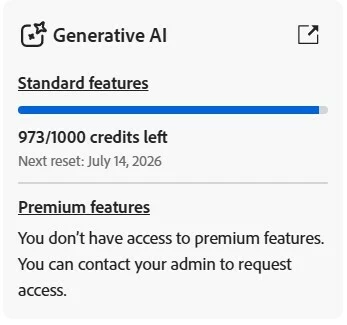
Rotate Object is a generative AI feature powered by Adobe Firefly that consumes generative credits (20 credits per use). For it to work, two things need to be true on your account:
You need to be on a named-user license (not a shared-device license).
Generative AI / Firefly features need to be enabled for your user profile in your institution's Admin Console, this is a toggle that your IT admin controls
If either of those conditions isn't met, the feature will attempt to load but fail, which lines up with the broken popup you're seeing. The fact that it used to work suggests something changed on the admin side (a license reconfiguration, a policy toggle, or a plan renewal that shifted SKUs).
Your key next step is to reach out to your university's IT administrator, specifically whoever manages the Adobe Creative Cloud licenses for your institution. Unfortunately, this isn't something that can be resolved from the community side. Enterprise entitlements are managed entirely by your institution's admin, and we don't have visibility into how individual accounts are configured.
Hope that helps point you in the right direction. Let us know how it goes!
Best,
Anshul Saini





 AdChoices