


Participating Frequently
March 14, 2021
Answered

Rounded Rectangle Tool missing

  • March 14, 2021
  • 3 replies
  • 65793 views

Hello.


I cannot find the Rounded Rectangle tool in CC 21. I have reset all toolbar settings, reset workspace settings, etc, and the Rounded Rectangle tool is nowhere to be found.
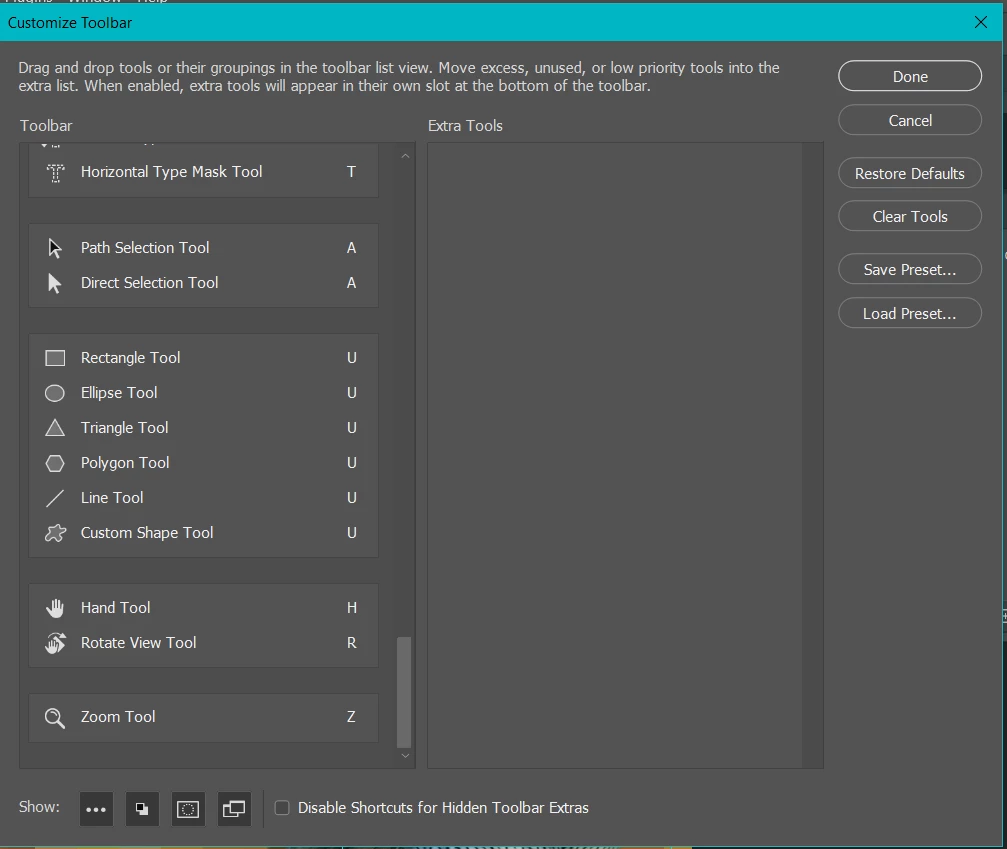
 

As you can see, all other shape tools are available in the Customize Toolbar options and no tools are hidden. One would think that if the Rounded Rectangle tool was available, it would be shown somewhere in here.


I own legacy software (CS6) and I even confirmed that I didn't just imagine the existence of this tool. It's readily available by default in the toolbar on CS6. Nowhere on CC 21.


Is this the result of the recent update? Is there something very obvious that I'm missing and can't find? Any help would be appreciated.

Correct answer jane-e

Oh, sorry. 🙂


In Photoshop it works. Sorry again.


Edvard


@Edvard Edde Larsson wrote:

Oh, sorry. 🙂


Hi

In Illustrator, turn on the Bounding box from the View menu to see the Resize handles and Corner widgets.

~ Jane


3 replies

Participant
August 13, 2025

The accepted answer is misleading. The rounded rectangle tool is still an option in Illustrator as of today. It's just no longer a default tool in the toolbar. If you click on the three dots at the bottom of the toolbar (...) to open the toolbar options, you will find the rounded rectangle tool right there to use and add to your tools whereever you would like. "No longer needed" is also incorrect, because while you can drag the handles on a single object to round the corners of a rectangle, making multiple rounded rectangles with the same radius would be a tedious chore without the rounded rectangle tool.

davescm
Community Expert
Community Expert
March 14, 2021

In version 22.3 the rounded rectangle tool has been removed. It is no longer needed as the standard rectangle tool can now do rounded corners. Just drag the handles


Dave

Participating Frequently
March 14, 2021

Hi,


Thank you so much. I thought I was losing my mind.


I appreciate it!

Trevor.Dennis
Community Expert
Community Expert
March 14, 2021

That's a well thought out screen shot I must say.  It answers an obvious question you were likely to have been asked.


OK, any reason you are still using version 21. ?  Is it an operating system issue like you have an earlier version of OSX that won't run v22?  If not, then updating it always going to be your first best bet.

I am usually loath to suggest resetting Preferences until all else has been tried, but in this case, I think that's what I would do.

If resetting Preferences does not fix it, then we will need to know what operating system you are using.

Participating Frequently
March 14, 2021

Thanks, haha. Sorry, I had gotten busy after posting, but Dave below figured it out for me.


Thank you for replying!