

Inspiring
March 3, 2023
Answered

Roundness rectangle bug Cannot change roundness corners after being drawn

  • March 3, 2023
  • 3 replies
  • 804 views

When I create a rectangle with the PS shape tool if I apply the roundness degree before drawing the rectangle it works as it should, but if I select that rectangle and want to change afterward the degree of roundness of the corners in the upper menu of the tool it does nothing. It only works if i go to the properties window and appearance, but not in the top menu of the shape.


Once established, you cannot change it after. You have to select the rectangle, erase it and draw a new one with the desired roundness or go to the properties menu. It should work in the tool top menu too.
This topic has been closed for replies.
Correct answer Jeff Arola

What version of photoshop are you using?


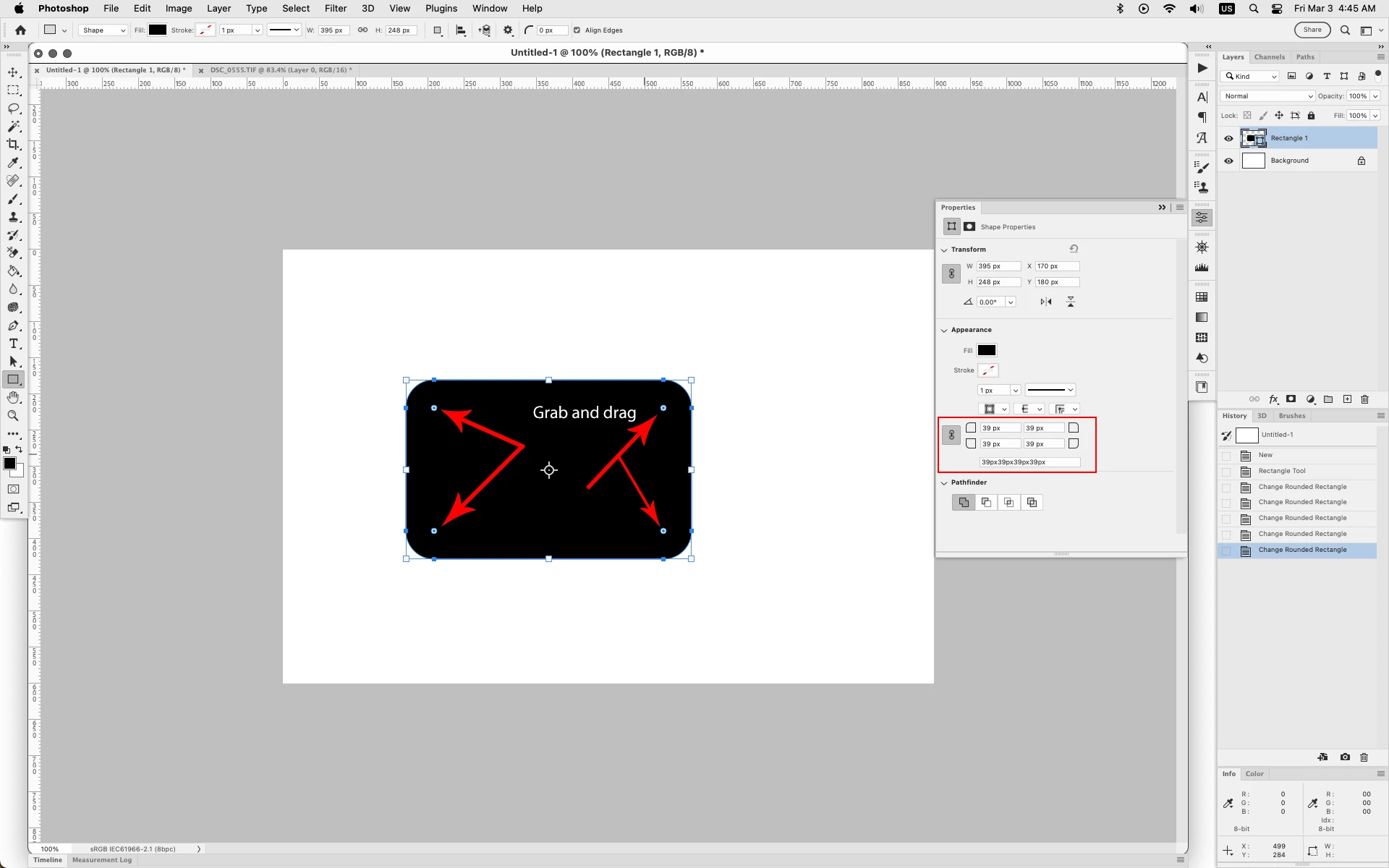
In the most recent photoshop versions here are two ways to change the Corner Radius after drawing

the rectangle using the Rectangle Tool set to Shape:


1. Grab and drag on the inside of the rectangle


2. In Window>Properties change the Corner Radius


3 replies

jane-e
Community Expert
Community Expert
March 3, 2023

Moved from Bugs to Discussions


Re-marked Jeff's answer as "correct" because correct answers get unmarked automatically when posts are moved from bugs to discussions


Jane


mastixAuthor
Inspiring
March 3, 2023

Thank you. Didn't know about the drag option. I was using the properties. 


But both are NOT the most intuitive ones. The one that you always look for is the tool options on the top . There is an option to change the roundness, but only at the beginning. if You select the rectangle and change it later this does not work which is very confusing. 

Adobe should get rid of that option on top if it does not work properly or better yet when you select the rectangle being able to change it at a later stage like the two options you mentioned. 


Any option on the tool menu should be changeable all the time -color,pixel wide stroke size,dimensions and also roundness. This later does not work correctly. I hope they can correct this in the future. For now, the two other options you mention get the job done.

Jeff Arola
Community Expert
Jeff ArolaCommunity ExpertCorrect answer
Community Expert
March 3, 2023

What version of photoshop are you using?


In the most recent photoshop versions here are two ways to change the Corner Radius after drawing

the rectangle using the Rectangle Tool set to Shape:


1. Grab and drag on the inside of the rectangle


2. In Window>Properties change the Corner Radius


Fasih K.
Inspiring
November 2, 2023

The problem here is once you forget to drag, then get out of focus. Then again select the shape, the drag feature goes missing and you are forced to use the properties panel for this. This feature needs to be persistent and flexible with the shape.