Vizzie
Inspiring
May 18, 2026
Answered

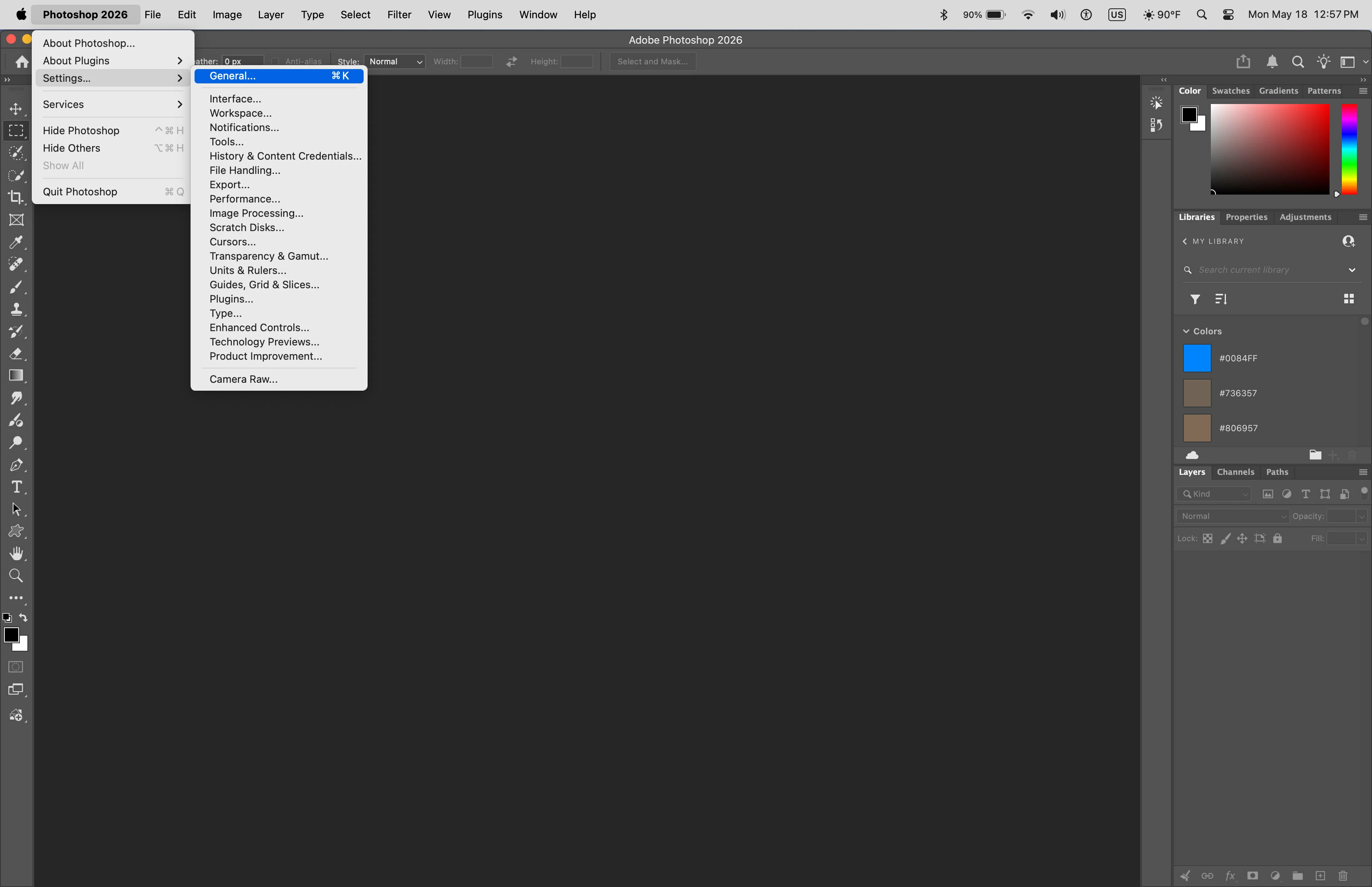
Running iMac Tahoe 26.3---Preferences are missing

  • May 18, 2026
  • 2 replies
  • 50 views

Odd--there is no Preferences in my Edit Photoshop---???

    Correct answer Jeff Arola

    On the Mac side it’s Photoshop 2026>Settings


    2 replies

    Jeff Arola
    Community Expert
    Jeff ArolaCommunity ExpertCorrect answer
    Community Expert
    May 18, 2026

    On the Mac side it’s Photoshop 2026>Settings


    J E L
    Community Expert
    Community Expert
    May 18, 2026

    HI ​@Vizzie, you might need to reset your preferences. The how-to is here: https://helpx.adobe.com/photoshop/desktop/get-started/settings-and-preferences/reset-preferences.html

    And also, shut everything down. Start by first launching the Creative Cloud Desktop app and then open Photoshop from there. Let us know how it goes!