



JR Boulay
Community Expert
Community Expert
December 22, 2025
Answered

Save a copy without "copy" in the file name

  • December 22, 2025
  • 2 replies
  • 317 views

Whenever I use Save a Copy in Photoshop, I am using it to save an exact version of a file, but in a different format.


Is there a way to turn off adding "copy" to the existing file name when I use Save a Copy? 

As of right now, I have to delete it manually and then save (or save and change file name after).


Thank you

Correct answer Trevor.Dennis

@LAMY2017  FYI Use the image widget rather than post images directly into the post.

That displays the image full size like below.
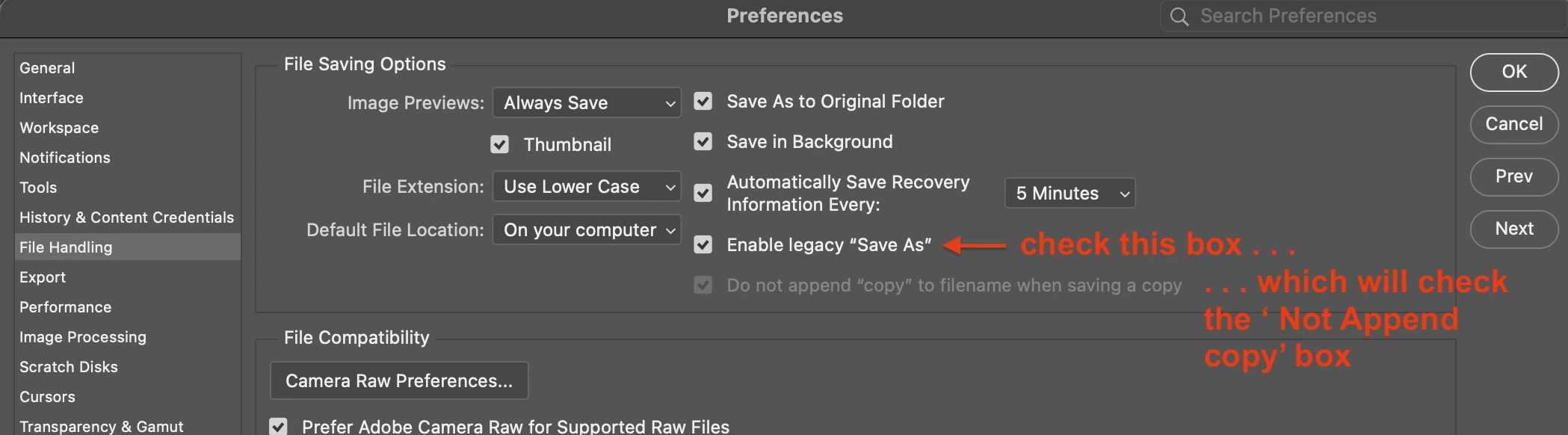
image.png

2 replies

Legend
December 23, 2025

ExUSA is exactly right, JR.


LAMY2017_0-1766458075012.png


Larry
Trevor.Dennis
Community Expert
Trevor.DennisCommunity ExpertCorrect answer
Community Expert
December 23, 2025

@LAMY2017  FYI Use the image widget rather than post images directly into the post.

That displays the image full size like below.

image.png

Legend
December 23, 2025

Thanks for the info, TD, but no use for me to use the image widget since that generates an error message and doesn't not display the image. "to be fixed in the new Community package," I was told when I asked the Community for help.

Larry
Legend
December 22, 2025

Look in Preferences/Settings, the file saving UI has changed a few times but there are options available.