

Known Participant
June 24, 2026
Answered

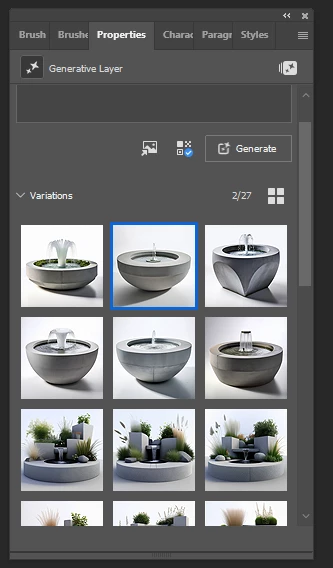
Save all AI generative layers?
  • June 24, 2026
  • 2 replies
  • 37 views

Is it possible to save this as it is? Save them as layers in a psd file isn’t what I am looking for.

    Correct answer Spas K.

    They should stay as available variations in the psd file, along with your prompt if you don't rasterize the layer, doesn't that work?

    2 replies

    Stephen Marsh
    Community Expert
    Community Expert
    June 25, 2026

    It’s not crystal clear to me… Does this link help?


    c.pfaffenbichler
    Community Expert
    Community Expert
    June 25, 2026

    I wonder if the original poster might just have saved the image/s in a non-layer-capable format like jpg and so have lost the Generative Layer. 

    Spas K.
    Community Expert
    Community Expert
    June 24, 2026

    Do you mean to save them in bulk as separate files? Generative Fill is more for generating something partial in place within the context of an existing image. Not really for generating whole images, so it doesn't have quick export of all generated variations natively. You could duplicate this layer multiple times, select a different variation for each copy, and then export layers as files in bulk. 

    Known Participant
    June 25, 2026

    I was thinking that maybe I could export the file or save it with some other extension and when open again, I would see this and be able to continue eg. click on one generation and use “more like this”.
    Anyway, it would be great if it become possible


    c.pfaffenbichler
    Community Expert
    Community Expert
    June 25, 2026

    I might be misunderstanding, but doesn’t the Generative Layer save with all its content anyway when one saves a layered psd/psb/tif?
